LDShop
guide registration¡Regístrate ahora para disfrutar de un 15% de descuento en el regalo para nuevos miembros!Ir a registro >
Minecraft Dungeons II - Steam Gift

Minecraft Dungeons II - Steam Gift

🔥Invita amigos y obtén 15%OFF

To get your Steam Friend Link, click the “Buy Now” icon on the right to view the instructions.

Más juegos que podrían gustarte

Descripción

Buy Minecraft Dungeons II cheaper at LDShop and get ready for your next gaming adventure. Check platform compatibility, release information, product details, and availability before placing your order.


Minecraft Dungeons II Edition Comparison

Compare the available editions of Minecraft Dungeons II and choose the version that best fits your gaming needs and budget.

Standard Edition

$29.99

Includes the base game of Minecraft Dungeons II — the full action-RPG dungeon-campaign experience across the Overworld and a mysterious new dimension, with online co-op for up to 4 players.

Deluxe Edition

$49.99

Includes the base game plus DLC 1 & DLC 2 (unlocked as released), the Soul Cape, the Blub pet companion, and 4 Hero Skins — everything you need to customize your hero from day one.


Before You Buy Minecraft Dungeons II on Steam

1

Confirm that you are buying the correct Steam (PC) version of Minecraft Dungeons II.

2

Check the region restrictions and make sure the key works with your Steam account and a linked Microsoft account.

3

Review the system requirements and storage before purchasing or downloading the game.

4

Check the Activation Guide beside the purchase section above before placing your order.

5

If activation fails, contact LDShop's 24/7 customer support for assistance.

Game Details
PlatformSteam (PC)
Product TypeSteam Digital Key
Release DateSeptember 29, 2026
PublisherXbox Game Studios
DeveloperMojang Studios & Double Eleven
GenreAction RPG / Dungeon Crawler
Storage~30 GB Estimated
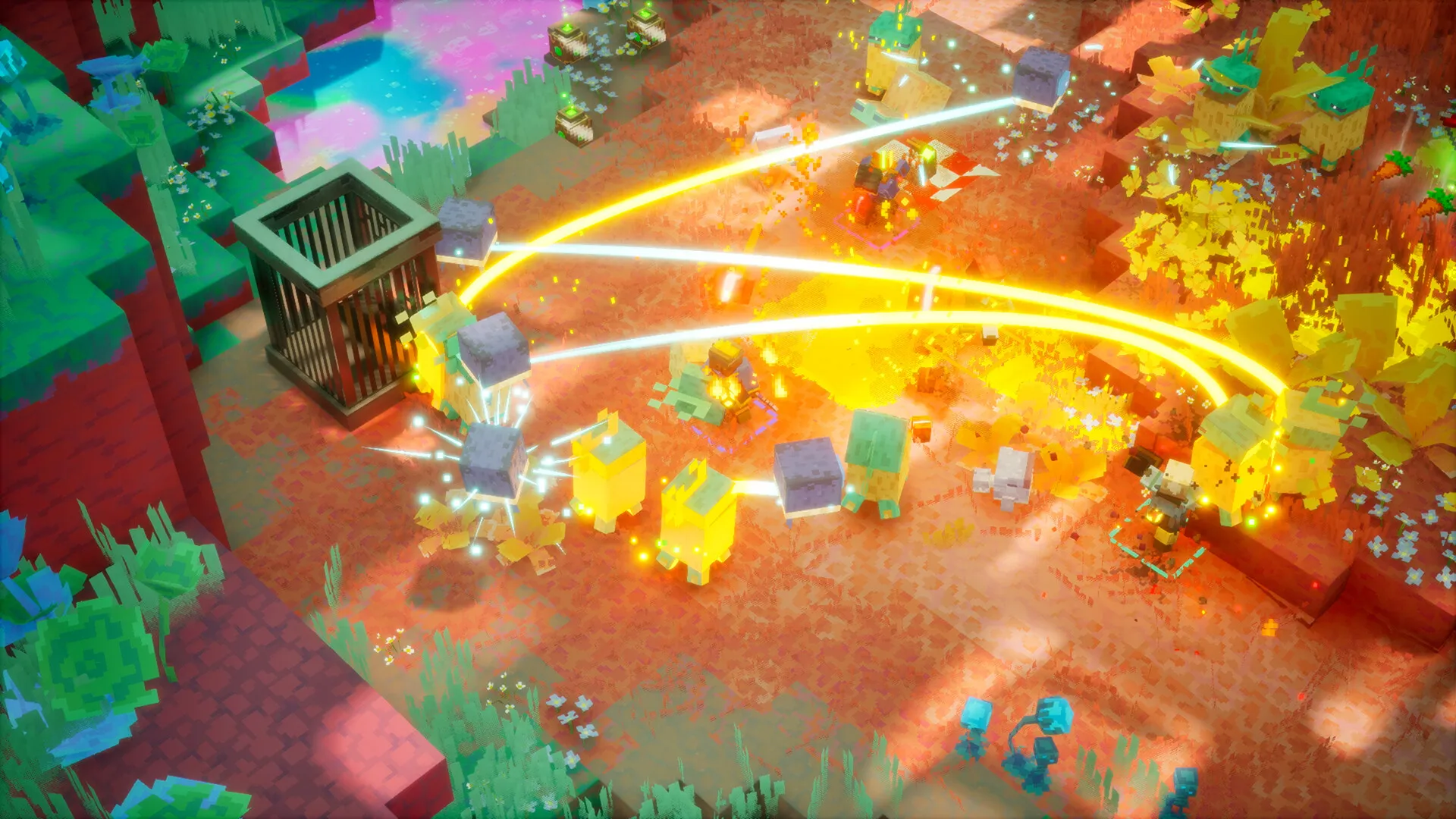
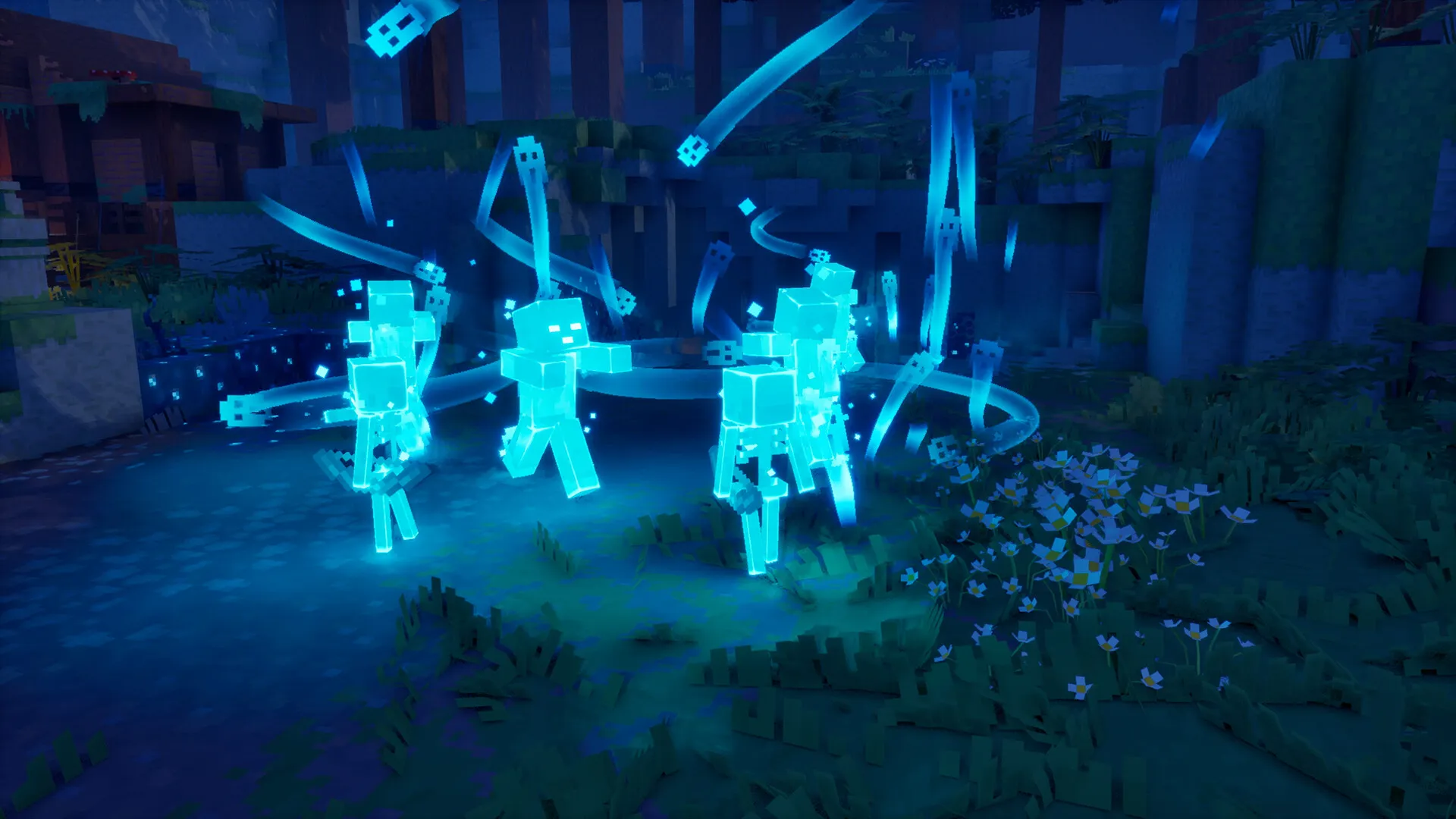
Minecraft Dungeons II Screenshot 1
Minecraft Dungeons II Screenshot 2


Why Buy Minecraft Dungeons II on LDShop?

Competitive Prices & Extra Savings

Get Minecraft Dungeons II at a competitive price and enjoy frequent discounts, extra coupon offers, and cashback on selected products.

Fast & Secure Delivery

Link your Steam, Xbox, PlayStation, or other supported platform account when available for a smoother purchase experience and fast, secure delivery of your game key.

More Platforms & Regional Options

Choose from game keys across different platforms, editions, and regions to find the version that best fits your account and gaming needs.

24/7 Customer Support

Get help anytime with your Minecraft Dungeons II digital key, order, delivery, activation, or other after-sales issues from LDShop's 24/7 customer support team.


About Minecraft Dungeons II

Drop the pickaxe, grab a sword, and charge into a brand-new adventure in Minecraft Dungeons II! Developed by Mojang Studios and Double Eleven, published by Xbox Game Studios, and out on September 29, 2026, this is the sequel to the hit dungeon-crawling action-RPG set in the Minecraft universe.

Journey through unexplored lands and a mysterious new dimension to stop a rising evil that threatens not just one, but two worlds. Battle fierce new foes, carve your way through hordes of mobs, and test your skills against tougher-than-ever bosses and elite enemies.

Forge your perfect hero with a huge arsenal of legendary weapons, armor, and artifacts. Squad up with up to three friends in 4-player online co-op — or local split-screen — and take on the Overworld and beyond together. Cross-platform play lets you team up regardless of which supported platform you're on.
Action RPG Dungeon Crawler Co-op Loot & Voxel Steam


Minecraft Dungeons II System Requirements

Minimum

Operating System Windows 10 64-bit (1703 or newer)
Processor Intel Core i3-8100 or AMD Ryzen 3 2200G
Memory 8 GB RAM
Graphics NVIDIA GeForce GTX 1050 or AMD Radeon RX 560 (2 GB VRAM)
DirectX Version 11
Storage ~30 GB available space (estimated)
Additional Notes Requires a 64-bit OS and a Microsoft Account for online play.

Recommended

Operating System Windows 10 64-bit (1703 or newer)
Processor Intel Core i5-8400 or AMD Ryzen 5 2600
Memory 16 GB RAM
Graphics NVIDIA GeForce GTX 1060 or AMD Radeon RX 580 (6 GB VRAM)
DirectX Version 11
Storage ~30 GB available space (estimated)
Additional Notes Requires a 64-bit OS and a Microsoft Account for online play. Full controller support (Xbox / DualSense).

Procedimientos de recarga

Steam gifts are non-refundable once sent. Please confirm your account region before purchase.

Purchase Process

Step 1: Enter the LDShop official website
Go to the LDShop official website, select your language and currency, then log in.
Step 2: Select a denomination and enter your Steam friend link
Choose the desired denomination and quantity, then enter your Steam friend invite link.
Step 3: Select a payment method and pay
Choose your preferred payment method and complete the payment.
Step 4: Check your order status
Check your order status in the Order Center.
Step 5: Contact customer service if needed
If you encounter any issues, please contact customer service (click the customer service button at the bottom right of the platform).

How to Check Your Steam Account Region

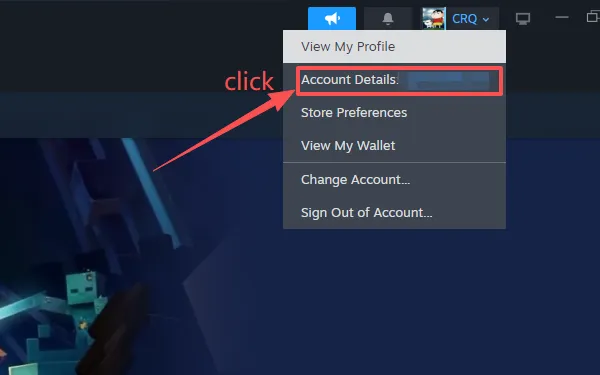
Step 1: Open the Steam client and click your account name in the top right
Log in to the Steam client, click your Steam nickname in the top right, then select Account details from the dropdown menu.
Click your account name to open Account details
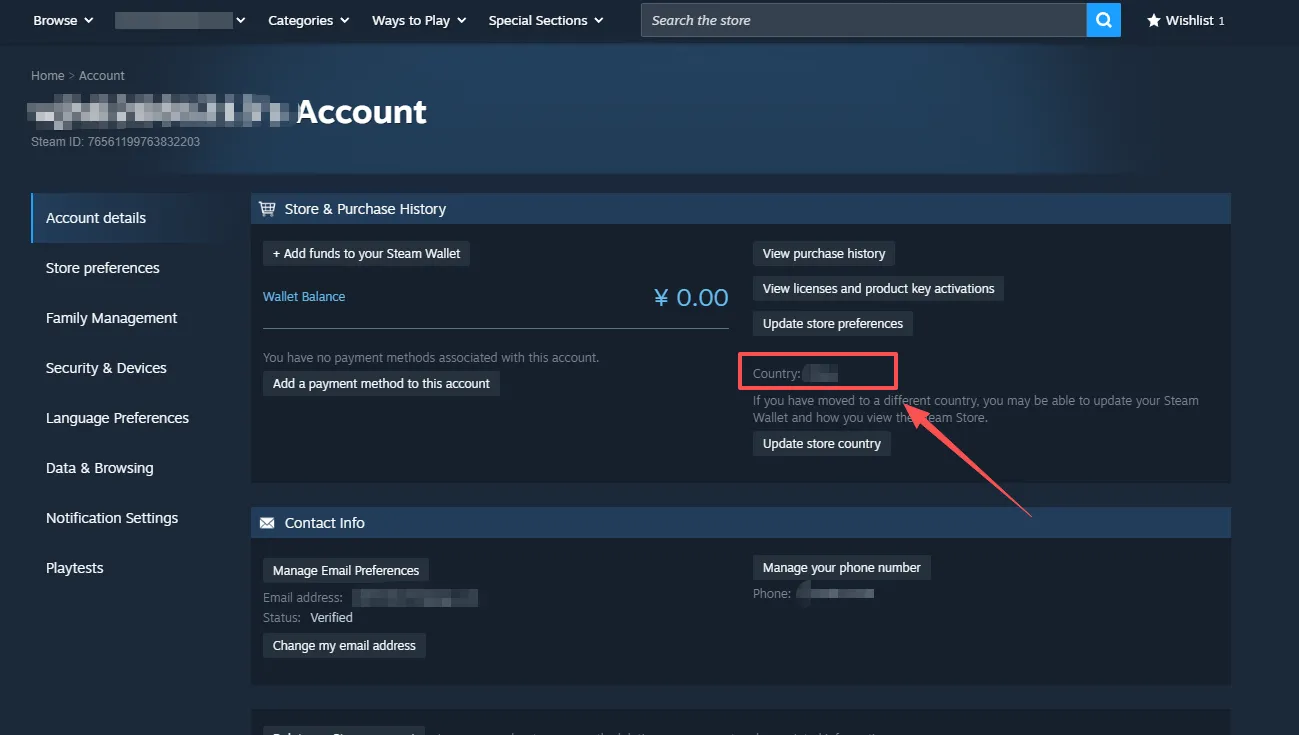
Step 2: Check "Store and transaction country"
On the Account Details page, find Store and transaction country — this shows your account region.
View your account region on the Account Details page
Important Notes
  • Store region ≠ IP address: your account region is the store billing region bound to your account; changing your IP does not change your account region.
  • Steam account region changes have cooldown limits; frequent switching may trigger risk control and result in account restrictions.
  • Purchasing and activating gifts and CDKeys is subject to your account's store region policy.
  • If the displayed region does not match your expectation, do not repeatedly attempt to switch regions.

How to Get Your Friend Invite Link via the Steam Web Browser

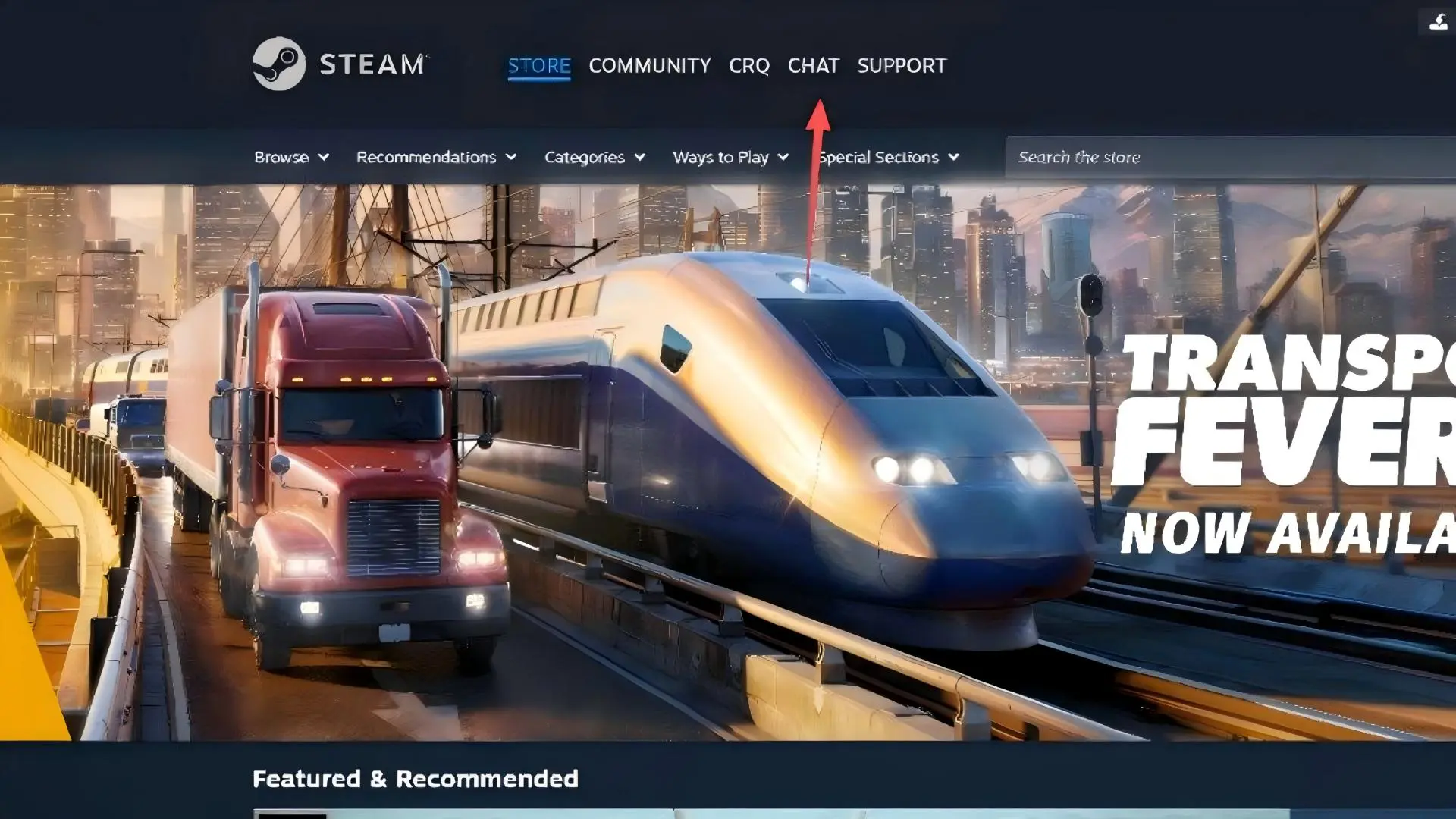
Step 1: Go to the Steam website and open the chat panel
Visit the Steam official website and click CHAT in the top navigation bar to open the friends chat sidebar.
Steam website homepage
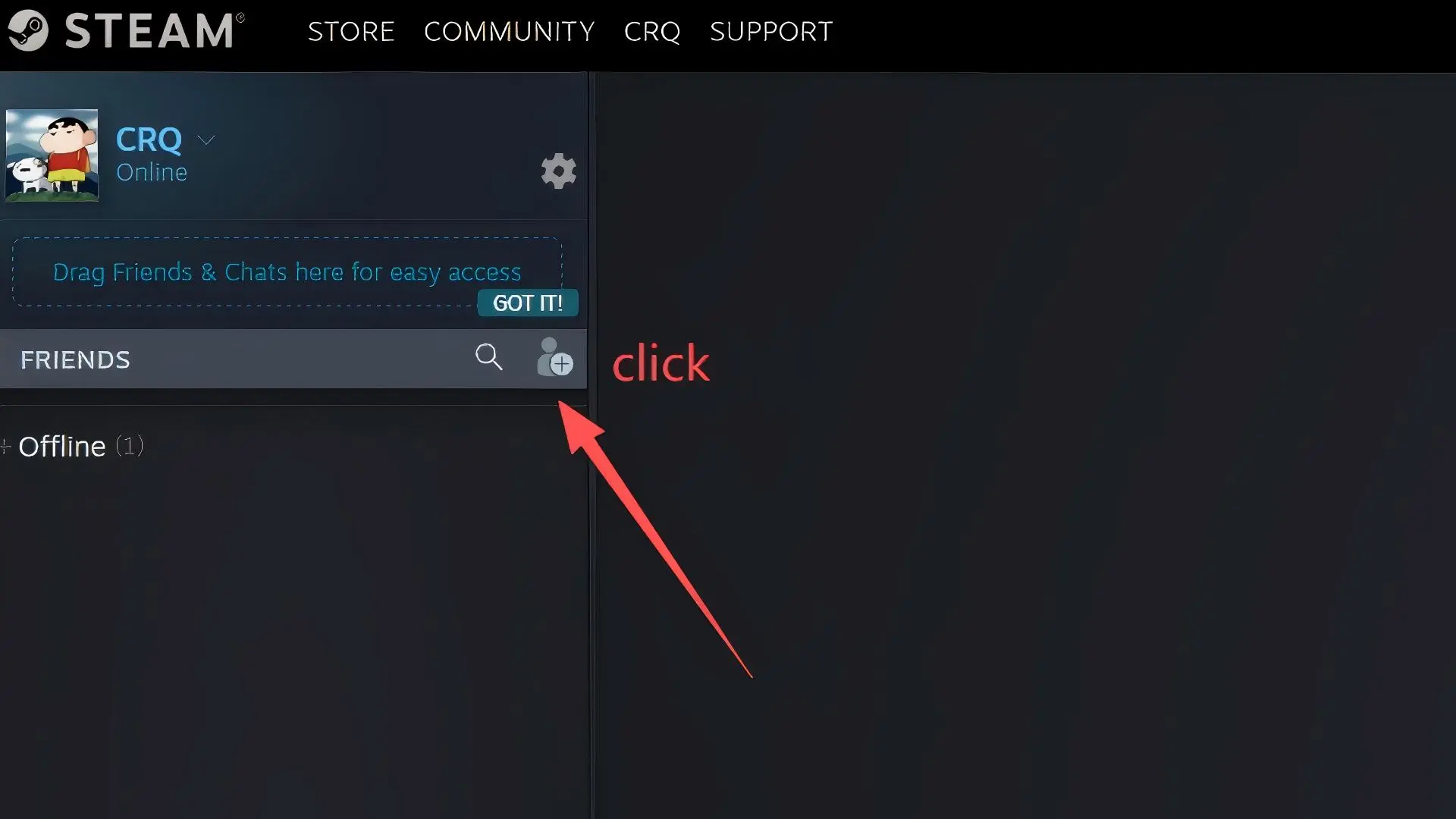
Step 2: Click "Add a friend"
In the friends chat sidebar, click the Add a friend button (person-plus icon) to go to the Add a Friend page.
Click the Add a friend icon
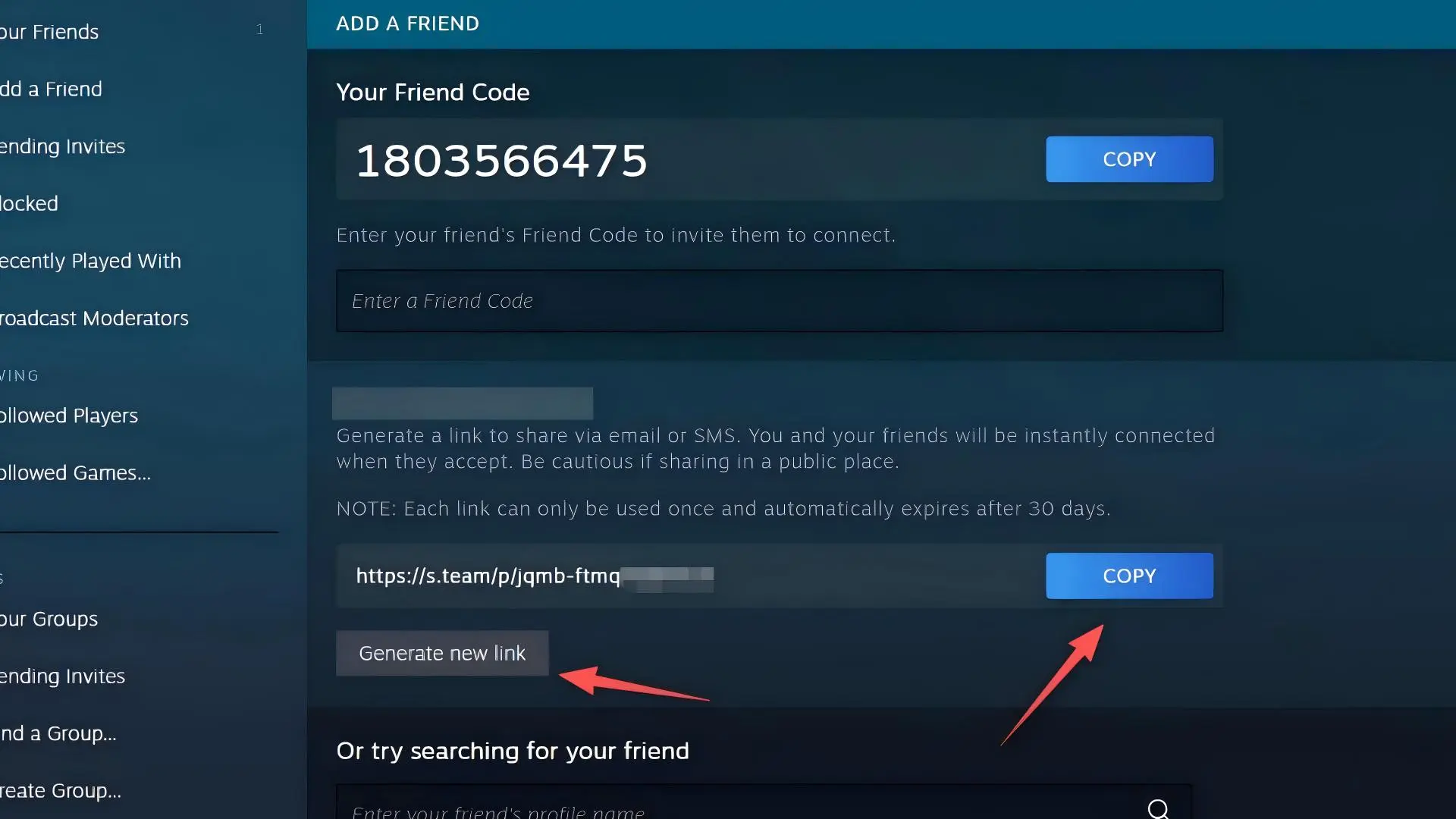
Step 3: Copy your friend invite link
On the Add a Friend page, find the friend invite link starting with https://s.team/p/.
Click the blue COPY button on the right to copy the link;
click Generate new link if you need to create a new one.
Copy your friend invite link

How to Get Your Friend Invite Link via the Steam Desktop Client

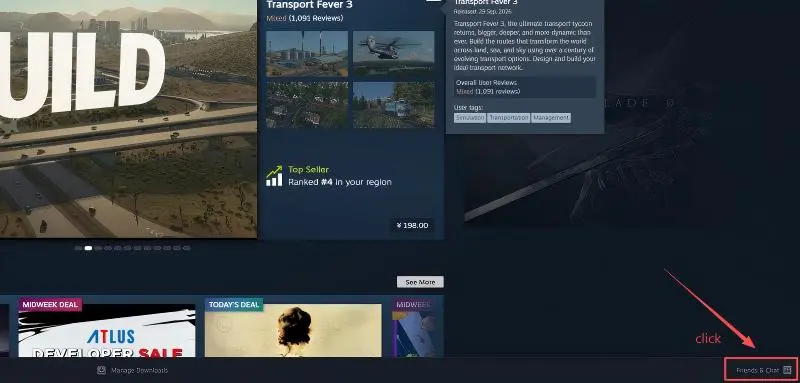
Step 1: Open the Steam client and click "Friends & Chat" in the bottom right
Launch the Steam desktop client, find the Friends & Chat button in the bottom right corner of the window and click it to open the friends chat panel.
Steam client homepage, Friends & Chat in the bottom right
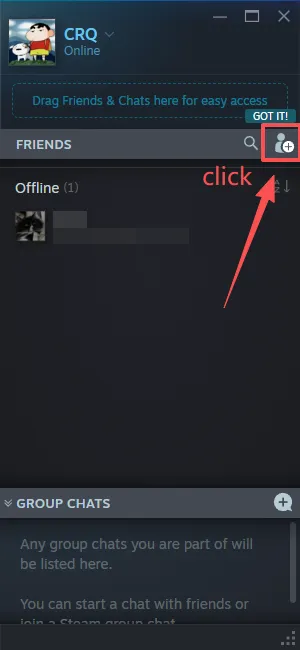
Step 2: Click the "Add a friend" icon in the friends panel
In the pop-up friends chat window, click the Add a friend button (person-plus icon) to go to the Add a Friend page.
Click the Add a friend icon in the friends panel
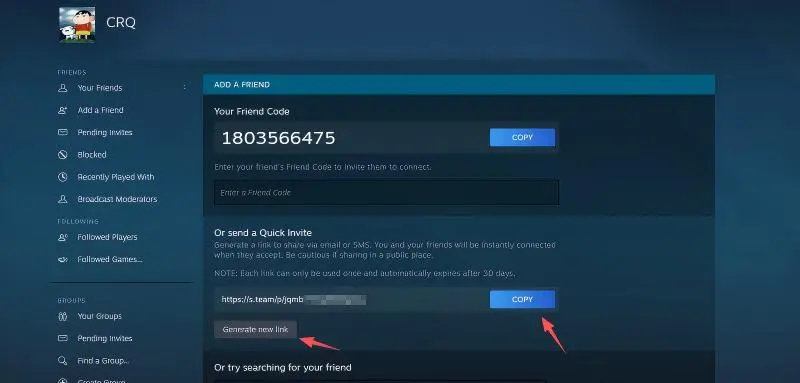
Step 3: Copy your Quick Invite link
On the ADD A FRIEND page, find the Quick Invite section; the link format is https://s.team/p/.
Click the blue COPY button on the right to copy the link;
click Generate new link if you need a fresh link.
Copy your friend invite link
Important Notes
  • The Quick Invite link is one-time use: it becomes invalid once the recipient accepts your friend request, and is valid for up to 30 days.
  • Limited accounts (accounts that have not spent at least $5 USD on Steam) cannot generate friend invite links and can only receive invites from others.
  • The "Your Friend Code" at the top of the page is a friend code, not the same as the Quick Invite link; always use the invite link for transactions.

FAQ

How to activate Minecraft Dungeons II key on Steam?

How to activate Minecraft Dungeons II key on Steam?

To activate your Minecraft Dungeons II key on Steam, open the Steam client and log in, click the "Games" menu, and select "Activate a Product on Steam…". Enter your CD key, follow the prompts, then launch the game and sign in with a Microsoft Account when asked (required for online play and cross-progression). If you still have trouble redeeming the key, contact LDShop's 24/7 customer support for assistance.

Is Minecraft Dungeons II on Xbox Game Pass or PlayStation Plus?

Is Minecraft Dungeons II on Xbox Game Pass or PlayStation Plus?

Yes — Minecraft Dungeons II launched day-and-date with Xbox Game Pass on Xbox Series X|S, PC, and Xbox Cloud Gaming, and supports Xbox Play Anywhere. It is not included in PlayStation Plus; on PS5, online co-op requires a separate PlayStation Plus subscription. If you buy a Steam key from LDShop, you own the game independently outside Game Pass.

What platforms is Minecraft Dungeons II available on?

What platforms is Minecraft Dungeons II available on?

Minecraft Dungeons II is available on Windows PC via Steam and the Microsoft / Minecraft Launcher, as well as Xbox Series X|S, PlayStation 5, Nintendo Switch, and Nintendo Switch 2. Before buying a Minecraft Dungeons II digital key, check the product listing carefully to confirm the correct platform (this listing is the Steam PC key), edition, region, and activation method for your account.

Does Minecraft Dungeons II support multiplayer?

Does Minecraft Dungeons II support multiplayer?

Yes. Minecraft Dungeons II supports up to 4-player online co-op and local split-screen co-op, both in the campaign and endgame. Online play on console may require Xbox Game Pass Core / Ultimate or PlayStation Plus; on PC (Steam), a free Microsoft Account is required.

Is Minecraft Dungeons II cross-platform play supported?

Is Minecraft Dungeons II cross-platform play supported?

Yes. Cross-platform multiplayer is supported across the game's supported platforms (Steam PC, Xbox Series X|S, PlayStation 5, Nintendo Switch / Switch 2), so you can squad up with friends regardless of which platform they own. Cross-play requires linking a Microsoft Account and may require console online-subscription tiers on Xbox / PlayStation.

Is it safe to buy a Minecraft Dungeons II digital key on LDShop?

Is it safe to buy a Minecraft Dungeons II digital key on LDShop?

Yes. LDShop provides secure checkout, multiple trusted payment options, and 24/7 customer support for digital game purchases. Before buying your Minecraft Dungeons II Steam key, confirm that the selected key matches your region, edition (Standard or Deluxe), and that your Steam account can activate a Microsoft-published key in your region.

What payment methods does LDShop support?

What payment methods does LDShop support?

LDShop supports multiple trusted payment methods, with the available options shown at checkout based on your location. Select your preferred payment method, review the final order details, and complete your purchase through LDShop's secure checkout page.