

FAQ
LDShop platform related
Product issues
Payment issues
Risk control issues
Invoice issues (Taiwan only)
Order issues
6.1 What should I do if I enter incorrect information?6.2 The order shows that it has been refunded but the money has not been received6.3 The order is displayed as completed but the purchased products are not received in the game.6.4 I purchased All-in-one packge or multiple monthly passes, why didn’t all of them arrive in my account?6.5 What is the security code/backup code?
Pre-order Issues
What is game pre-order?Why should I pre-order games?Do all games support pre-order?How do I pre-order a game?Will I be charged immediately for a pre-order?What payment methods are supported for pre-order?Where can I view my pre-order orders?How soon will I receive the key after pre-ordering?Can I upgrade my pre-order to a higher edition (e.g. from Standard to Deluxe)?How does a price change affect my pre-order?What are pre-order bonuses?What are the differences in pre-order bonuses between editions?How do I claim pre-order bonuses?Is pre-order time‑limited? Can I obtain pre-order bonuses by other means?Why can’t I play the game immediately after pre‑order?What is pre‑load?Do all pre‑ordered games support pre‑load?Can I cancel my pre‑order?Can I get a refund for a pre‑order?Does a pre‑order key work on multiple platforms?What happens if the game is delayed (slips)?Will LDShop notify me about pre‑load and unlock times?Does pre‑order affect Steam Family Sharing or console home/shared accounts?Does LDShop take responsibility if the pre‑ordered game has serious technical issues (e.g. cannot start, severe frame drops)?What should I do if I don’t receive my pre‑order bonuses?Can I gift a pre‑ordered game to a friend?
The key cannot be activated.
Steam Key Troubleshooting FAQ
1.1 Introduction to LDShop
LDShop is a game top-up platform. It provides game top-up, point card purchase, gift card and other services. The platform has a full range of game types, fast top-up speed and considerate service.
1.2 Is it safe to top up at LDShop?
LDShop is a formal and legal game top-up platform, aiming to provide users with high-quality and convenient top-up services.
1.3 Will topping up at LDShop lead to the game account being banned?
LDShop, as a legitimate top-up platform, provides users with absolutely secure top-up services. The platform places a high priority on the safety of users' game accounts, and all top-up activities strictly adhere to the compliance regulations within the game. Currently, no users of the platform have had their accounts banned due to using LDShop for top-ups, so you can top up with confidence.
2.1 Can I receive a first-time top-up reward on your platform?
If your game character has never topped up through the game or any other platform before, and there is a first-time top-up reward for the corresponding tier in the game, topping up through our platform will trigger the corresponding reward.
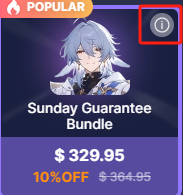
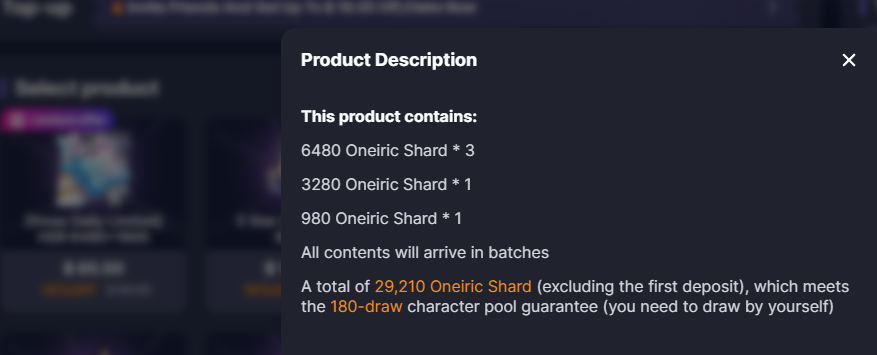
2.2 What is a gift package?
Please click on the icon in the upper right corner to view the details of the gift package.
2.3 How long does it usually take for a top-up to be credited?
Direct storage products generally arrive in your account within 5 minutes, while manual stored value products arrive in your account in 10-15 minutes.
2.4 What is the difference between direct top-up and log in top-up?
The information required for direct top-up is the game UID or server. For log in top-up, you need to provide your login credentials, as the top-up staff will log into your game account to complete the transaction. For the security of your game account, you can change your login password after the top-up is completed.
3.1 What is LD Gold?
LDGold is the currency of LDShop, which can be used for top-ups and to deduct the amount of the recharge. LDGold can be accessed by clicking on the username to enter 'My Wallet' and selecting 'Top Up LDGold' within 'My Wallet'.
3.2 What payment methods are supported?
LDShop supports the mainstream payment methods in various regions to store value, which is convenient and fast

3.3 What are the handling fees?
The handling fee is an additional fee charged by the payment channel. The handling fee will vary according to different payment channels. Users can see the detailed price on the payment page.
3.4 How to get coupons?
You can get it by inviting friends to register, LDShop’s official social media activities and social media entrance registration, festival activities, KOL’s sharing links, VIP’s weekly benefits, and LDShop’s event emails.
Please stay tuned to LDShop for more coupons.
3.5 How to use coupons?
Usually LDShop will give priority to the largest discount coupon that can be used by default, and the system will automatically select it when paying. You can also click Coupon on the payment page, select the appropriate coupon, and click OK to use it. You can see the discounted price after use.
3.6 Why does PayPal payment fail?
It may be due to risk control reasons of payment channels. If you encounter problems with payment or payment failure, please contact the customer service of the bank where your credit card is located for help, or change to another credit card for payment. If you still cannot pay successfully, please try other payment channels.
4.1 Why can’t I place an order?
If you have any problems with ordering or payment, please contact online customer service for further assistance.
4.2 Why does an error message pop up when making payment?
If you have any problems with ordering or payment, please contact online customer service for further assistance.
5.1 When will the electronic invoice be received?
When you top up online on the LDShop official website, use Green World and MyCard to pay in Taiwan dollars, and an electronic invoice will be issued for you. If payment is made in non-Taiwan dollars, JUST OKAY LIMITED. will issue an invoice for you. LDShop will send you an electronic invoice via email in the shortest possible time. Please be reminded that you must fill in the correct information. If the information is filled in incorrectly, you will not be able to receive the electronic invoice.
5.2 Can I store invoices in other people’s vehicles?
It is recommended that you use your own vehicle to request electronic invoices to avoid affecting enquiries, winnings and other rights. If you use other people's vehicles without their consent, it may lead to disputes over the ownership of winnings and criminal liability.
5.3 Prize winning instructions
According to the Ministry of Finance’s instructions for receiving prizes on unified invoices, the winning numbers for the previous two months’ unified invoices will be issued on the 25th of every single month. For users who use the vehicle, the Ministry of Finance’s electronic invoice integration platform will automatically notify you when your electronic invoice wins.
6.1 What should I do if I enter incorrect information?
If the recharge has not been completed, please seek further help through online customer service; if the recharge has been completed, further cancellation or modification will not be possible
6.2 The order shows that it has been refunded but the money has not been received
Orders are generally refunded in the form of LDGold, which can be used to place new orders. For LDGold, you can click on the user's avatar - View My Wallet in the upper right corner of the mall to see the LDGold balance on the account.
6.3 The order is displayed as completed but the purchased products are not received in the game.
Please seek further assistance through online customer service.
6.4 I purchased All-in-one packge or multiple monthly passes, why didn’t all of them arrive in my account?
Combination products usually arrive in batches, so please be patient and wait for a while. If your account has not been credited for a long time, please contact customer service personnel through online customer service for further assistance.
6.5 What is the security code/backup code?
Security code/backup code is used for Google login verification.
How to create and view backup codes

Go to the Google Accounts page.
Click "Security" on the left.
Under "How to sign in to Google," click "2-Step Verification." You may need to log in.
Click the "Continue" icon below "Backup Code".
You can do the following:
Generate backup code: Click "Get backup code" to generate backup code.
Generate a new set of backup codes and deactivate the old backup codes: Click the "Refresh" icon to generate a new backup code.
Delete the backup code: Click the "Delete" icon Delete to delete the backup code and automatically deactivate it.
Download backup code: Click the "Download backup code" icon.
Print backup code: Click the "Print" icon.
Tip: If the backup code is lost, has been used, or you think the backup code has been stolen, you can generate a new set of backup codes by clicking the "Refresh" icon.
After a new backup code is generated, the old backup code will automatically become invalid.

How to create and view security codes

Verify your Google Account
If your device uses Android 6.0 or higher:

On your phone, go to Settings and click Google.
Click Manage your Google Account. Then scroll to the right, find and click Security, then click Verification Code
If necessary, please enter your mobile phone password and select the corresponding account.
A 10-digit verification code will be generated on your phone.
Enter the verification code on the device you want to sign in and click Continue.

Users are reminded not to enter the screen for obtaining the security code again after sending the security code. This will cause the security code to be reset and the previous security code to be invalid.
What is game pre-order?
Game pre-order means purchasing an activation key for a game on our platform before its official release date. After successful payment, the key will be delivered to your order page on the agreed date (usually on or a few days before the release day).
Why should I pre-order games?
1. Exclusive pre-order bonuses: Some games offer limited skins, items, or early access only to pre-order customers.
2. Play immediately upon release: You receive the key on release day (or earlier) without having to wait until after launch.
3. Possible discounts: LDShop may offer lower pre-order prices or extra coupons compared to official stores.
Do all games support pre-order?
No. Only games authorized by developers/publishers for third‑party pre‑orders are supported. Our store page will clearly mark “Pre-order”.
How do I pre-order a game?
1. Log into your LDShop account.
2. Find the game that supports pre-order, and select the edition (Standard, Deluxe, etc.).
3. Click “Buy” and complete the payment.
4. After the order is placed, you can see it in “Order Details” and claim the key on release day.
Will I be charged immediately for a pre-order?
Yes. When you pre-order a game on our platform, the payment is deducted from your account (or payment method) immediately after successful payment.
What payment methods are supported for pre-order?
We typically support Visa, MasterCard, PayPal, and various local payment methods. Please refer to the checkout page for details.
Where can I view my pre-order orders?
Log into our website, go to “Order Center” → “Order Details” to see all your pre-order orders.
How soon will I receive the key after pre-ordering?
Generally, the activation key will be delivered to your order page on the official release day. For some games, we may send keys earlier to allow pre-loading.
Can I upgrade my pre-order to a higher edition (e.g. from Standard to Deluxe)?
We do not support direct upgrades on our platform. If you wish to upgrade, please contact customer service to cancel the original order (only if the key has not been delivered yet) and then pre-order the higher edition. Alternatively, you can purchase an upgrade pack after release (if provided by the publisher). We recommend confirming the edition before ordering.
How does a price change affect my pre-order?
Price drop: We do not automatically refund the difference. You may cancel your pre-order (if refund conditions are met) and re-order at the lower price. Be aware that re-ordering may cause loss of original pre-order bonuses.
Price increase: If the official price does not rise excessively, LDShop will absorb the difference within a reasonable range – you do not need to pay extra. If the price increase is too large, we may cancel and refund the order, and you can re-order according to your needs.
What are pre-order bonuses?
Pre-order bonuses are extra content offered by the game publisher to encourage early purchases. Common examples include:
In-game skins, weapons, items
Extra missions or characters
Digital soundtrack, art book
Early access (unlock a few days before the official release)
What are the differences in pre-order bonuses between editions?
Standard Edition: Usually includes basic pre-order bonuses (e.g. one skin set).
Deluxe / Ultimate Edition: May include the Standard Edition bonuses + Season Pass / future DLC + additional Deluxe‑exclusive bonuses (more skins, soundtrack, etc.).
Please carefully read the “Edition Comparison” table on our product page for specifics.
How do I claim pre-order bonuses?
You are purchasing an activation key that includes pre‑order bonus eligibility. After activating the key on the corresponding platform (e.g. Steam, PlayStation, Xbox), the bonuses will be automatically added to your game library. Some games require you to manually claim them from the in‑game mailbox or rewards menu. Please refer to the game’s instructions.
Is pre-order time‑limited? Can I obtain pre-order bonuses by other means?
Yes, pre‑order is time‑limited. Only purchases completed before the game’s official release date will receive pre‑order bonuses. After release, pre‑order bonuses are usually no longer obtainable. However, some publishers may sell certain bonuses as paid DLC later (common with Japanese game publishers).
Why can’t I play the game immediately after pre‑order?
Because the game has not yet been officially released. Even if you have received the key and activated it on platforms like PlayStation, Xbox, or Steam, the game will show as “not yet released” and cannot be launched until the official unlock time.
What is pre‑load?
Pre‑load means that before the official release date, the official platform (e.g. PlayStation, Xbox, Steam) allows users to download encrypted game files in advance. On release day, the files are decrypted and you can play immediately without waiting for a download. We will try to send keys as early as possible (if allowed by the publisher) so you can participate in pre‑loading.
Do all pre‑ordered games support pre‑load?
Not necessarily. Whether pre‑load is supported depends on the official platform (PlayStation, Xbox, Steam, etc.) and the publisher. We will try our best to ensure pre‑order customers receive keys before the pre‑load period, but we cannot guarantee that every game supports pre‑load.
Can I cancel my pre‑order?
Yes. You can contact customer service to cancel a pre‑order as long as the activation key has not yet been delivered to your order page. Once the key has been delivered (even if unused), cancellation is generally not possible.
Can I get a refund for a pre‑order?
Before key delivery: Full refund (no handling fee).
After key delivery but unused: Not refundable.
Key already activated: Not refundable (virtual goods have been consumed).
Does a pre‑order key work on multiple platforms?
Mostly no. Each activation key sold on our platform typically works only on one specific official platform (e.g. a Steam key can only be activated on Steam, not on Epic or Xbox). However, there are rare cases – for example, an Xbox key may also work on PC. Please check the platform information shown on the product page before purchasing.
What happens if the game is delayed (slips)?
If you still want to wait, no action is needed – we will postpone key delivery until the new release date.
If you do not wish to wait, you may request a refund before the new release date (as long as the key has not been delivered yet).
Note: If the game is delayed multiple times, you always have the right to cancel the order before final key delivery.
Will LDShop notify me about pre‑load and unlock times?
Yes. We will notify pre‑order customers via product pages, order detail pages, email, or customer service messages about the estimated key delivery time and official unlock time. Pre‑load information should be followed on the official platform or game publisher’s announcements.
Does pre‑order affect Steam Family Sharing or console home/shared accounts?
Once the key sold by our platform is activated on the official platform, its sharing rules are exactly the same as any digital game purchased directly on that platform. For example, a Steam‑activated game supports Family Sharing (unless disabled by the publisher). Keys for PlayStation/Xbox also support the home console sharing feature. Our platform does not alter these functions.
Does LDShop take responsibility if the pre‑ordered game has serious technical issues (e.g. cannot start, severe frame drops)?
As a sales channel, we are not responsible for the quality or technical issues of the game itself. Please contact the official platform or the game developer for such problems. However, if you wish to refund because of widespread major bugs, you may contact customer service. We will consider such requests on a case‑by‑case basis, referring to the compensation policies of official platforms. However, generally, keys that have already been activated are not refundable.
What should I do if I don’t receive my pre‑order bonuses?
1. Confirm that the key has been successfully activated on the official platform.
2. Launch the game and check the in‑game “Gift/Rewards” menu.
3. Restart the official platform client or the game.
4. Check whether other players are also reporting missing bonuses – it might be a publisher‑side delay.
5. If the problem persists, contact our customer service with your order number and activation screenshot. We will check with the publisher and arrange a replacement if the key was indeed defective.
Can I gift a pre‑ordered game to a friend?
Yes. As long as the activation key has not been used, you can send the key string directly to your friend. Your friend can then activate it on the corresponding platform. Please note: once a key is activated, it is bound to the activator’s account and cannot be revoked. We recommend sharing keys through secure channels.
My key isn’t working. What can I do?
In most cases, a key doesn’t work because of a small typing mistake. If possible, copy and paste the key instead of typing it. Other issues can include region restrictions or using the wrong platform.
Here’s what to do:
Check the code carefully
- Make sure you’ve entered the code exactly as it appears.
- Look out for typos, missing characters, or extra spaces.
Follow the correct activation instructions
- Each product page on LDshop includes platform-specific redemption steps.
- Double-check that you’re following those instructions. You can always find the activation instructions for any game on its product page.
Confirm the platform
- Ensure you’re redeeming the key on the correct platform (for example, Steam, PlayStation, Xbox, or another launcher).
- A key for one platform won’t work on a different one.
Still having problems?
Our Customer Support team can help. To speed things up, please include:
- The code typed out exactly as it appears
- A screenshot of the error message
We’ll check the details and get things sorted for you.
Q: Why didn't my Steam key work, and what should I do?
If your key shows an error like "Invalid Key" or "Already Redeemed," please follow these two steps so our support team can investigate and issue a replacement or refund:
Step 1: Record a short screen recording of the activation attempt
- Capture your full desktop screen (including the system clock at the bottom corner).
- Open the Steam client, log in, navigate to Games > Activate a Product on Steam, and enter your code live on video.
- Ensure the entire activation process and the error message are clearly visible.
Step 2: Contact Steam Support for an activation timestamp
- Go to the Steam SUPPORT page and log in to your account.
- Select Steam Community > I need help with something not listed here > Contact Steam Support
- Submit a help ticket asking Steam Support for the exact date and time (including time zone) the product key was redeemed.
- Take a clear screenshot of Steam Support's official response once received.
Once you have the video clip and the screenshot from Steam Support, please send it to customer service, and we will resolve your issue promptly.
Help Ticket Example:
Greetings, i have bought CD key from retailer and i get message where says keyis already activated. They ask me to provide them time and date of activation.
Can you help me with that?
Game is XXXX
CD KEY: XXXX-XXXX-XXXX
Can't find anything helpful here?