LDShop
guide registrationسجل الآن للاستمتاع بخصم 15% على هدية العضو الجديد!انتقل إلى التسجيل >
Wardogs Steam Gift(USA)

Wardogs Steam Gift(USA)

🔥 قم بدعوة الأصدقاء واحصل على 15%OFF

To get your Steam Friend Link, click the “How to activate” icon on the right to view the instructions.

ألعاب أخرى قد تعجبك

وصف

Buy WARDOGS cheaper at LDShop and get ready for your next gaming adventure. Check platform compatibility, release information, product details, and availability before placing your order.


WARDOGS Edition Comparison

Compare the available editions of WARDOGS and choose the version that best fits your gaming needs and budget.

Standard Edition

$39.99

Includes the base game of WARDOGS and all standard content included with the regular edition.

Supporter Edition

$49.99

Includes the base game of WARDOGS plus the Supporter Pack bonus content.


Before You Buy WARDOGS on Steam

1

Confirm that you are buying the correct Steam version of WARDOGS.

2

Check the region restrictions and make sure the game key works with your account.

3

Review the system requirements and storage before purchasing or downloading the game.

4

Check the Activation Guide beside the purchase section above before placing your order.

5

If activation fails, contact LDShop's 24/7 customer support for assistance.

Game Details

PlatformSteam
Product TypeSteam Digital Key
Release Date11 Sep, 2026
PublisherTeam17
DeveloperBULKHEAD
GenreAction, Indie, Massively Multiplayer, Simulation, Early Access
Storage50 GB available space
WARDOGS Screenshot 1
WARDOGS Screenshot 2


Why Buy WARDOGS on LDShop?

Competitive Prices & Extra Savings

Get WARDOGS at a competitive price and enjoy frequent discounts, extra coupon offers, and cashback on selected products.

Fast & Secure Delivery

Link your Steam or other supported platform account when available for a smoother purchase experience and fast, secure delivery of your game.

More Platforms & Regional Options

Choose from game keys across different platforms, editions, and regions to find the version that best fits your account and gaming needs.

24/7 Customer Support

Get help anytime with your WARDOGS digital key, order, delivery, activation, or other after‑sales issues from LDShop's 24/7 customer support team.


About WARDOGS

WARDOGS is a TACTICAL ALL OUT WARFARE FPS where one hundred players split across three teams fight over the control zone. Set in the derelict industrial mountains of Eastern Europe on a destructible battlefield where teamwork pays and cash is king.

Combine tactical gunplay and combined arms combat with building and destruction mechanics in a large‑scale, up to 100‑player militaristic sandbox. Three teams fight for control of randomized 2x2km ‘Control Zones’. Earn points by holding the zone, first team to reach 100 points wins the match.

Start each match with $10,000 cash, buy custom loadouts of weapons, gear and vehicles. Teamplay rewards cash, and your money persists across matches. Destroy buildings with heavy firepower or fortify positions, and play solo or as part of a squad with no fixed engagement rules.
Early Access Action Tactical FPS Multiplayer Military


WARDOGS System Requirements

Minimum

Operating System Windows 10 / 11
Processor Intel Core i5‑8600, AMD Ryzen 5 3500
Memory 16 GB RAM
Graphics Nvidia GTX 1660, Radeon RX 590
Network Broadband Internet connection
Storage 50 GB available space
Additional Notes 1080p Low @ 60fps (Upscaled)

Recommended

Operating System Windows 10 / 11
Processor Intel Core i7‑12700K, AMD Ryzen 7 5700x
Memory 16 GB RAM
Graphics Nvidia RTX 3070, AMD Radeon RX 6700 XT
Network Broadband Internet connection
Storage 50 GB available space
Additional Notes 1440p Medium @ 70fps+ (Native) or 4k Medium @ 60fps+ (Upscaled)

إجراءات تعبئة الرصيد

Steam gifts are non-refundable once sent. Please confirm your account region before purchase.

Purchase Process

Step 1: Enter the LDShop official website
Go to the LDShop official website, select your language and currency, then log in.
Step 2: Select a denomination and enter your Steam friend link
Choose the desired denomination and quantity, then enter your Steam friend invite link.
Step 3: Select a payment method and pay
Choose your preferred payment method and complete the payment.
Step 4: Check your order status
Check your order status in the Order Center.
Step 5: Contact customer service if needed
If you encounter any issues, please contact customer service (click the customer service button at the bottom right of the platform).

How to Check Your Steam Account Region

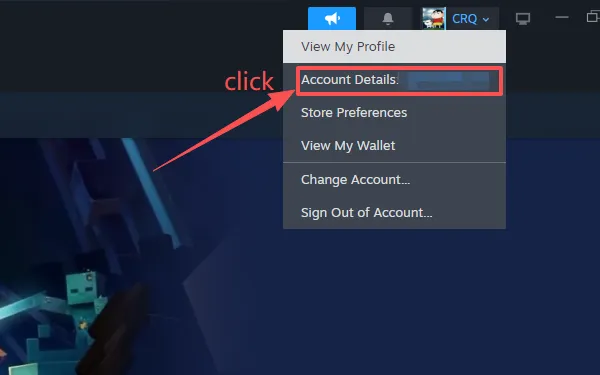
Step 1: Open the Steam client and click your account name in the top right
Log in to the Steam client, click your Steam nickname in the top right, then select Account details from the dropdown menu.
Click your account name to open Account details
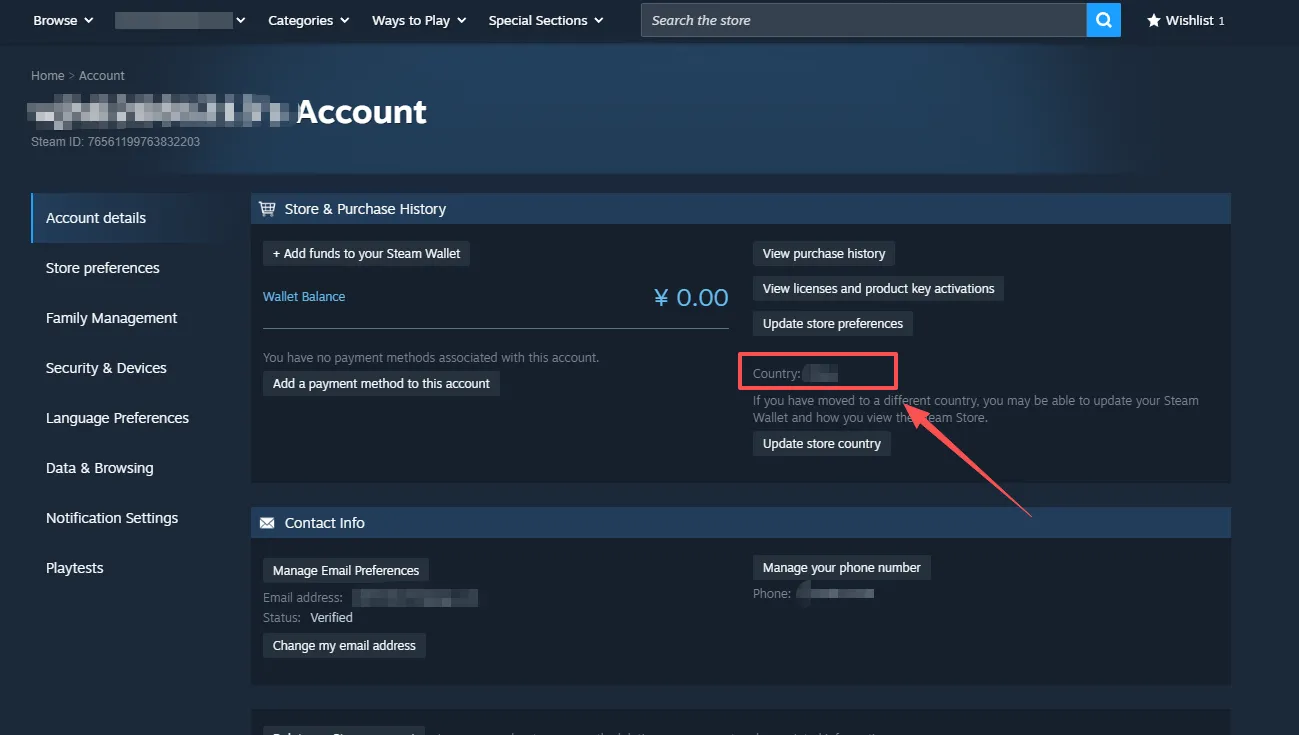
Step 2: Check "Store and transaction country"
On the Account Details page, find Store and transaction country — this shows your account region.
View your account region on the Account Details page
Important Notes
  • Store region ≠ IP address: your account region is the store billing region bound to your account; changing your IP does not change your account region.
  • Steam account region changes have cooldown limits; frequent switching may trigger risk control and result in account restrictions.
  • Purchasing and activating gifts and CDKeys is subject to your account's store region policy.
  • If the displayed region does not match your expectation, do not repeatedly attempt to switch regions.

How to Get Your Friend Invite Link via the Steam Web Browser

Step 1: Go to the Steam website and open the chat panel
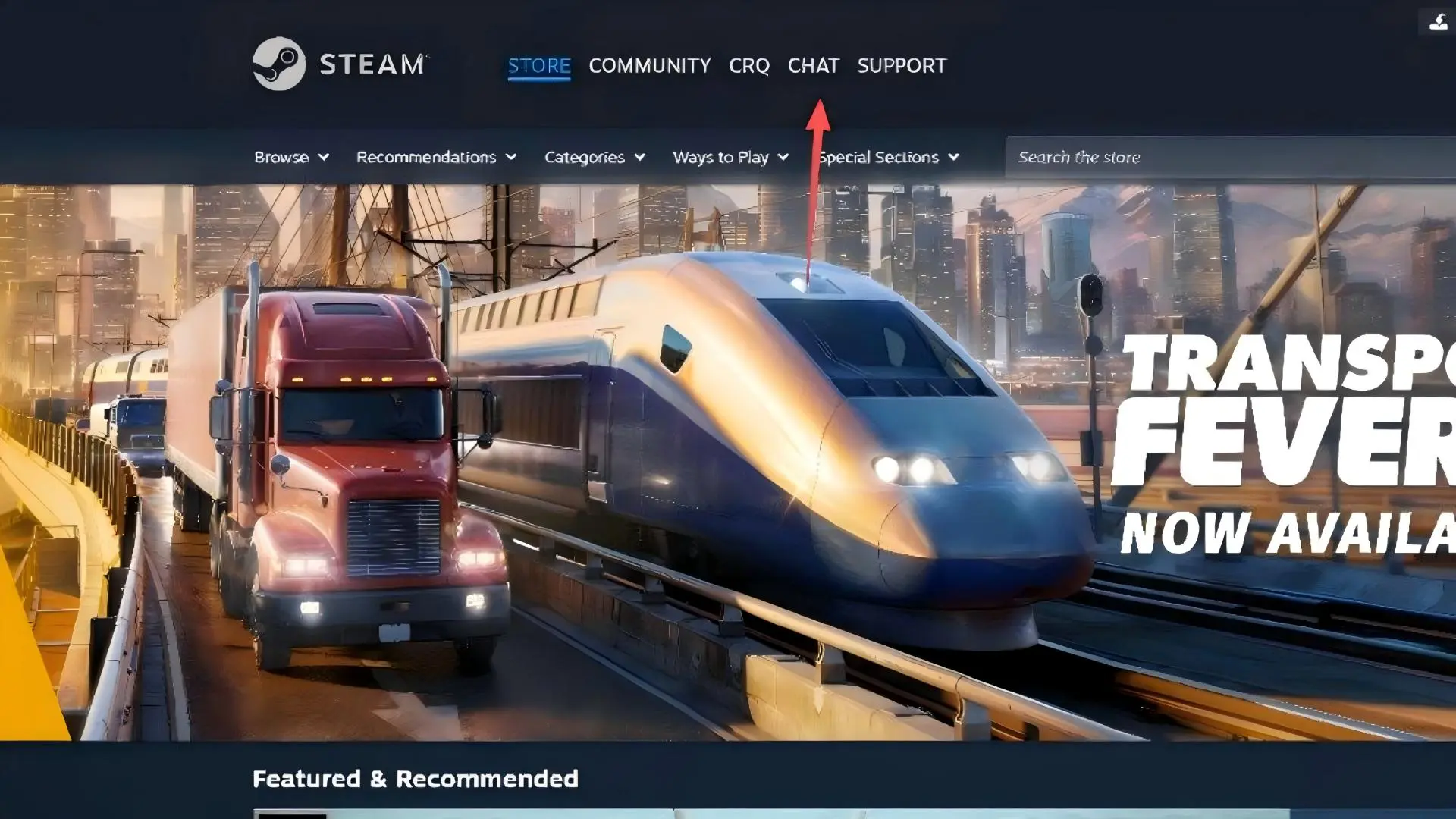
Visit the Steam official website and click CHAT in the top navigation bar to open the friends chat sidebar.
Steam website homepage
Step 2: Click "Add a friend"
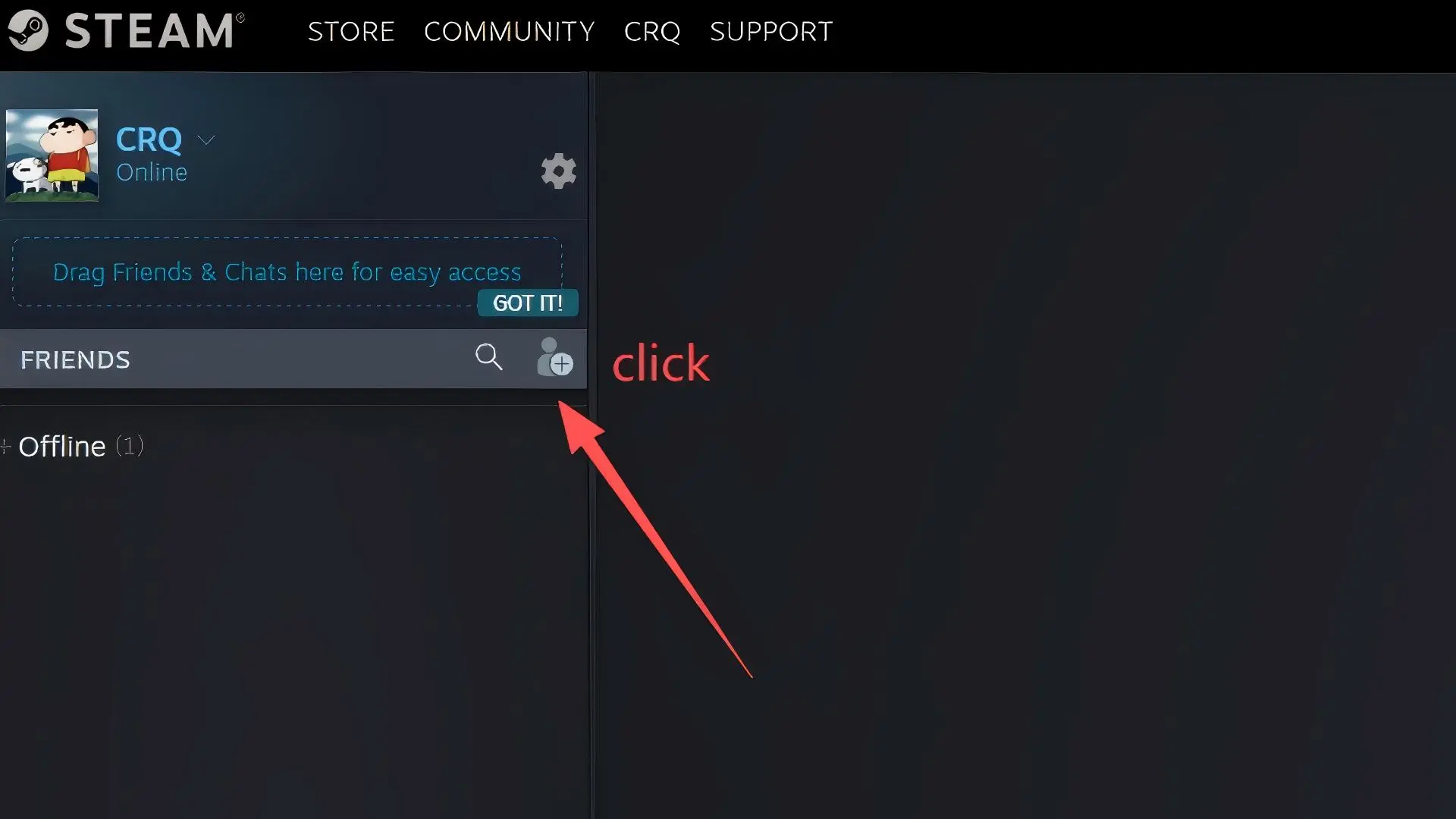
In the friends chat sidebar, click the Add a friend button (person-plus icon) to go to the Add a Friend page.
Click the Add a friend icon
Step 3: Copy your friend invite link
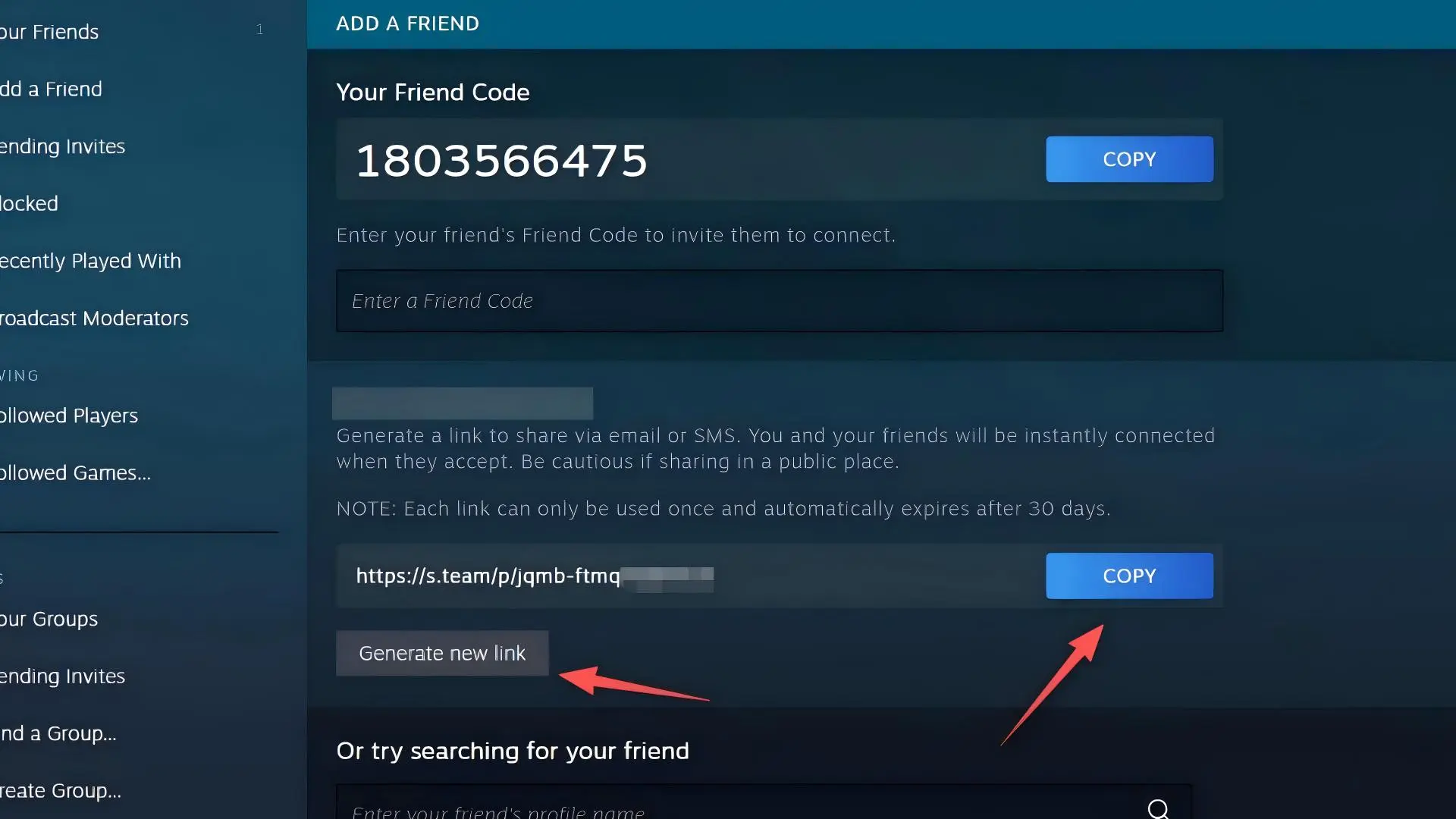
On the Add a Friend page, find the friend invite link starting with https://s.team/p/.
Click the blue COPY button on the right to copy the link;
click Generate new link if you need to create a new one.
Copy your friend invite link

How to Get Your Friend Invite Link via the Steam Desktop Client

Step 1: Open the Steam client and click "Friends & Chat" in the bottom right
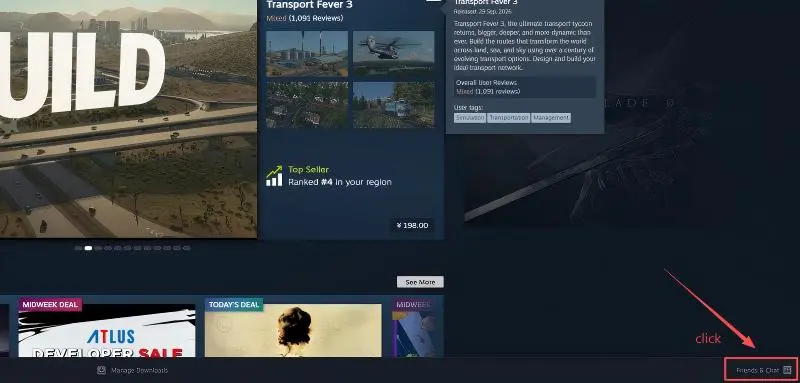
Launch the Steam desktop client, find the Friends & Chat button in the bottom right corner of the window and click it to open the friends chat panel.
Steam client homepage, Friends & Chat in the bottom right
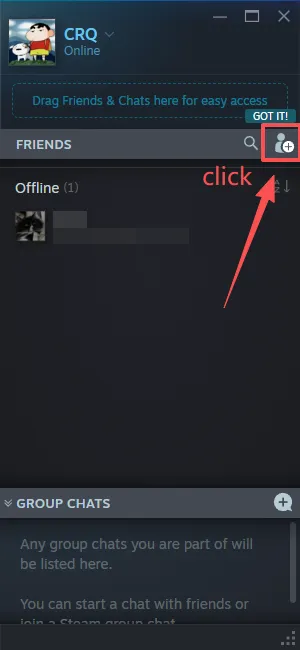
Step 2: Click the "Add a friend" icon in the friends panel
In the pop-up friends chat window, click the Add a friend button (person-plus icon) to go to the Add a Friend page.
Click the Add a friend icon in the friends panel
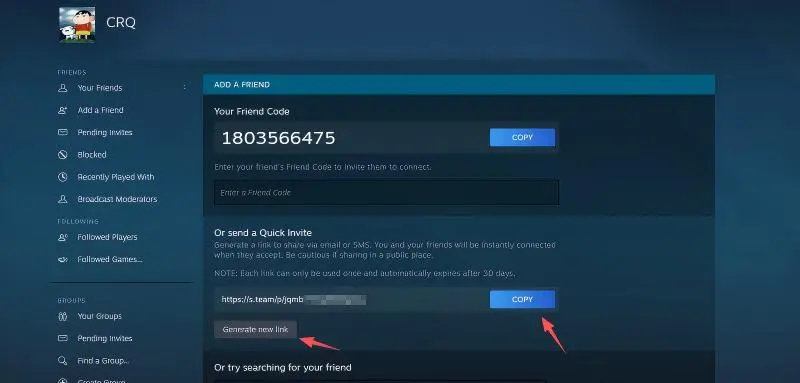
Step 3: Copy your Quick Invite link
On the ADD A FRIEND page, find the Quick Invite section; the link format is https://s.team/p/.
Click the blue COPY button on the right to copy the link;
click Generate new link if you need a fresh link.
Copy your friend invite link
Important Notes
  • The Quick Invite link is one-time use: it becomes invalid once the recipient accepts your friend request, and is valid for up to 30 days.
  • Limited accounts (accounts that have not spent at least $5 USD on Steam) cannot generate friend invite links and can only receive invites from others.
  • The "Your Friend Code" at the top of the page is a friend code, not the same as the Quick Invite link; always use the invite link for transactions.

FAQ

How to activate WARDOGS key on Steam?

How to activate WARDOGS key on Steam?

To activate your WARDOGS key on Steam, first make sure the key matches your platform, account region, and activation requirements. After purchase, follow the activation instructions provided with your order or check the Activation Guide shown near the purchase section above. If you still have trouble redeeming the key, contact LDShop's 24/7 customer support for assistance.

Is WARDOGS on Xbox Game Pass or PlayStation Plus?

Is WARDOGS on Xbox Game Pass or PlayStation Plus?

Availability on Xbox Game Pass or PlayStation Plus may vary by platform, region, and subscription tier. Check the latest information from Xbox or PlayStation before purchasing. WARDOGS is a Steam Early‑Access title and is not included with console subscriptions, you will need to purchase the game separately.

What platforms is WARDOGS available on?

What platforms is WARDOGS available on?

WARDOGS is available on PC (Steam Early Access). Before buying a WARDOGS digital key, check the product listing carefully to confirm the correct platform, edition, region, and activation method for your account.

Does WARDOGS support multiplayer?

Does WARDOGS support multiplayer?

WARDOGS supports online PvP multiplayer for up to 100‑player three‑team tactical warfare. Multiplayer features require a stable broadband internet connection. Check the latest official game information for specific multiplayer features.

Is it cross‑platform play supported?

Is it cross‑platform play supported?

WARDOGS is PC‑only on Steam, cross‑platform play with consoles is not supported at this Early Access stage. Check the latest official cross‑play information before purchase.

What are the two editions of WARDOGS?

What are the two editions of WARDOGS?

Standard Edition: base game WARDOGS. Supporter Edition: includes WARDOGS base game plus the Supporter Pack. Compare editions before you place your order to pick the version that fits your needs.

Is it safe to buy a WARDOGS Steam Gift on LDShop?

Is it safe to buy a WARDOGS Steam Gift on LDShop?

Yes. LDShop provides secure checkout, multiple trusted payment options, and 24/7 customer support for digital game purchases. Before buying your WARDOGS Steam Gift, confirm that the selected key matches your preferred platform, edition, region, and activation requirements.

What payment methods does LDShop support?

What payment methods does LDShop support?

LDShop supports multiple trusted payment methods, with the available options shown at checkout based on your location. Select your preferred payment method, review the final order details, and complete your purchase through LDShop's secure checkout page.