


SUGO Top Up | Buy SUGO Coins for Less at LDShop
Top up SUGO Coins easily at LDShop. Select the Coins product you need and enter your SUGO User ID to complete a direct top-up. You do not need to provide your SUGO account password or verification code.
SUGO Coins can be used to send virtual gifts, access VIP features, and participate in supported in-app activities. Before paying, carefully check your User ID, product quantity, and account region. Once the order is processed, the Coins will be added directly to the SUGO account associated with that User ID.
What Is SUGO?
SUGO is a social app for voice chat and video calls. You can meet new friends, join group voice rooms, chat in real time, and take part in various interactive activities. With SUGO Coins, you can send virtual gifts and access paid or VIP features supported by the current version of the app.
Why Top Up SUGO at LDShop?
Better Prices
Choose a suitable SUGO Coins product from those shown on the product page and enjoy competitive top-up prices.
Direct Top-Up with User ID
Simply provide your SUGO User ID. There is no need to share your account password, verification code, or third-party login details.
Fast Delivery
Your order will be processed as soon as possible, and the Coins will be added directly to the SUGO account associated with the User ID you entered.
Secure Payment
Complete your order using a payment method supported by LDShop. If you have an issue with your order, contact customer support for assistance.
How to Top Up SUGO Coins
- Select the SUGO Coins product you need on the LDShop product page.
- Enter your SUGO User ID in the top-up information field.
- Check your User ID, Coins quantity, and eligible account region again.
- Choose a payment method and complete your payment.
- Once the order is complete, open SUGO and check your Coins balance.
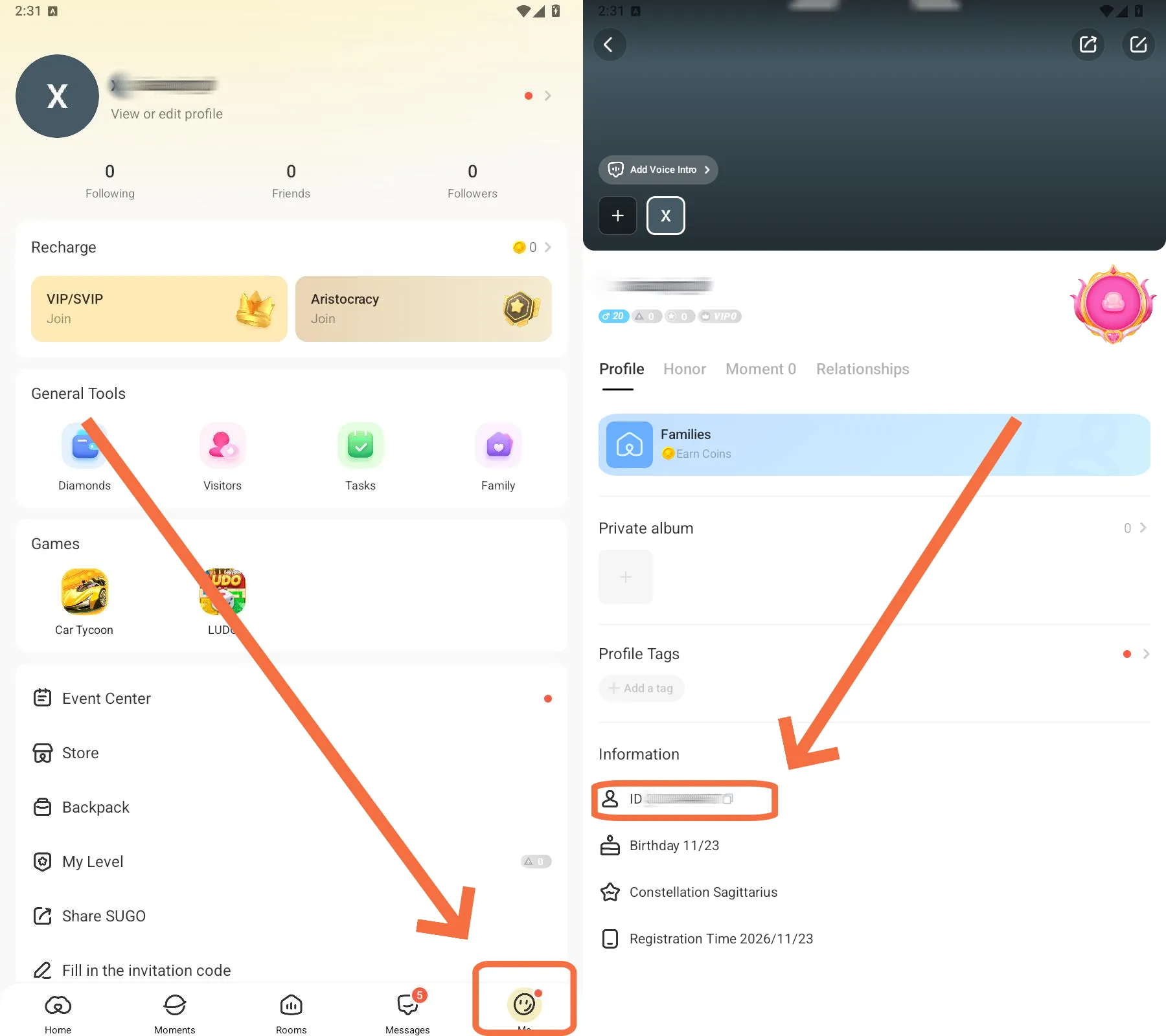
How to Find Your SUGO User ID
- Open the SUGO app and log in to the account you want to top up.
- Tap Me in the bottom-right corner, or tap View/Edit Profile
- Go to your personal information page.
- Find and copy your numeric User ID on your profile page.