LDShop
guide registrationĐăng ký ngay để được hưởng ưu đãi giảm giá 15% dành cho thành viên mới!Vào đăng ký >
Last Z: Survival Shooter Top Up

Last Z: Survival Shooter Top Up

Giao hàng ngay lập tứcGiao hàng ngay lập tức
🔥Mời bạn bè và nhận 15%OFF

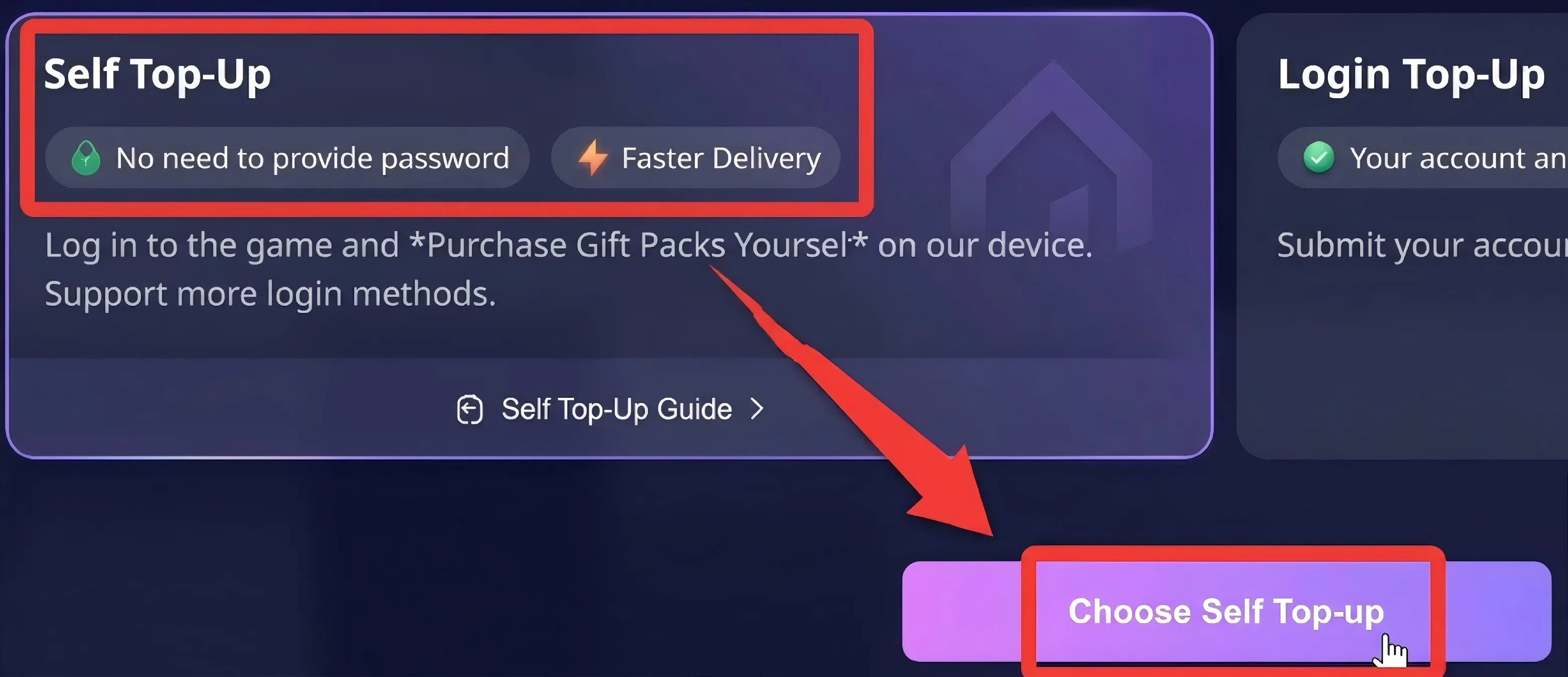
Faster Self Top-Up is now available! Click the "?" on the right for guidance.

Những trò chơi khác bạn có thể thích

Sự miêu tả

Last Z: Survival Shooter Top Up at LDShop – Cheap, Fast & Secure

LDShop offers cheap Last Z top up with discounted prices and great value:

Top up Last Z: Survival Shooter at LDShop with cheap prices, instant delivery, and secure payment. Buy diamonds, gold bars, and packs easily to unlock heroes, upgrade faster, and get more resources. In this zombie survival shooter, you’ll fight waves of undead, build your base, and strengthen your team to survive and progress faster.

Join our Discord to get more offers and information
Discord: https://discord.com/invite/6VVYPqkVj7

Thủ tục nạp tiền

How to Top Up Survival Shooter on LDShop?

  • Self-Service Top-Up

1. Select [Self-Service Top-Up] After Placing Your Order:Select a product, place your order, complete the payment, and then select [Self-Service Top-Up].

Self-Service Top-Up

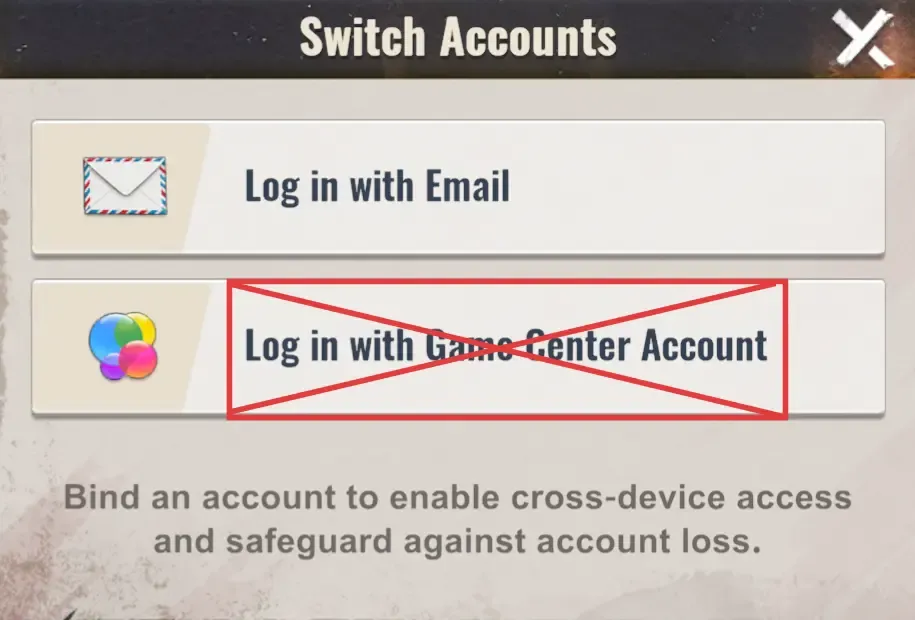
2. Log In Through LDShop: Launch the game through LDShop and log in to your game account. (Email login only)

Note: Apple account login is currently not supported

Log In Through LDShop

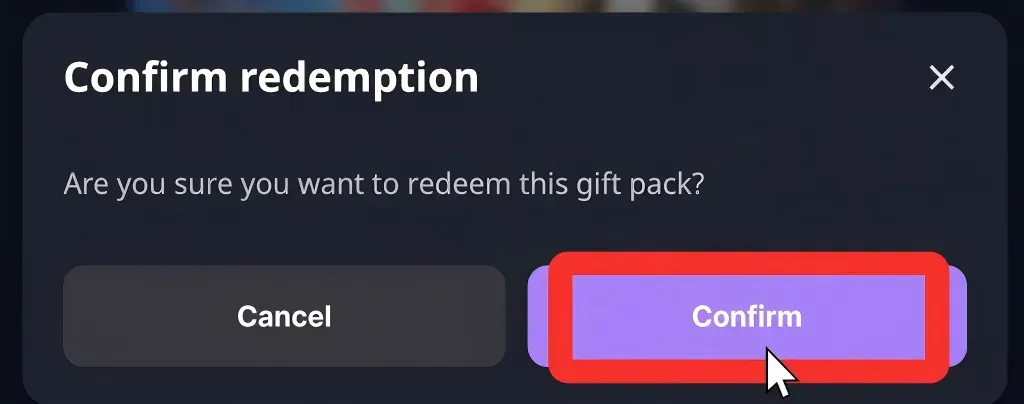
3. Redeem a Bundle Through LDShop: In the game, select the bundle you want and confirm.

[Purchase Recommendation]
To ensure your order is credited successfully, we recommend that you: Before making a purchase on the platform, spend Gold Bars in the game until your balance is lower than the amount required for the bundle (for example, purchase other daily items or resources first), then return to the platform to purchase/redeem it.

Redeem a Bundle Through LDShop

4. Automatic Logout: Once the top-up is complete, your account will be logged out automatically and the login record will be cleared.


Manual Top-Up

To ensure your purchase is delivered successfully, follow the steps below and provide the required information accurately:

Choose Your Bundle: Select the Exploration Coins, Pass, or all-in-one bundle you want to purchase.

1. Select [Manual Top-Up] After Placing Your Order: Select a product, place your order, complete the payment, and then select [Manual Top-Up].

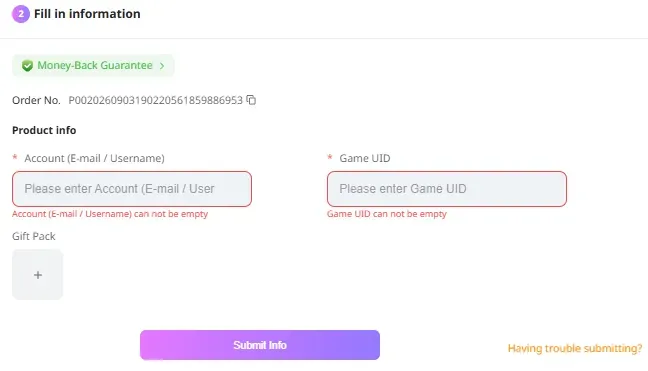
2. Enter Your Account Information:

Enter the required top-up information (linked email account and Character ID)

Enter Your Account Information

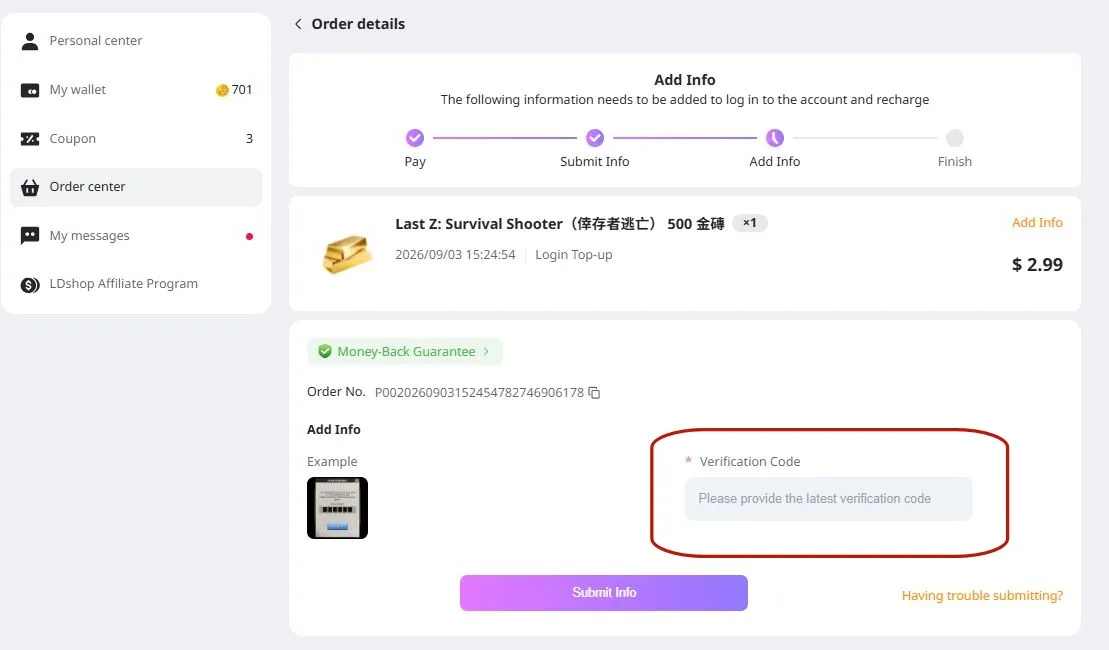
3. Enter the verification code sent to your linked email address

Enter the verification code sent to your linked email address

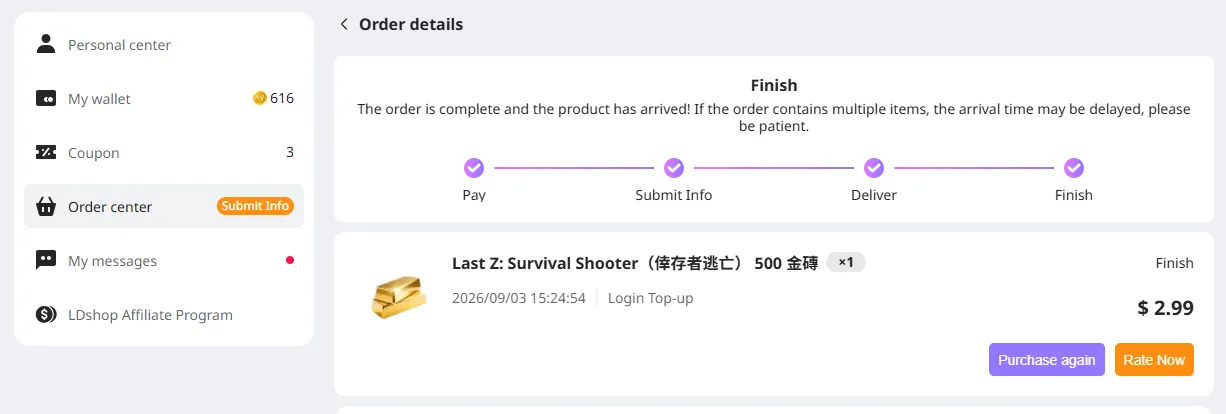
4. Track the Top-Up Progress: You can check the order status in the [Order Center]. Once the top-up is complete, enter the game to confirm.

Track the Top-Up Progress

What Should I Do If I Accidentally Close the Top-Up Information Page?

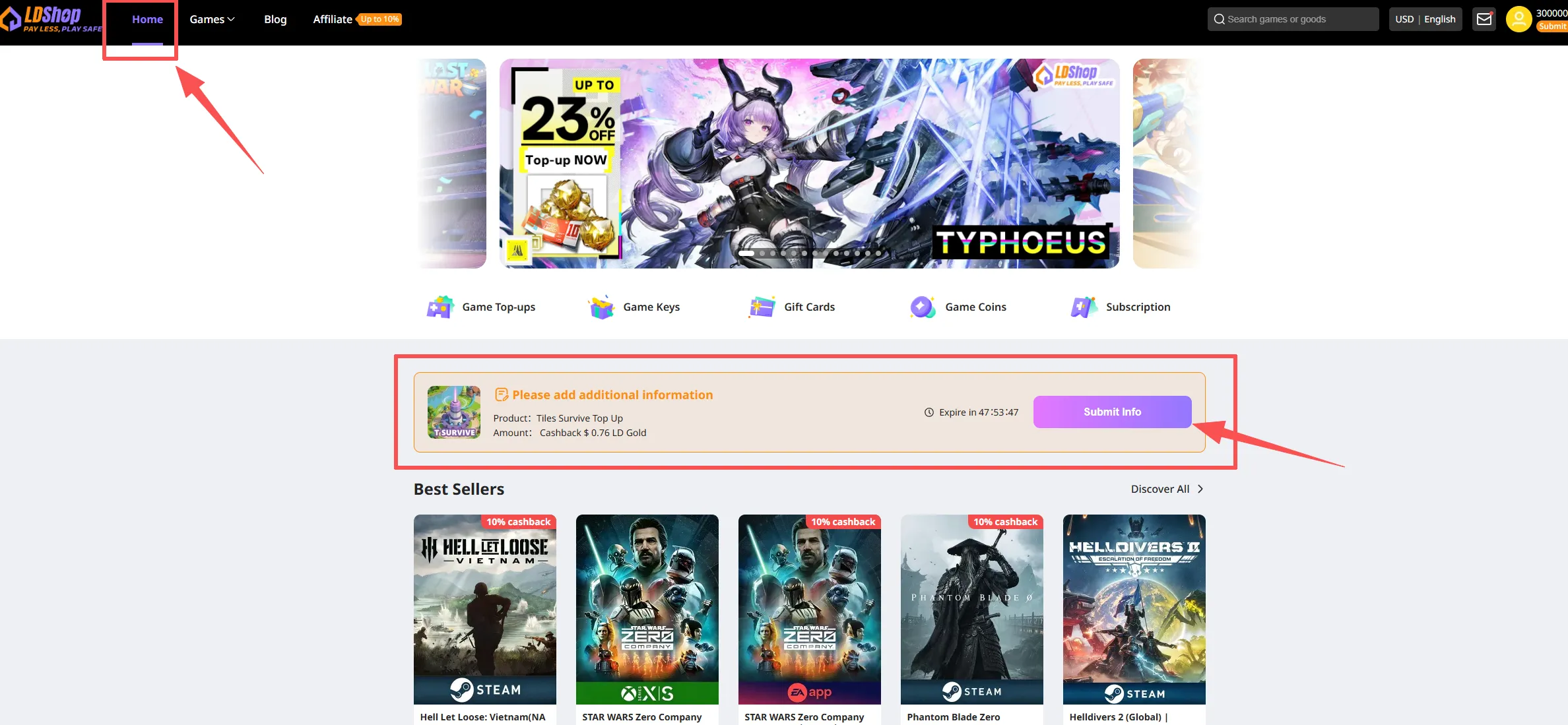
Method 1: Return to the main page, find the bundle you have paid for, and click "Fill in Information".

Return to the main page, find the bundle you have paid for, and click "Fill in Information"

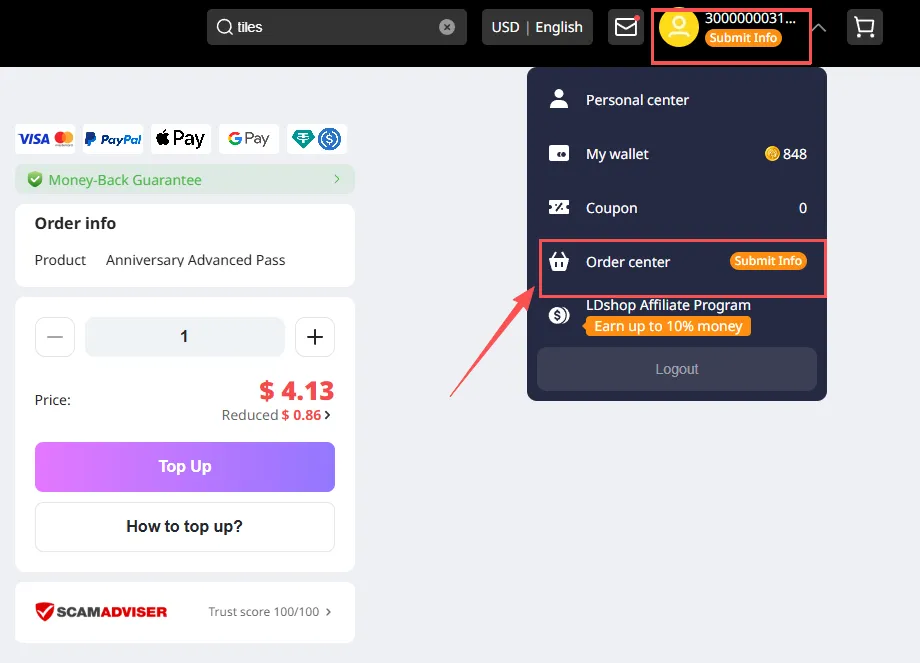
Method 2: Click your profile picture in the upper-right corner, then click Order Center.

Click your profile picture in the upper-right corner, then click Order Center

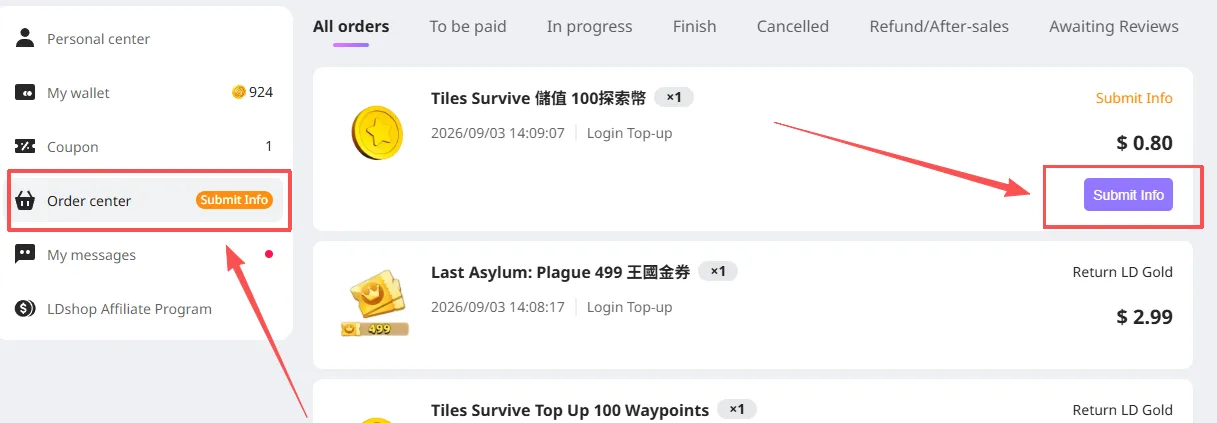
After opening Order Center, find the item you purchased and click "Fill in Information" to continue.

After opening Order Center, find the item you purchased and click "Fill in Information" to continue.

🚨[MUST READ] If this top-up requires verification-code login, please watch for messages on the site after submitting your order.

If you do not receive it within the expected time, contact customer service for assistance.


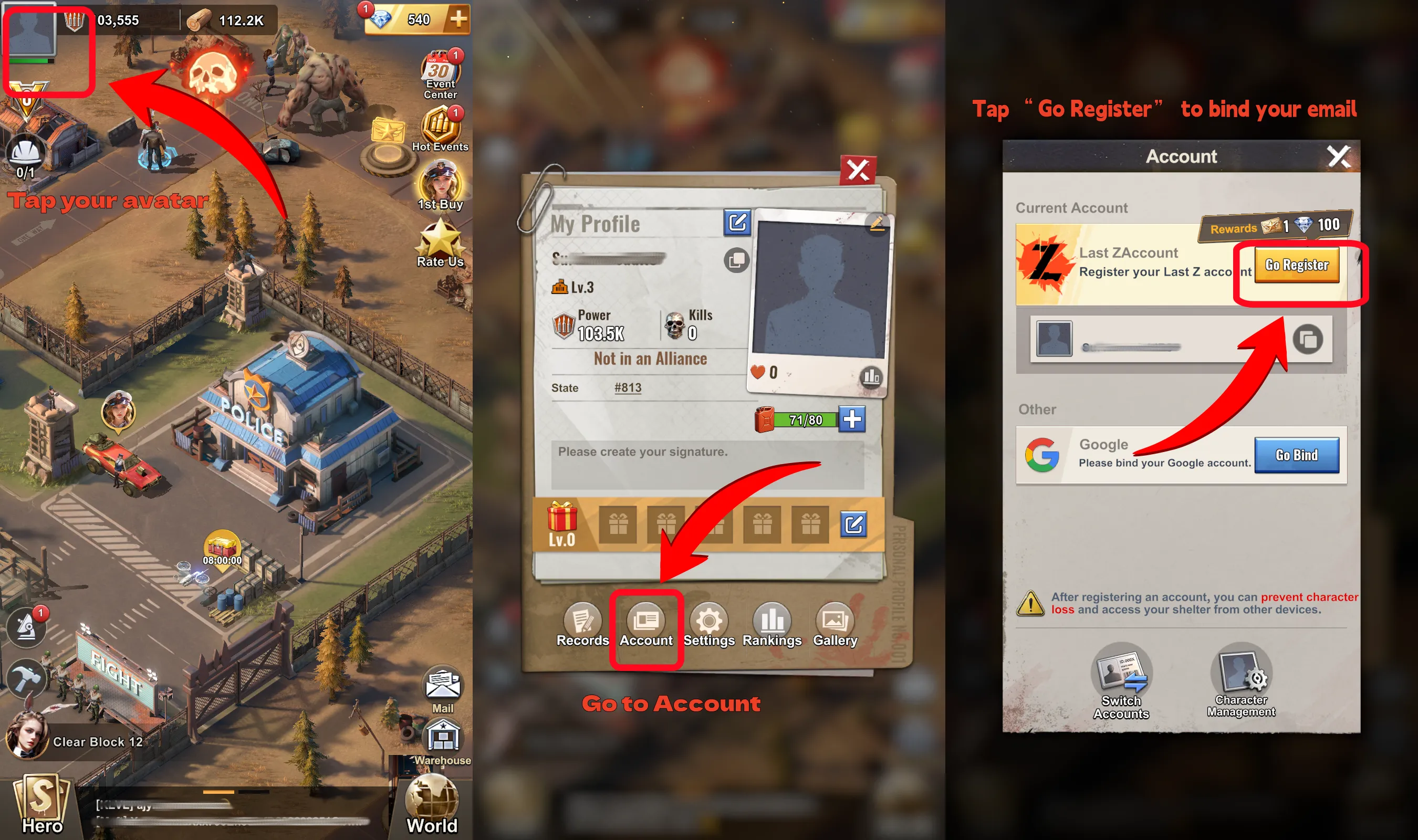
How to Link Your In-Game Account?

  1. After logging in to the game, click the profile picture in the upper-left corner ("Profile Picture") -> click "Account"
  2. Select "Link" – link your game account

How to Link Your In-Game Account


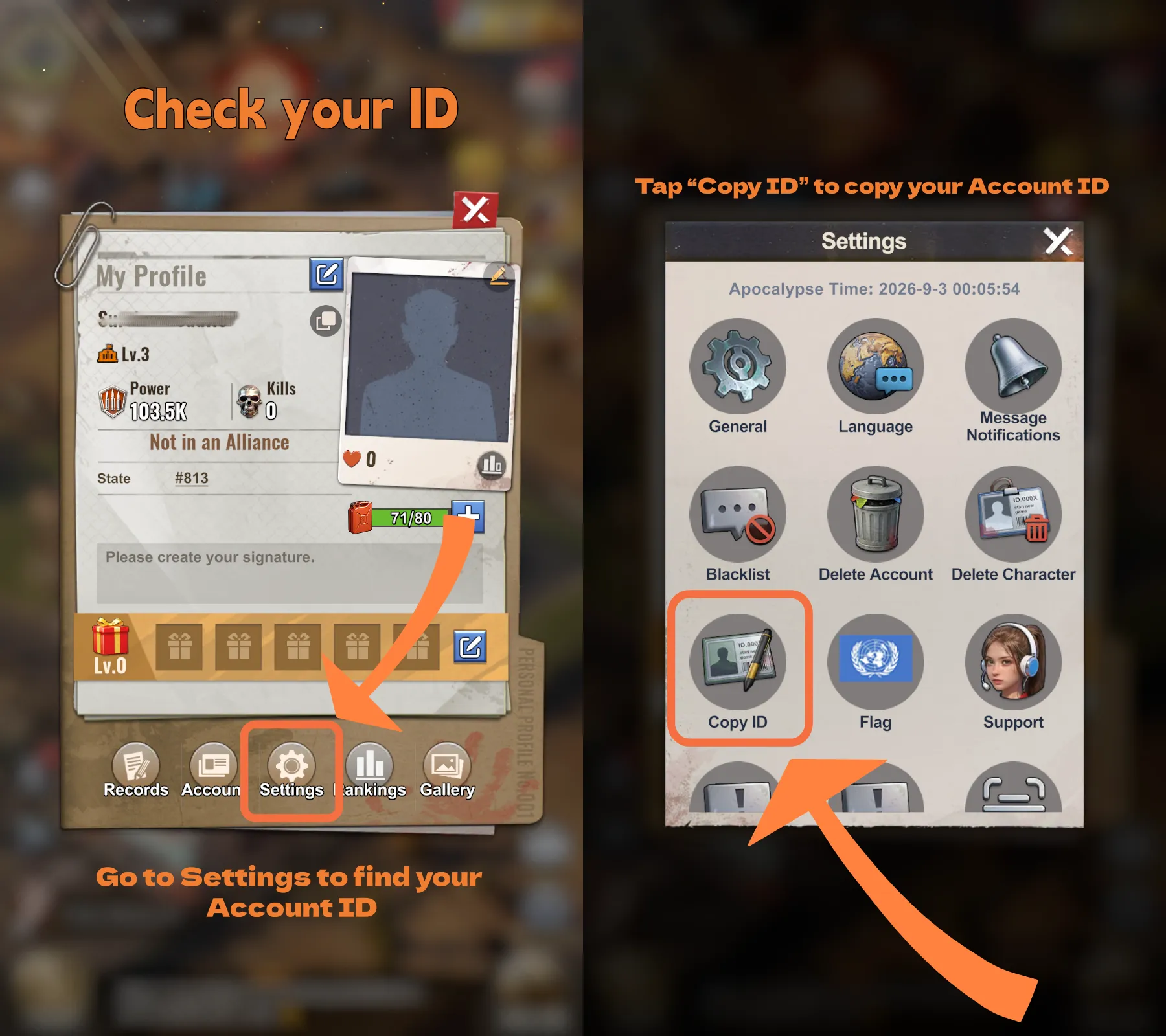
How to Find Your Player ID?

  • Click the profile picture in the upper-left corner
  • Click "Settings"
  • Copy your Player ID

How to Find Your Player ID?


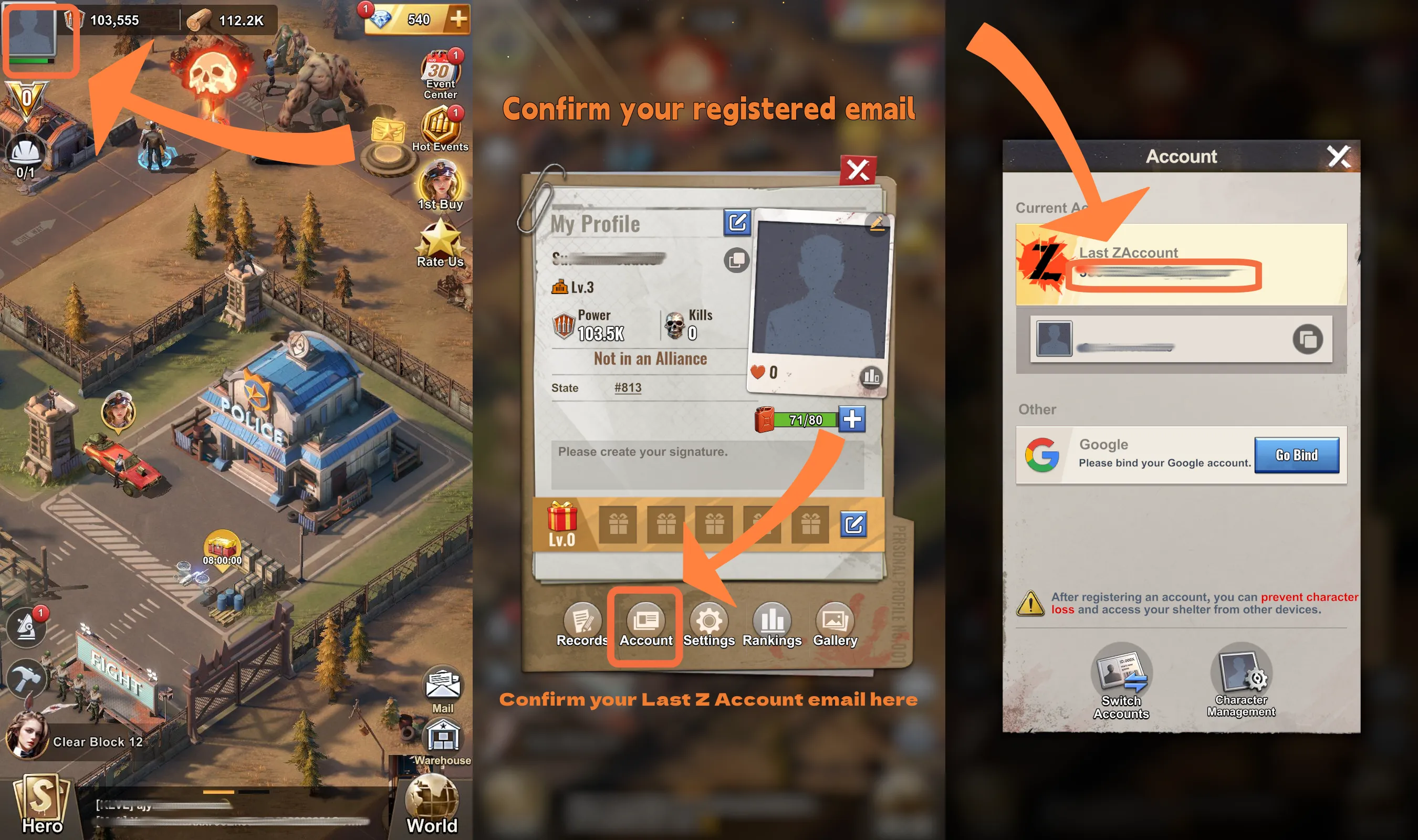
How to Confirm Your Linked Email Account?

  • Click the profile picture in the upper-left corner
  • Click "Account"
  • Confirm the linked email account

How to Confirm Your Linked Email Account

Why Choose LDShop for Your Last Z Top Up?

Competitive Prices

Save on selected Last Z Gold Bars and packs with competitive prices and limited-time offers.

Secure Payment

LDShop uses secure payment processing to help protect your transaction information.

Fast Processing

Last Z top-up orders are processed quickly after payment and the required account verification.

Multiple Payment Methods

Choose from credit cards, PayPal, e-wallets, and other payment options available at checkout.

Simple top-up: Select your Gold Bars or pack, complete payment, provide the required account information when prompted, and track your order until completion.

What Are Gold Bars in Last Z?

Gold Bars are one of the main premium resources in Last Z: Survival Shooter. They can be used toward eligible in-game purchases and packs that support base development, hero growth, resource management, and other progression systems.

For players who want to progress faster or prepare for major events, a Last Z Gold Bar top up provides a flexible way to access the resources and offers they need without being tied to a single type of pack.

Tip: Gold Bars are currently the main Last Z: Survival Shooter top-up product available on LDShop, making them a practical choice for players who want more flexibility with their in-game spending.

Why Buy Last Z Gold Bars?

Speed Up Development

Use Gold Bars toward eligible purchases that help support construction, research, and overall base progression.

Support Hero Growth

Access packs and resources that can help strengthen your heroes, squads, and overall combat power.

Buy Useful Resources

Spend on eligible resource packs and progression items based on what your account currently needs.

Prepare for Events

Keep Gold Bars available for limited-time packs, event offers, and other opportunities when they appear.

What Else Can You Buy in Last Z?

Besides Gold Bars, Last Z: Survival Shooter also offers different packs and passes for specific progression goals. Availability may change depending on current events and store rotations.

Module Token All-In-One

A limited-time all-in-one option for players looking for a bundled purchase during the current offer period.

ApocaAid Monthly Pass

A 30-day pass aimed at active players who want ongoing daily rewards and steady long-term value.

About Last Z: Survival Shooter

Last Z: Survival Shooter is a mobile strategy and action game set in a zombie-infested post-apocalyptic world. Players fight waves of undead, explore abandoned areas, gather resources, develop heroes, and expand their own fortified base.

The game combines fast-paced shooting sections with long-term SLG progression, requiring players to balance combat, resource management, hero development, research, and base upgrades as they work to survive and grow stronger.

Last Z Beginner Guide

1

Learn the Core Loop

Fight zombies, gather resources, develop your heroes, and keep upgrading your base. Avoid spending everything at once before you understand which resources are limiting your progression.

2

Build Your Main Heroes

Focus resources on the heroes you use most instead of spreading upgrades across your entire roster too early.

3

Manage Your Resources

Collect food, materials, Gold Bars, and other resources regularly and prioritize upgrades that remove your biggest progression bottlenecks.

4

Keep Your Base Growing

Upgrade important buildings, research new technologies, and strengthen your headquarters so you can unlock more progression systems.

5

Watch Limited-Time Events

Events can provide useful progression rewards and limited offers, so check the current event schedule before deciding where to spend your resources.

FAQ

▼ Is it safe to top up Last Z: Survival Shooter on LDShop?

Is it safe to top up Last Z: Survival Shooter on LDShop?

LDShop uses secure payment processing and encryption technology to help protect transaction information. Follow the instructions shown on the order page and make sure the required account information is correct before submitting your Last Z top-up.

▼ What can I buy for Last Z on LDShop?

What can I buy for Last Z on LDShop?

Gold Bars are currently the main Last Z top-up product available on LDShop. Selected packs and passes, such as Module Token All-In-One and ApocaAid Monthly Pass, may also be available depending on the current store lineup.

▼ What are Gold Bars used for in Last Z?

What are Gold Bars used for in Last Z?

Gold Bars can be used toward eligible in-game purchases and packs related to resources, hero development, base growth, events, and other progression needs. Available uses may vary as the game and store are updated.

▼ What payment methods does LDShop support?

What payment methods does LDShop support?

LDShop supports multiple payment methods, including Visa, MasterCard, PayPal, and other options available at checkout. Available payment methods may vary by region.

▼ How long does a Last Z top-up take?

How long does a Last Z top-up take?

Most Last Z top-up orders are processed quickly after payment and the required account information have been confirmed. Processing time may vary depending on the selected product, verification requirements, and order conditions.

Purchase Notice

1. This platform is an independently operated sales and top-up service platform for virtual goods and is not an official operator or partner of any game, application, or other online service.

2. There is no affiliation between this platform and the aforementioned official entities, nor does this platform make statements on their behalf.

3. Game names, trademarks, logos, character images, art assets, and other identifiers displayed on this platform belong to their respective rights holders. They are used solely for descriptive purposes within the necessary scope of product identification and do not constitute a claim of authorization, endorsement, recommendation, or guarantee by the rights holders.

4. Products sold on this platform, including third-party virtual items, top-up codes, gift codes, and top-up services, are subject to the actual name, content, validity, regional restrictions, scope of application, and usage rules displayed by the relevant official platform.

5. If you have any questions regarding these terms, please contact our customer service team.