


Dark War: Survival is a post-apocalyptic zombie survival strategy game where every resource matters. From upgrading your shelter to strengthening survivors and preparing for alliance events, having enough resources can make progression much smoother.
If you are looking for a more affordable way to buy Dawn Badges, LDShop provides discounted Dark War Survival top up options with multiple payment methods, fast order processing, and customer support. This guide explains the latest Dawn Badges prices, LDShop recharge advantages, and how to complete your Dark War Survival recharge step by step.
👇LDShop offers the best deals to top up Dark War Survival. Visit the Dark War Survival top up page to see more.
Why Choose LDShop for Dark War Survival Top Up?
Choosing the right recharge platform can help you reduce spending while making the purchasing process more convenient. Here are several reasons players may consider LDShop for their Dark War Survival recharge.
Save More on Dawn Badges
The biggest advantage is the discounted price. Based on the listed packages, Dawn Badges can be up to 40% cheaper than the original price. Larger packages can also provide significant dollar savings.
Fast Order Processing
After payment and the required account information are confirmed, orders are generally processed quickly. Most orders are expected to be completed within around 30 minutes.
Secure Payment Options
LDShop supports several payment methods to make checkout more convenient. Depending on your region and currency, available options may include Visa, MasterCard, and PayPal.
Always complete your payment through the official LDShop checkout page.
Professional Top-Up Service
LDShop uses a standardized order process for account information, payment, verification, and delivery. This can make Dark War Survival top ups easier to manage, especially when purchasing larger Dawn Badges packages.
24/7 Customer Support
If an order is delayed or you encounter a problem during the recharge process, LDShop customer support is available to help check the order status and troubleshoot the issue.


What Information Is Needed for a Dark War Survival Top Up?
Before placing your order, prepare the following information:
- Dark War: Survival account
- Email login information
- Verification code when required
- Dark War Survival UID
- Server ID
Make sure all information is accurate. An incorrect UID, Server ID, account, or verification code can delay the order or prevent successful delivery.
For security, only use an account that you own or are authorized to acces
How to Top Up Dark War Survival on LDShop
LDShop currently provides different top-up methods depending on the product and account requirements. Follow the instructions displayed on the product page after placing your order.
Method 1: Self Top-Up
Step 1: Select Self Top-Up
Choose your preferred Dawn Badges package, place the order, and complete the payment. After ordering, select Self Top-Up if this option is available.
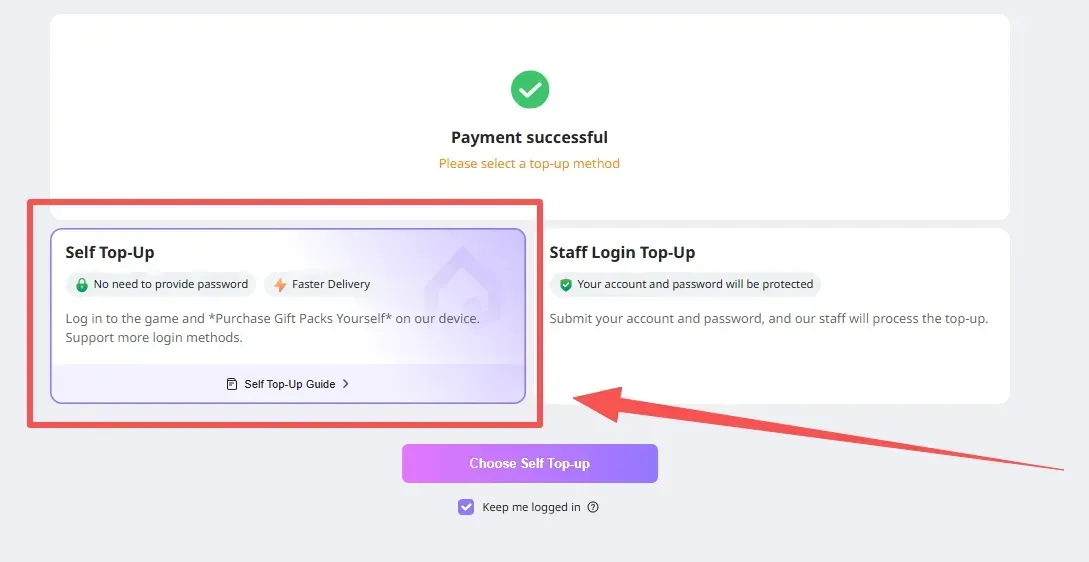
Step 2: Log In Through LDShop
Enter the game through the LDShop top-up interface and log in to your Dark War Survival account.
The current instructions support email login.
Step 3: Redeem the Gift Pack
After entering the game through the LDShop interface, select the desired gift pack and confirm the purchase.
Purchase Recommendation: Before attempting to redeem a package through the platform, consider spending enough existing Dawn Badges in-game so that your current balance falls below the required amount for the package. You can then return to the platform and complete the purchase.
Step 4: Complete the Top Up
After the recharge is completed, you will be automatically logged out. Your login records will also be cleared according to the top-up process.
Method 2: Manual Top Up
You can also complete the Dark War Survival recharge through the manual top-up process when this option is available.
Step 1: Open LDShop
Visit the official LDShop website and select your preferred language and currency.
Step 2: Select a Dark War Survival Package
Find the Dark War Survival top-up page and choose the Dawn Badges package or other available pack you want to purchase. Click Top Up.
Step 3: Select Payment Method
Choose your preferred payment method and apply an available coupon if applicable. Then click Pay Now.
Step 4: Enter Your Account Information
Complete the required account information, including your UID, Server ID, email, and verification details when requested. Check everything carefully before continuing.
Step 5: Check Your Order
Open the order center and check the status of your purchase. Once the order is marked as completed, open Dark War: Survival and check whether the Dawn Badges or purchased items have arrived.
Step 6: Contact Customer Support if Needed
If your order remains pending or the items do not arrive after the expected processing time, contact LDShop customer support and provide your order number.
Important Tips Before Your Dark War Survival Recharge
Before purchasing Dawn Badges, check the following:
- Submit the correct account information.
- Double-check your UID and Server ID.
- Make sure your verification code is valid.
- Do not log in to the game during the recharge process unless customer support instructs you to.
- Only recharge an account you own or have permission to use.
- Check the product page for the latest price before payment.
- Keep your order number until the top up is successfully completed.
These simple steps can reduce the risk of delays caused by incorrect information.
How to Find Your Dark War Survival UID and Server ID
Your UID and Server ID are required for some Dark War Survival recharge methods.
Step 1: Open Dark War: Survival
Launch the game and enter your account.
Step 2: Open Your Profile
Tap your avatar in the upper-left corner of the game screen.
Step 3: Find Your Server ID
Check your profile or account information to locate your Server ID.
Step 4: Find Your UID
Open the game settings or account information and copy your UID.
Step 5: Enter the Information on LDShop
Return to the LDShop order page and carefully enter your UID and Server ID.
What Is Dark War: Survival?
Dark War: Survival is a post-apocalyptic zombie survival strategy mobile game. Players take the role of a survivor leader after a devastating virus outbreak and must build and defend a shelter while managing limited resources.
The game combines base building, resource management, survivor development, exploration, and alliance gameplay. Players need to upgrade facilities, strengthen their teams, collect resources, and participate in different activities to survive in a world filled with zombie threats.
For players who want to progress faster or take advantage of limited-time packs and events, Dawn Badges can be an important premium resource.
Conclusion
A Dark War Survival top up can be useful when you need Dawn Badges for limited-time packs, progression resources, or event preparation. LDShop offers multiple Dawn Badges packages at discounted prices, with the listed discounts reaching up to 40% compared with the original prices.
Before purchasing, compare the current prices, choose a package that matches your needs, and carefully check your UID, Server ID, and account information. Following the correct recharge process can help you complete your Dark War Survival top up more smoothly and get the resources you need without unnecessary delays.






 TOP UP WITH DISCOUNT NOW
Rich Experienced Game Editor
Rich is a passionate gamer and strategy explorer who loves uncovering hidden mechanics, experimenting with team comps, and sharing tips that actually help players succeed. She has a talent for breaking down complex systems into easy-to-understand guides, making even the trickiest battles feel manageable. When she's not diving into virtual worlds, you might find her debating game lore, hunting for easter eggs, or enjoying a snack while plotting her next in-game strategy. Rich's goal? Helping fellow gamers have more fun while leveling up their skills.
