


EA SPORTS FC 27 launches worldwide on September 25, 2026. Before pre-ordering the PC version, it is worth checking whether your setup meets EA’s official minimum or recommended requirements—and whether you have enough room for the 100 GB installation.
Below, you will find the confirmed EA FC 27 PC system requirements in one clear table, covering Windows, CPU, GPU, memory, DirectX, internet speed, and storage. The guide also includes the currently confirmed storage figures and brief compatibility answers for console and macOS players.
What Platforms Is EA FC 27 Available On?
EA FC 27 is available on two generations of PlayStation and Xbox consoles, both Nintendo Switch systems, and Windows PC.
|
Platform |
EA FC 27 Support |
The Grounds and Clubs |
Official Storage |
|---|---|---|---|
|
Windows PC |
Yes |
Yes |
100 GB |
|
PlayStation 5 |
Yes |
Yes |
TBA |
|
PlayStation 4 |
Yes |
No |
TBA |
|
Xbox Series X|S |
Yes |
Yes |
TBA |
|
Xbox One |
Yes |
No |
TBA |
|
Nintendo Switch 2 |
Yes |
Yes |
66.5 GB estimated |
|
Nintendo Switch |
Yes |
No |
29.8 GB estimated |
|
macOS |
No native version announced |
— |
— |
The Grounds, including Clubs, is only available on PS5, Xbox Series X|S, PC, and Nintendo Switch 2. Players on PS4, Xbox One, and the original Nintendo Switch can still access the supported core game modes, but The Grounds and its Clubs content are not included on those versions.
EA FC 27 PC System Requirements
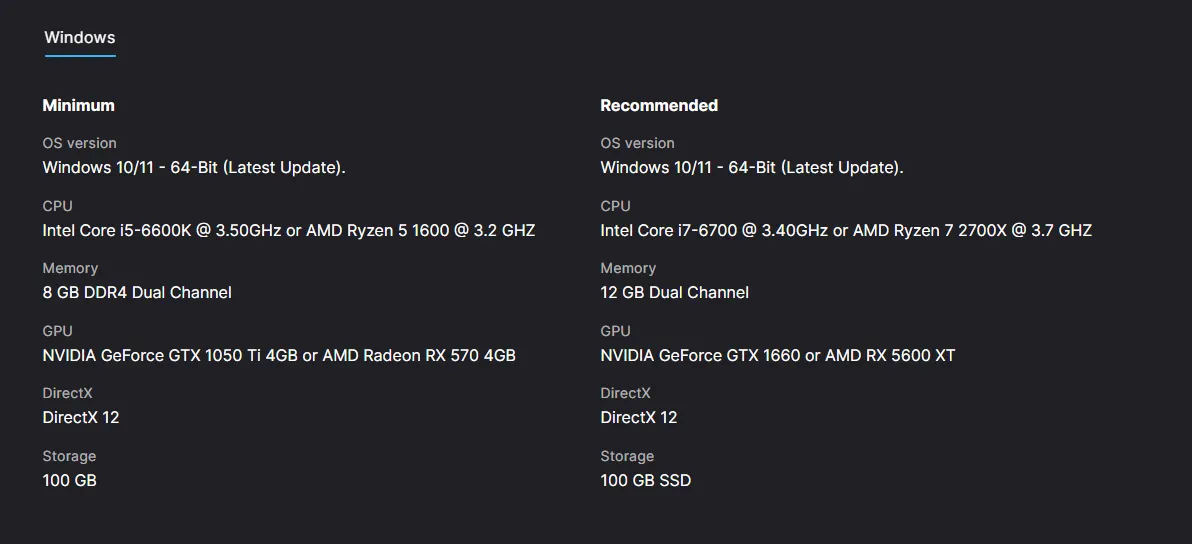
The good news is that EA FC 27 does not require a brand-new high-end gaming PC. Its minimum specification still targets hardware such as the GTX 1050 Ti and RX 570, while the recommended level calls for a GTX 1660 or RX 5600 XT.
Here are the official EA FC 27 minimum and recommended PC requirements.
|
PC Specification |
Minimum Requirements |
Recommended Requirements |
|---|---|---|
|
Operating System |
Windows 10/11, 64-bit, latest update |
Windows 10/11, 64-bit, latest update |
|
AMD Processor |
Ryzen 5 1600 |
Ryzen 7 2700X |
|
Intel Processor |
Core i5-6600K |
Core i7-6700 |
|
Memory |
8 GB DDR4, dual-channel |
12 GB, dual-channel |
|
AMD Graphics |
Radeon RX 570 |
Radeon RX 5600 XT |
|
Nvidia Graphics |
GeForce GTX 1050 Ti |
GeForce GTX 1660 |
|
DirectX |
DirectX 12 |
DirectX 12 |
|
Internet Connection |
512 Kbps or faster |
512 Kbps or faster |
|
Storage |
100 GB available space |
100 GB SSD |
EA has not published an official resolution, graphics preset, or frame-rate target for either specification. Meeting the minimum requirements means your PC reaches EA’s supported baseline; it does not guarantee 1080p at 60 FPS or any particular settings.
EA FC 27 System Requirements FAQ
Conclusion
You do not need a monster PC to run EA FC 27, but meeting the recommended specs is the safer bet if you want fewer headaches on launch day. Keep at least 100 GB free, use an SSD where possible, and do not treat the minimum requirements as a promise of 1080p or 60 FPS—EA has not published performance targets for either specification tier.
Once your setup is ready, compare the latest EA FC 27 pre-order options at LDShop and choose the edition that matches your platform. After Ultimate Team goes live, you can also buy FC 27 Coins at LDShop to strengthen your squad without turning every upgrade into another long grind.






 TOP UP WITH DISCOUNT NOW
Henry Smith Experienced Game Editor
Greetings! I’m a veteran game editor and strategy guide creator with over a decade of experience exploring the worlds of action RPGs and gacha adventures. From the elemental battlegrounds of Genshin Impact, to the cosmic journeys of Honkai: Star Rail, and the fast-paced combat of Wuthering Waves, I dive deep into the mechanics, meta, and moments that define each game. What can you expect? In-depth guides, expert commentary, and practical insights to sharpen your gameplay and expand your understanding of the titles you love.
