


Migration in Rise of Kingdoms is more than simply changing servers. Your destination kingdom’s season, immigration status, available slots, power cap, character age and approval rules all determine whether the transfer can be completed. The March 2026 immigration update shortened the permitted character-age difference for several cross-season routes. Governors planning to enter Season 2, Season 3 or the Season of Conquest should therefore check the current Kingdom Info screen instead of relying on the old kingdom-age rules.
This guide covers the current Rise of Kingdoms immigration rules, RoK Passport cost, Passport Page requirements, K2 and KvK3 migration rules, kingdoms open to migrants, full-hospital migration and the complete transfer process.

How Migration and Passport Pages Work
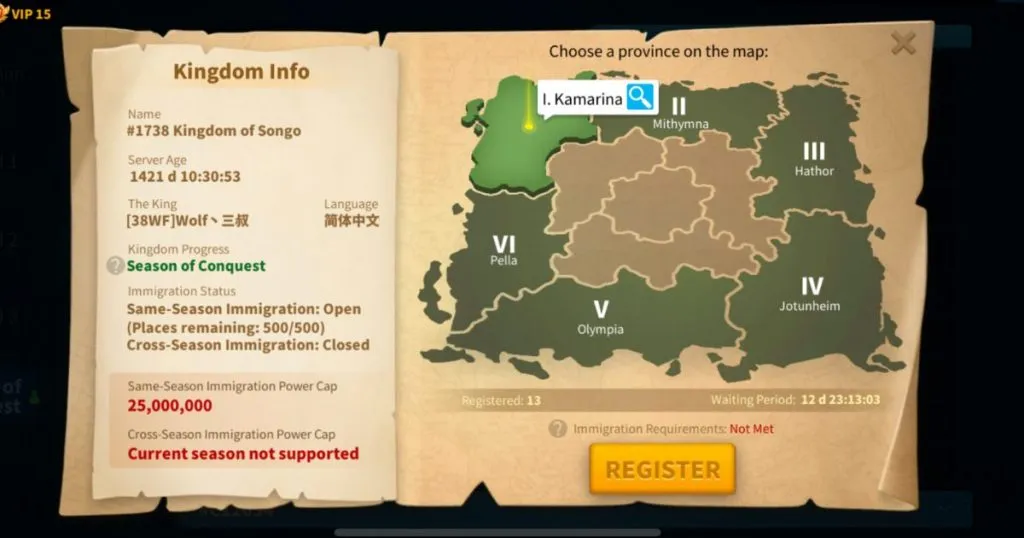
Migration transfers an existing character and its progress to another kingdom. It is not the same as creating a new character. Commanders, equipment, technology, VIP progress, troops and inventory items remain attached to the migrating character.
Every standard migration consumes Passport Pages. The required number is primarily calculated from the character’s displayed power when the transfer is confirmed.
Important effects of migration include:
- Open resources above Storehouse protection capacity are removed.
- The character appears in a random province of the destination kingdom.
- The required Passport Pages are consumed immediately.
- A 30-day cooldown normally begins after a successful transfer.
- The destination must meet the relevant season, power-cap, slot and immigration-status rules.
👇LDShop offers the best deals to top up Rise of Kingdoms. Visit the ROK top up page to see more.
Rise of Kingdoms Immigration Requirements
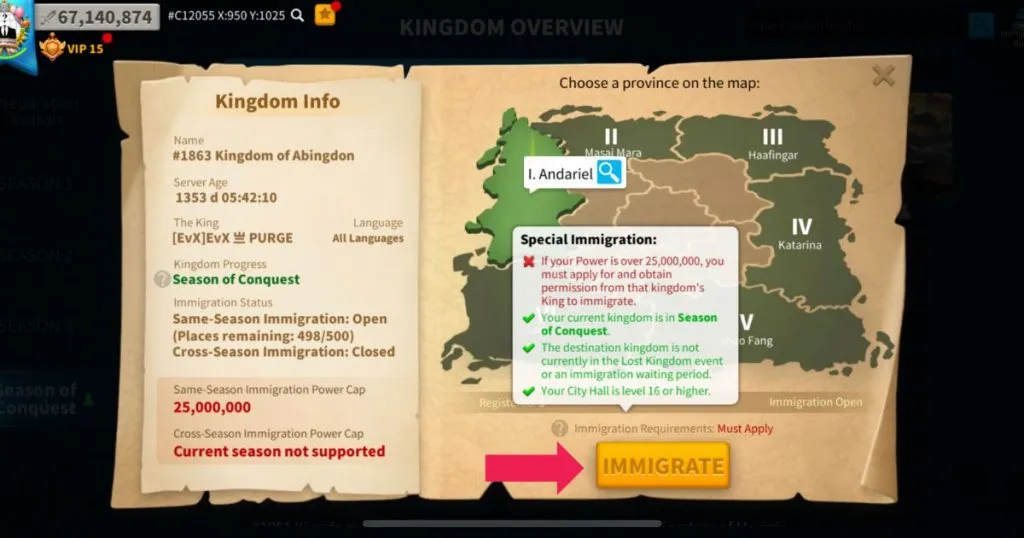
Before pressing the Immigrate button, complete the following Passport requirements
- Reach City Hall level 16 or higher.
- Leave the current alliance.
- Recall every march and scout to the city.
- Make sure the city and troops are not fighting, rallying or under attack.
- Reduce open resources to the Storehouse protection limit.
- Hold enough Passport Pages for the current power bracket.
- Select a destination with immigration currently available.
- Stay below the destination’s normal power cap or obtain the required permission.
- Complete the 30-day migration cooldown.
The requirements window checks each condition individually. Having enough Passport Pages does not guarantee entry when the destination is in an active Lost Kingdom, has filled its quota, is closed to the character’s season or does not meet the required age difference.
Additional Cross-Season Requirements
Standard cross-season immigration also checks several additional conditions:
- Characters below 10 million power cannot use standard cross-season immigration.
- The base cross-season power limit is 85 million, although a destination may impose a lower cap.
- Receiving eligibility requires a temporary 20,000-Gem deposit.
- The deposit is returned after the migration is completed.
- The deposit is lost when eligibility expires before the character migrates.
- Secondary password verification is required when that security feature is enabled.
RoK Passport Cost and Requirement Chart
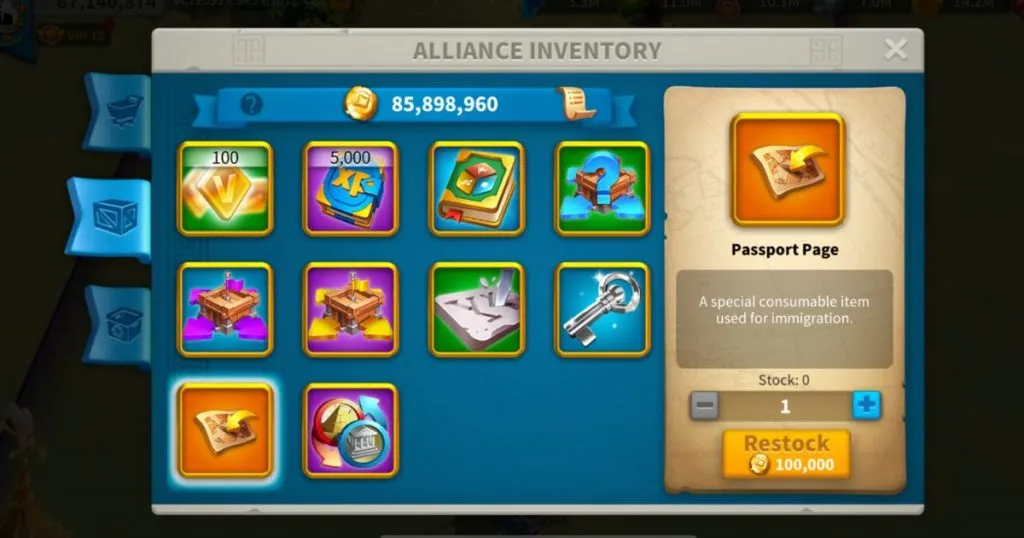
(Passport Pages can be purchased from the Alliance Shop with Individual Credits)
The answer to “how many Passports are needed to migrate in RoK?” depends on the character’s displayed power. Each Passport Page purchased through the Alliance Shop costs 600,000 Individual Credits.
|
Current Power |
Passport Pages |
Individual Credits |
|
0–10M |
1 |
600,000 |
|
10–15M |
2 |
1,200,000 |
|
15–20M |
3 |
1,800,000 |
|
20–25M |
4 |
2,400,000 |
|
25–30M |
6 |
3,600,000 |
|
30–35M |
9 |
5,400,000 |
|
35–40M |
12 |
7,200,000 |
|
40–45M |
15 |
9,000,000 |
|
45–50M |
20 |
12,000,000 |
|
50–55M |
25 |
15,000,000 |
|
55–60M |
30 |
18,000,000 |
|
60–65M |
35 |
21,000,000 |
|
65–70M |
40 |
24,000,000 |
|
70–75M |
45 |
27,000,000 |
|
75–80M |
50 |
30,000,000 |
|
80–85M |
55 |
33,000,000 |
|
85–90M |
60 |
36,000,000 |
|
90–95M |
65 |
39,000,000 |
|
95–100M |
70 |
42,000,000 |
|
100M+ |
75 |
45,000,000 |
Formula: Required Individual Credits = Passport Pages × 600,000
For example, a character at 38 million power requires 12 Passport Pages, costing 7.2 million Individual Credits. Dropping below 35 million before migrating may reduce the requirement to nine Passport Pages.
Power can change through healing, training, technology completion and other upgrades. The number displayed on the destination kingdom’s immigration screen should always be treated as the final requirement.
How to Get Passport Pages in RoK
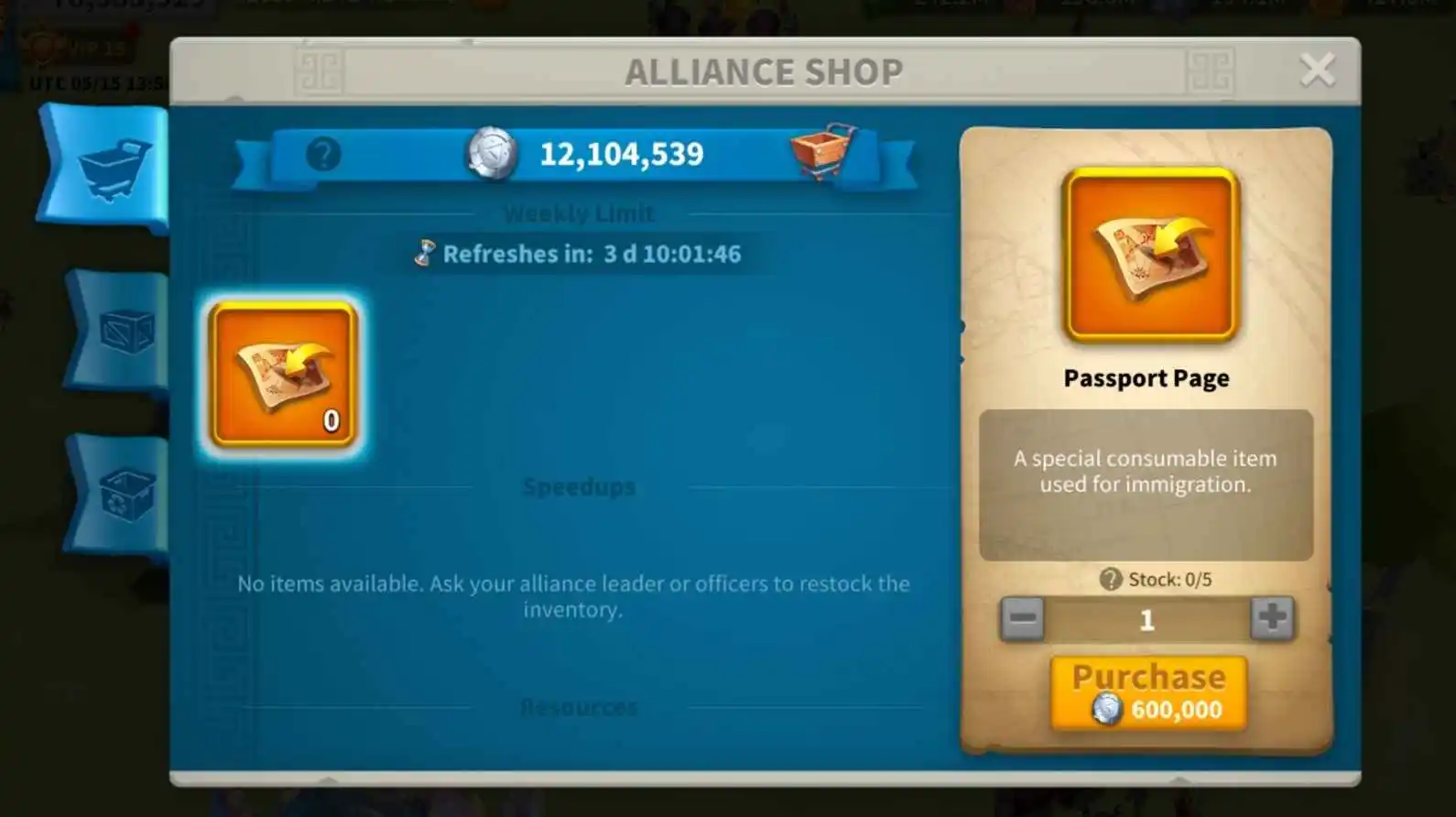
Weekly Limit in the Alliance Shop
Alliances with a member capacity of at least 100 receive a Weekly Limit section. Passport Pages in this section restock automatically without consuming Alliance Credits.
The stock is personal to each governor, so purchases made by other members do not reduce your supply. Each Passport Page still costs 600,000 Individual Credits. Unpurchased stock can accumulate up to a limit, with the current interface commonly allowing as many as five pages to be stored.
Alliance Inventory Restocking
An alliance leader or Rank 4 officer can also restock Passport Pages in the shared Alliance Inventory:
Restocking one page costs 100,000 Alliance Credits.
Buying one page costs the member 600,000 Individual Credits.
The inventory is shared, so arrange the purchase with alliance management before leaving.
New World Bundle
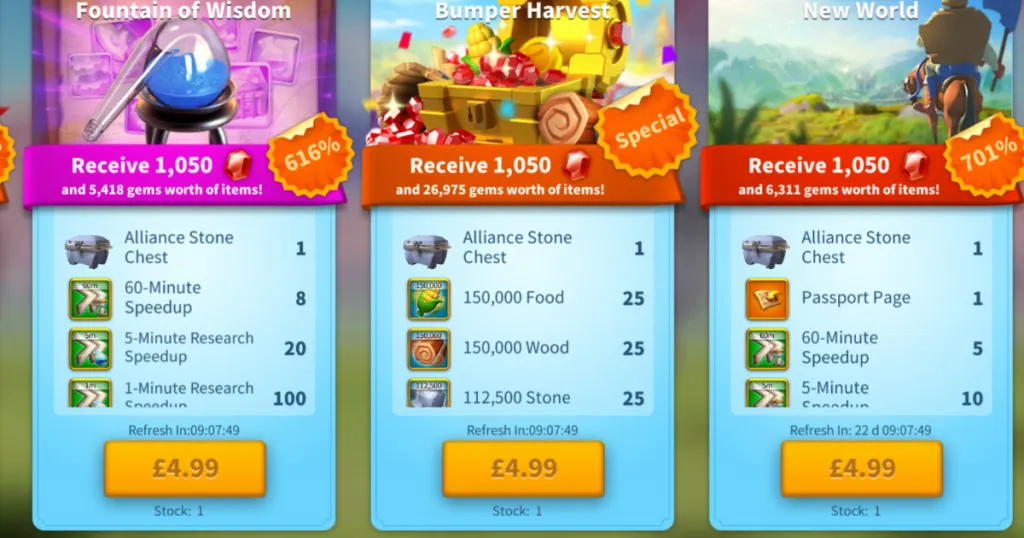
The New World bundle provides the direct paid route for acquiring Passport Pages. It contains a Passport Page and additional items, but purchase limits and refresh times apply. If ypu want to get these items at a Cheap Price, Consider LDShop!
New K2, KvK3 and Season of Conquest Migration Rules

After the March 24, 2026 adjustment, the major character-age limits are
|
Migration Route |
Destination |
Current Restriction |
|
Same-season immigration for new kingdoms |
Before the end of Season 1 |
New kingdoms are generally restricted, with availability rolling out on selected continents |
|
Same-season immigration |
First Season of Conquest story |
The character may be no more than 150 days older than the target kingdom |
|
Cross-season immigration |
Season 2 / KvK2 |
The character may be no more than 80 days older than the target kingdom |
|
Cross-season immigration |
Season 3 / KvK3 |
The character may be no more than 120 days older than the target kingdom |
|
Post-season immigration within the same Lost Kingdom |
Another kingdom in the current Lost Kingdom |
Application and approval are required, with a reduced Passport Page cost |
The new RoK K2 migration rule therefore uses an 80-day limit rather than the previous 120-day limit. Cross-season migration into KvK3 uses a 120-day limit rather than the former 180-day window.
Post-Season Team Immigration
After a Season of Conquest story ends and its designated immigration period opens, governors can apply to another kingdom that participated in the same Lost Kingdom. Approved transfers require fewer Passport Pages than a normal migration.
A kingdom that has just entered the Season of Conquest can receive up to 150 immigrants before beginning its first story. After completing that first story, the seasonal capacity can increase to 500. Remaining places are shown on the Kingdom Info screen.
How to Check Kingdoms Open to Migrants
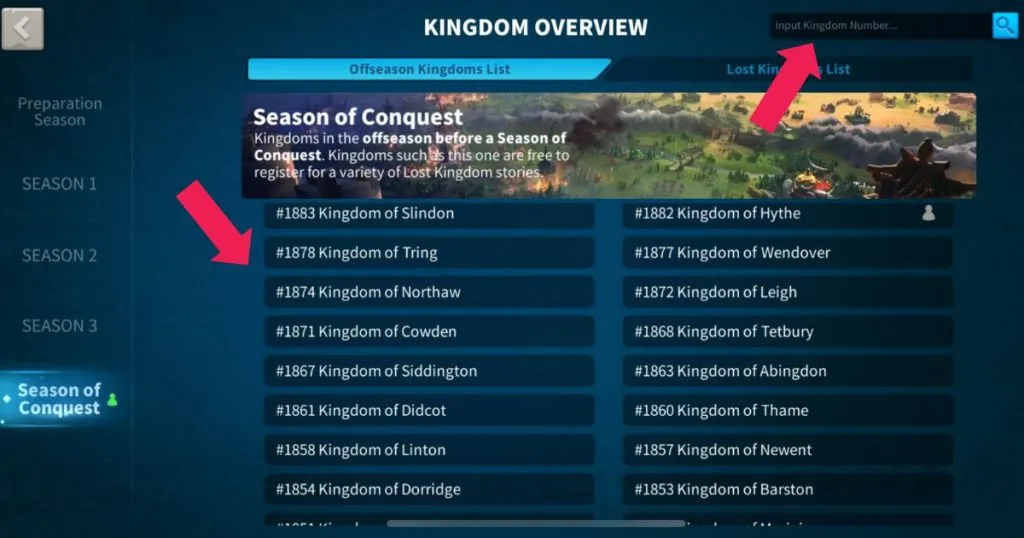
Search for a destination kingdom through Kingdom Overview.
A fixed list of current offseason kingdoms quickly becomes outdated because immigration status, available places, power caps and waiting periods change continuously.
Use the following method to check which kingdom you can migrate to:
1. Zoom out from the city map.
2. Tap the globe icon in the lower-right corner.
3. Open Kingdom Overview.
4. Filter by Preparation Season, Season 1, Season 2, Season 3 or Season of Conquest.
5. Enter the destination kingdom number in the search box.
6. Open the kingdom’s information page.
7. Check immigration status, remaining places, power caps and opening timers.

The destination may show one of several results:
- Open: The character can enter after meeting all normal conditions.
- Must Apply: The character exceeds the normal power cap or requires a controlled slot.
- Closed: The current season, event state or quota does not permit immigration.
- Waiting Period: Registration is available, but immigration has not opened yet.
- Current Season Not Supported: The character and destination are not within a valid migration route.
A king can set the standard power cap and approve certain applications, but approval cannot override age limits, season restrictions, cooldowns or other base conditions.
Step-by-Step Migration Process
1. Contact the destination kingdom and confirm its power, activity and placement requirements.
2. Collect the required Passport Pages.
3. Reduce open resources below Storehouse protection capacity.
4. Recall all marches and scouts.
5. Leave the current alliance.
6. Select the target through Kingdom Overview.
7. Tap Apply, Register or Immigrate.
8. Prepare the 20,000-Gem deposit when receiving cross-season eligibility.
9. Review the Passport Page cost and every requirement.
10. Confirm the transfer and allow the game to reload in the destination kingdom.
How to Reduce RoK Migration Cost

Stop Increasing Power Near a Passport Bracket
When power is close to the next Passport Page bracket, delay troop training, technology completion, building upgrades and other power increases. A relatively small increase may add several Passport Pages to the migration cost.
Migrate With a Full Hospital
Wounded troops in the hospital reduce displayed power and may move the character into a cheaper Passport bracket.
A full hospital does not automatically block immigration. All field marches must still return to the city, and the city cannot be fighting. After arriving, heal wounded troops before sending marches into combat, especially when the hospital is close to or above its normal capacity.
Remove Unnecessary High-Tier Siege Units
Tier 4 and Tier 5 siege units add power while providing limited value for routine gathering. Characters close to a Passport threshold may remove part of their high-tier siege force and retrain it after arriving.
Do not delete primary combat troops without first comparing the saved Passport cost against the resources and speedups required to rebuild them.
Keep Resources in Item Form
Unopened resource items remain in the inventory. Only open resources in the city must be reduced below Storehouse protection capacity. Spend excess open resources before migrating and avoid opening additional resource packs.
Confirm Acceptance Before Buying Bundles
A destination can close immigration, lower its power cap or exhaust its application slots. High-power governors should secure acceptance and verify the immigration window before buying a large number of New World bundles.
Migration FAQ

Can I migrate with a full hospital in Rise of Kingdoms?
Yes. The migration conditions require field troops to return, but they do not require an empty hospital. Wounded troops reduce displayed power and may lower the number of Passport Pages required. Heal them after arriving before resuming combat.
Can I migrate to a kingdom in an active Lost Kingdom?
Standard migration is generally unavailable when the destination is participating in an active Lost Kingdom. The exception is the designated post-season immigration period in the Season of Conquest, when approved transfers may occur between kingdoms from the same Lost Kingdom.
Can you migrate only to offseason kingdoms?
Most standard transfers occur while the destination displays an open immigration status, which is commonly during the offseason. However, the special post-season transfer period within the same Lost Kingdom means “offseason only” is not a complete rule. Always check Kingdom Info.
Do kings control migration in RoK?
They control part of the process. Kingdom management can set a standard power cap and approve applications above that cap or through limited immigration places. They cannot bypass character-age restrictions, season compatibility, Passport requirements or the migration cooldown.
How long do I have to wait for a new kingdom?
There is no universal waiting period. New kingdoms are generally restricted from same-season immigration until the end of Season 1, while later kingdoms depend on their season progress, immigration timer, available places and the character’s age difference.
Does VIP transfer when migrating?
Migration moves the existing character, so that character retains its VIP level and progression. A newly created character has separate progression and does not inherit the VIP level of another character.
What is the Passport cost in dollars?
There is no fixed dollar price. The no-spend route costs 600,000 Individual Credits per Passport Page. The paid price depends on regional currency, store pricing, bundle tier and the number of New World purchases required.
How soon can I migrate again?
A successful migration normally starts a 30-day cooldown. The character’s current cooldown can be checked through Kingdom Overview and the immigration interface.
Conclusion
Successful migration requires more than collecting Passport Pages. Before committing resources, check the destination’s season, immigration status, character-age window, available places, power cap and approval process.
For migration into Season 2 and Season 3, use the current 80-day and 120-day age limits. Confirm acceptance before purchasing bundles or removing troops, then calculate the Passport requirement from the character’s final displayed power. This approach avoids unnecessary cost and reduces the chance of preparing for a kingdom that is no longer available.
Better top-up service from LDShop to secure the Cheap, Safe, Efficient items for you!






 TOP UP WITH DISCOUNT NOW
Savannah Reed Experienced Game Editor
I'm a game guide writer with over 20 years of experience playing all types of games, especially anime-style RPGs, gacha and sports games. I love finding smart ways to beat tough levels without spending too much money. By studying game mechanics and character systems, I create easy tips to help players save time and resources. When I'm not gaming, I watch anime to get inspiration for strategies. My goal? To help you enjoy games more and stress less – even when facing "impossible" bosses! Let’s make gaming fun and affordable together!
