


Hey everyone, many players in Tiles Survive just glance at whether they won or lost and close the battle report immediately after a fight. That might cause you to miss a lot of critical details. Actually, a small battle report hides a wealth of information about the enemy's strength, your own defensive weaknesses, and priorities for upgrading buildings.
Today, LDShop dives deep into interpreting battle reports and discuss how to use that information.
👇LDShop offers the best deals to top up Tiles Survive. Visit the Tiles Survive top up page to see more.
Arcadia Quick Guide
Before we dig into battle reports, let's briefly touch on the Arcadia conquest event. It's a weekly inter-alliance event where the core goal is to control the central area.
- Core Objective: Capture and control the central zone for a cumulative total of 1.5 hours. If no alliance achieves this, the one with the longest cumulative control time wins.
- Strategic Points: The four towers at the map's corners are crucial. Once captured, they continuously attack enemy troops in the center. Each minute of control weakens the central defenders' troops by 2%, making your assault much more effective. So, don't just blindly charge the center; coordinating with allies to capture the towers first is key.
- Personal Points: During the event, every enemy troop you kill and every one of your own troops that falls grants you personal points. This is a key way to earn individual rewards. So, even defending earns you points.
- Governors: The R5 of the winning alliance becomes the next Governor, receiving practical buffs and being able to distribute reward to all alliance members.
Deep Dive into a Battle Report
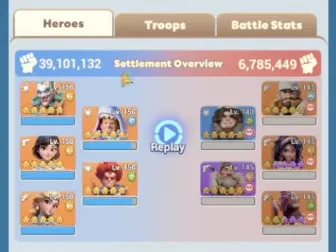
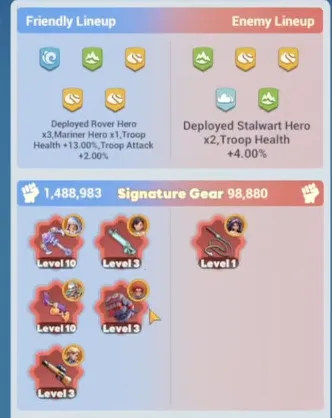
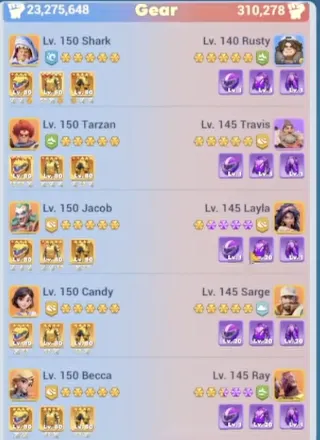
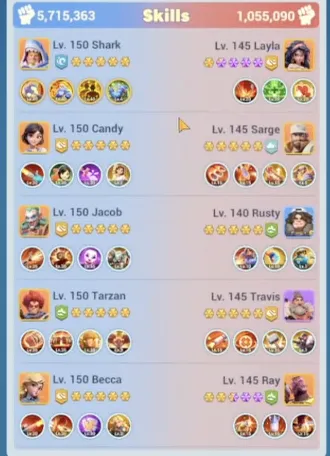
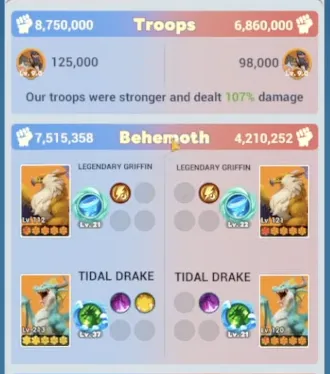
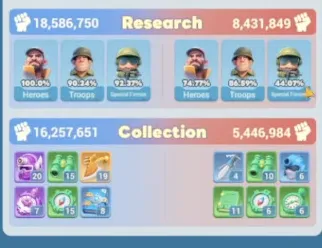
Alright, with the event background out of the way, let's look at our main topic—the battle report. Many players just see the kill ratio and move on, but clicking "More Details" opens up a new world. Let's use a case of attacking a settlement for a detailed breakdown.
This clearly shows the heroes used by both sides, their levels, and equipment. You can quickly identify the opponent's main hero lineup and adjust your own roster. Clicking the "Troops" icon lets you see specific troop types, rally sizes, and even their troop research levels and the stats of war beasts like Dragons and Griffins. This is the best way to scout enemy strength and learn high-level troop compositions.
A Special Gift Just for You!
LDShop has a special deal for you—copy the exclusive code "LDSHOP5FF" and get a 5%OFF coupon for your next purchase! You can redeem the coupon by pasting the code in your Personal Center page, or redeem it directly at checkout. Please click the button below to top up now!


Discount code validity period: 2026.04.01 00:00:00 - 2026.09.30 23:59:59
The mechanism to adding your power
Why do your battle reports look different from others' when attacked? The secret is in these two buildings:
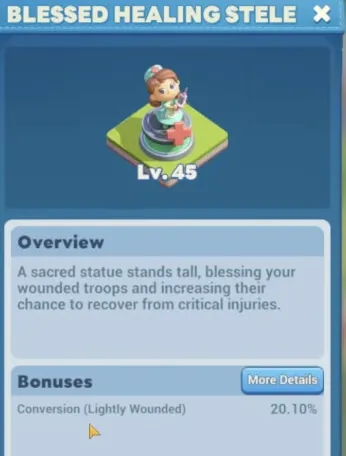
- Hospital: Determines Your Healing Capacity
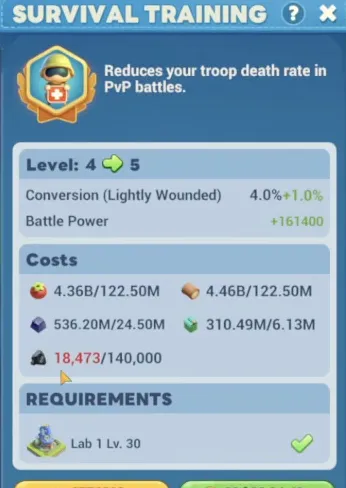
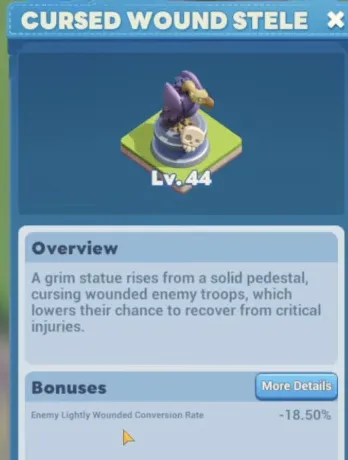
"Lightly Wounded" units in the report go directly to the hospital. As long as there's capacity, they can be healed. "Severely Wounded" units, on the other hand, head to the next key building. To increase the proportion of lightly wounded and reduce severely wounded and deaths, you must upgrade your "Hospital". This building directly determines how many of your soldiers can enter a "treatable" state when you are defending.
- Enlistment Office: Turning Death into Reserves
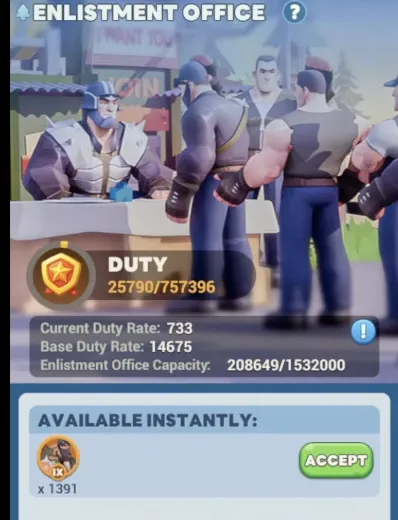
What happens when your hospital fills up? Do subsequent "Lightly Wounded" units from battles just turn into "Deaths"? Not necessarily! This is where the "Enlistment Office" shines. When the hospital is full, subsequent lightly wounded units are sent to the Enlistment Office. It acts as your second reserve pool. You can choose to recall them at an appropriate time (like outside of combat), effectively giving you a large batch of reserve troops that don't require immediate resource expenditure for treatment.
Combat Strategy
Understanding the reports and building mechanics allows for some clever strategies to quickly boost your combat power during events.
1. Maximize the Enlistment Office, Stockpile Troops:
- Before the event starts, ensure your "Hospital" and "Enlistment Office" are upgraded to your current maximum level.
- Once the event begins, don't heal your hospital wounded immediately. Keep fighting. Let your hospital fill up quickly. After that, all subsequent lightly wounded units will start flowing into the Enlistment Office.
- You can use the "Infirmary" or coordinate with an ally to rapidly consume troops and fill both buildings. The idea is to expand your total "available" troops to a theoretical maximum without spending heavy resources on healing.
2. Mass Recall Before War, Instant Power Spike:
- Then, right before the crucial King's War (KVK) or event settlement, spend the resources to recall all soldiers from both the Hospital and the Enlistment Office at once. Your troop count will spike dramatically in an instant, causing your power ranking to soar.
- This is why some players are ranked high at the event start, drop to the middle, and then suddenly jump back to the top at the end. They aren't "creating" troops out of thin air; they're "storing" them using battle reports and building mechanics.
Mastering your battle reports and understanding the mechanics behind hospitals and enlistment offices rewards strategy and patience. Log in consistently, analyze your reports after every fight, and prioritize filling those buildings before major events like KVK.
If you ever hit a resource wall while trying to heal those troops or push for that next building upgrade, LDShop can provide secure top-up options. Sometimes a little boost is all you need to keep that momentum going.
Ready to get free top-up benefits and turn your gaming into earnings? Join the LDShop Affiliate Program now to unlock exclusive rewards, get dedicated guidance in our community, and start earning by promoting LDShop to more players.






 TOP UP WITH DISCOUNT NOW
Savannah Reed Experienced Game Editor
Savannah Reed is a senior game editor at LDShop.gg, specializing in in-depth coverage of RPG and strategy games. With a strong focus on titles like Wuthering Waves, Honkai: Star Rail and Whiteout Survival, she combines industry insight with firsthand player experience to deliver clear, informative, and actionable content. Her work is dedicated to helping gamers make smarter decisions—whether it’s understanding new updates or optimizing their in-game strategy.
![[New User Exclusive] 500 Waypoints | Tiles Survive Top Up](https://shop.ldrescdn.com/rms/ld-space/process/img/7fb432ef6bd844b5ac85f6b7be7fb2ca1784113996.webp?x-oss-process=image/resize,m_fill,h_160,w_160)