



Buy PlayStation Network Card (USD) at LDShop – Fast Digital Delivery
Buy your PlayStation Network Card at LDShop for a better-value top-up experience. Enjoy competitive pricing, fast digital delivery, and 24/7 customer support whenever you need help.
This product is a digital code used to top up your PlayStation Store wallet, so you can buy eligible games, DLC, add-ons, and more from the PlayStation Store.
Important: The card region must match your PlayStation account region before redemption.
How to Buy a PlayStation Network Card on LDShop
1. Go to the official LDShop website, select your language and currency, and log in.
2. Choose the PlayStation Network Card denomination, then click "Pay Now".
3. Select your preferred payment method and complete the payment.
4. Check your order status in the Order Center to receive the 12‑digit redemption code.
If you encounter any problems, contact customer support (click the support button at the bottom right of the platform).
How to Redeem Your PlayStation Network Card
You can redeem your PlayStation Store code in several ways:
▼ Option 1: Online
Go to PlayStation Store and select your profile at the top of the screen.
Select Redeem Code from the drop-down menu.
Carefully enter the 12-digit code and select Continue. The credit or content will then be applied to your account.
▼ Option 2: PlayStation App
Select the PS Store icon, then select the menu icon on the right side of the screen.
Select Redeem Code.
Carefully enter the 12-digit code and select Continue. The credit or content will then be applied to your account.
▼ Option 3: PS5 Console
Go to PlayStation Store, then press the triangle button to access the menu.
Select ... (More) > Redeem Code.
Carefully enter the 12-digit code and select Redeem. The credit or content will then be applied to your account.
Select Download to start downloading. You can also download it later. Download is not displayed for content that does not require a download.
You can also redeem a voucher code during checkout by selecting Redeem Codes and Gift Cards from the payment method menu.
▼ Option 4: PS4 Console
Go to PlayStation Store, scroll to the bottom of the sidebar, and select Redeem Codes.
Carefully enter the 12-digit code and select Continue > Confirm or Yes. The credit or content will then be applied to your account.
Select Continue > Download to start downloading. You can also download it later. Continue and Download are not displayed for content that does not require a download.
Why Buy PlayStation Network Cards from LDShop?
Get more value on every PSN top-up, whether you are buying for yourself or sending a gift.
Your code is delivered digitally after checkout, so there is no need to wait for shipping.
Choose from multiple denominations and top up your PSN wallet without using a card directly on PlayStation Store.
Need help with delivery, region selection, or redemption? LDShop support is here to help.
What Is a PlayStation Network Card?
A PlayStation Network Card is a prepaid digital wallet top-up code for the PlayStation Store. After redemption, the value is added to your PlayStation wallet balance and can be used toward eligible digital purchases.
A PlayStation Network Card can buy almost any digital product sold on the PlayStation Store. Here are the main uses:
- Full Games – Buy complete game titles for PS5 and PS4, from major AAA releases to indie gems. You can also pre‑order upcoming games.
- Add‑Ons / DLC – Purchase additional content for your games, such as new chapters, character skins, weapon packs, and season passes.
- In‑Game Currencies – Use the funds to buy premium currencies in popular games like Genesis Crystals for Genshin Impact, FC Points for EA SPORTS FC™, COD Points for Call of Duty®, and many more.
- Subscriptions – Subscribe to PlayStation Plus to enjoy online multiplayer, monthly free games, exclusive discounts, and other benefits.
- Media Content – Rent or buy movies and TV series digitally.
Note: This product is not a PlayStation Plus membership card. It is a wallet top-up card.
Before You Buy: Region Match Matters
To use the code successfully, the card region must match the region of your PlayStation account.
For example:
- A US card works only with a US PlayStation account
- A UK card works only with a UK account
- A Hong Kong card works only with a Hong Kong account
- A Japan card works only with a Japan account
Choose the card based on the country or region where your PlayStation account was registered, not your current location.
If you buy the wrong region, the code may not work on your account. Please check carefully before placing your order.
Delivery Information
Before using a PlayStation Network Card, please keep the following in mind:
- Digital Product Only – This is a digital code product only. No physical card will be shipped or mailed to you.
- Delivery Time – Orders are typically delivered shortly after payment is confirmed. In some cases, delivery may take longer due to payment review or security checks.
- Region Lock – PlayStation Network Cards are strictly region‑locked. The gift card you purchase must exactly match the region registered to your PSN account, otherwise it cannot be redeemed. For example, a US gift card can only be redeemed on a US‑region account and cannot be used across regions.
- No Refunds – PlayStation Network Cards are generally non‑refundable and non‑returnable once purchased. Please confirm carefully before buying.
If you do not receive your code right away, please check your email, order page, or contact LDShop 24/7 customer support for assistance.
1. How to Get and Confirm Your Discount?
1. Access LDShop through the designated promotion page, referral link, or discount entry.
2. Click “Log In” or “Sign Up” in the upper-right corner of the page to sign in to your existing LDShop account or create a new account. Please use the same LDShop account that you intend to use for your purchase.
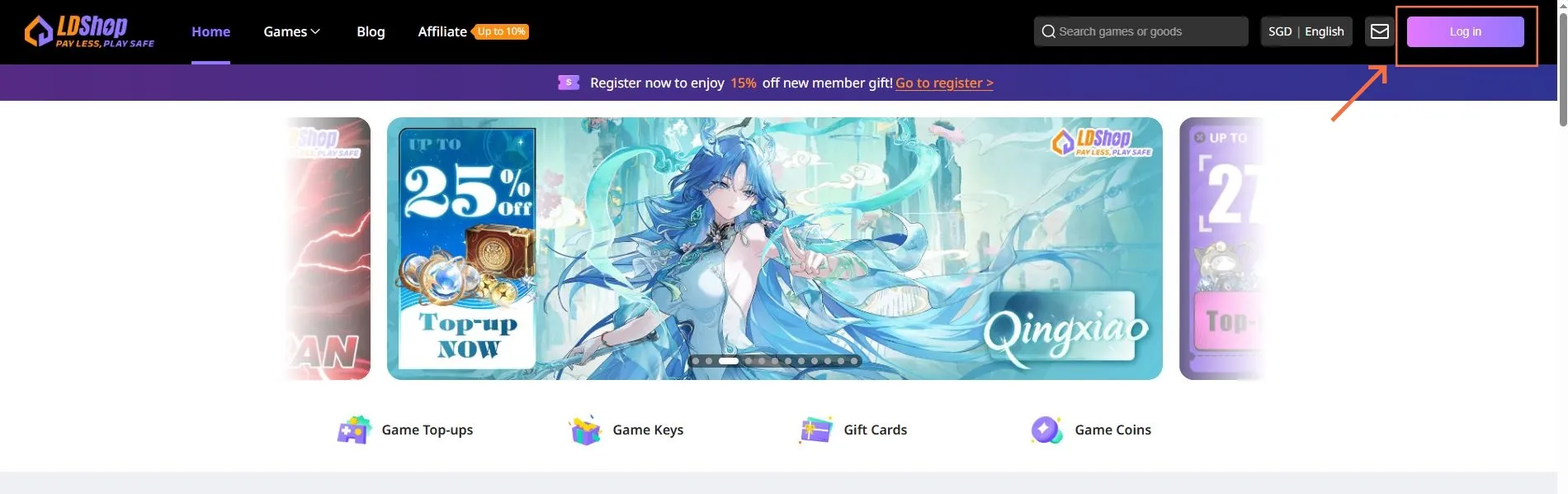
3. After signing in, check the promotion page, coupon notification, or the coupon section in your account to confirm that the discount has been successfully claimed or linked to your LDShop account.
4. Some discounts are applied automatically during checkout. You can also click “Coupon” on the payment page to manually select an eligible coupon.
Please note: Promotional discounts, coupon values, minimum purchase requirements, and eligible products may vary. If a promotion advertises a discount of up to 27%, the actual discount will be based on the final price displayed on the product and checkout pages.
2. How to Buy a PlayStation Network Card on LDShop?
1. Go to the PlayStation Network Card product page and select a card that matches the region of your PlayStation Network account.
For example: A US-region account requires a US PlayStation Network Card, while a Hong Kong-region account requires a Hong Kong PlayStation Network Card. Cards from different regions generally cannot be redeemed across regions.
2. Select the card denomination and purchase quantity you need. After confirming that the product region, currency, and denomination are correct, click “Buy Now.”
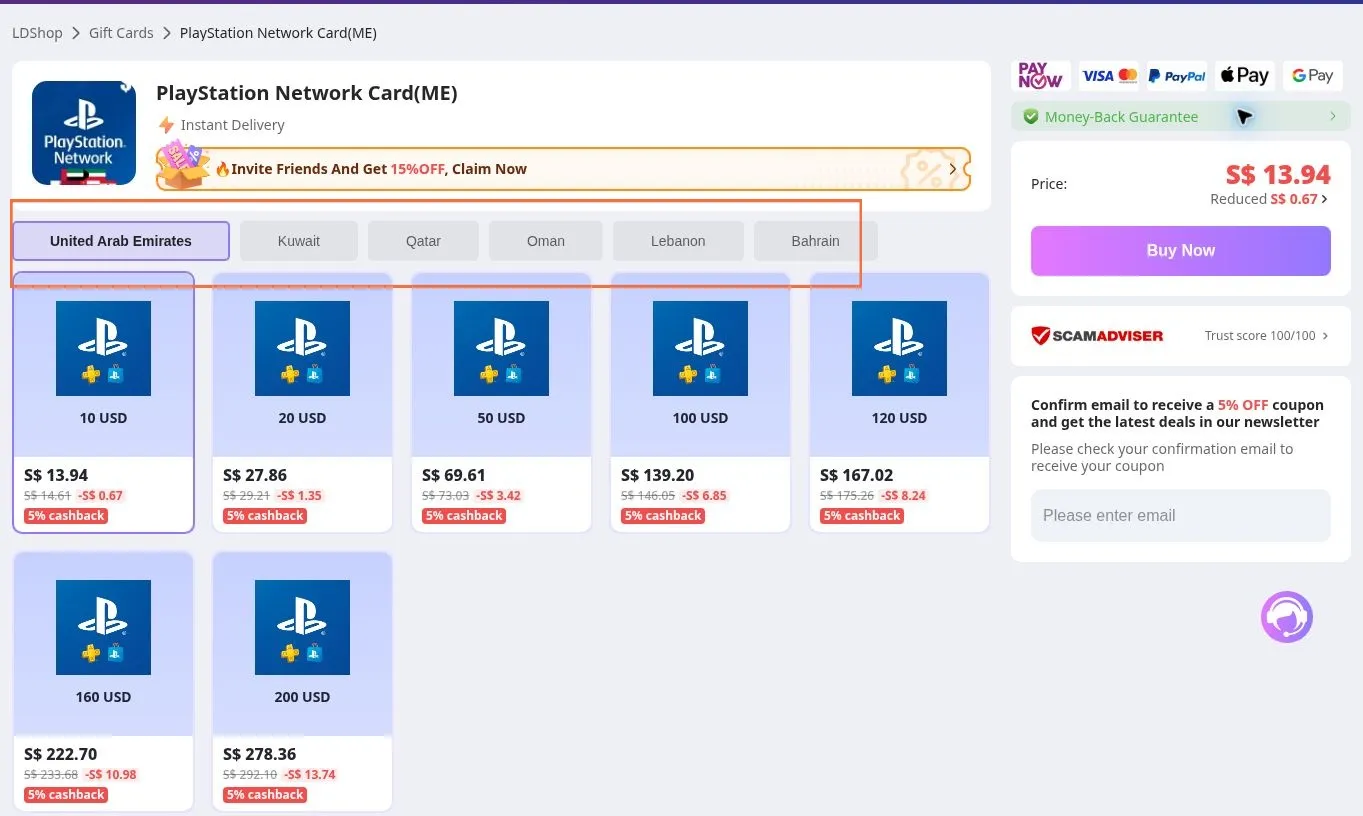
3. After entering the checkout page, click “Coupon” to view the coupons currently available for your order.
4. Select an eligible coupon and click “OK.” After returning to the checkout page, confirm that the discount has been deducted from the order total.
5. Check the product region, denomination, quantity, discount amount, and final payment amount again. If all the information is correct, select an available payment method and complete the payment.
Do not rely only on the advertised discount percentage. Before paying, always check the final amount displayed on the checkout page.
3. How to Get Your PlayStation Redemption Code After Payment?
1. After your payment is completed, sign in to the LDShop account used to place the order.
2. Go to “Order Center” and find the corresponding PlayStation Network Card order.
3. Open the order details, then view and copy the PlayStation Store redemption code you received.
4. If the order status is still shown as “Processing,” refresh the order page after a short wait. If you have not received the code after an extended period, prepare your order number and payment record, then contact LDShop customer support.
Security reminder: Do not publicly share your complete redemption code, order number, payment information, or account details. Once a redemption code has been used by another account, it generally cannot be redeemed again.
4. How to Redeem a PlayStation Network Card Online?
1. Go to PlayStation Store and sign in to the PlayStation Network account you want to top up.
2. After signing in, confirm that the account region matches the region of the PlayStation Network Card you purchased.
3. Click your profile icon in the upper-right corner of the page, then select “Redeem Code” from the menu.
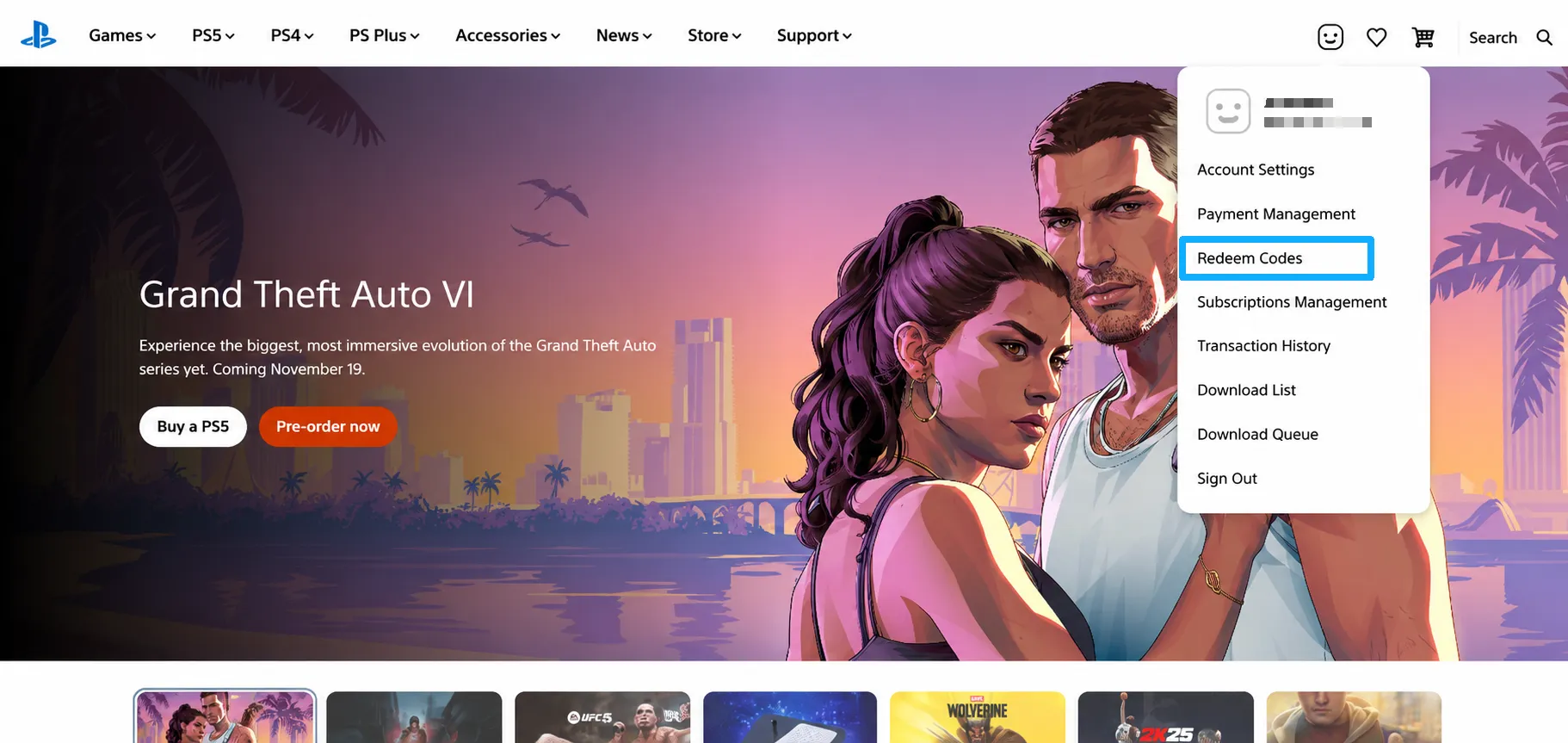
4. Carefully enter or paste the 12-digit redemption code obtained from your LDShop order, then select “Continue.”
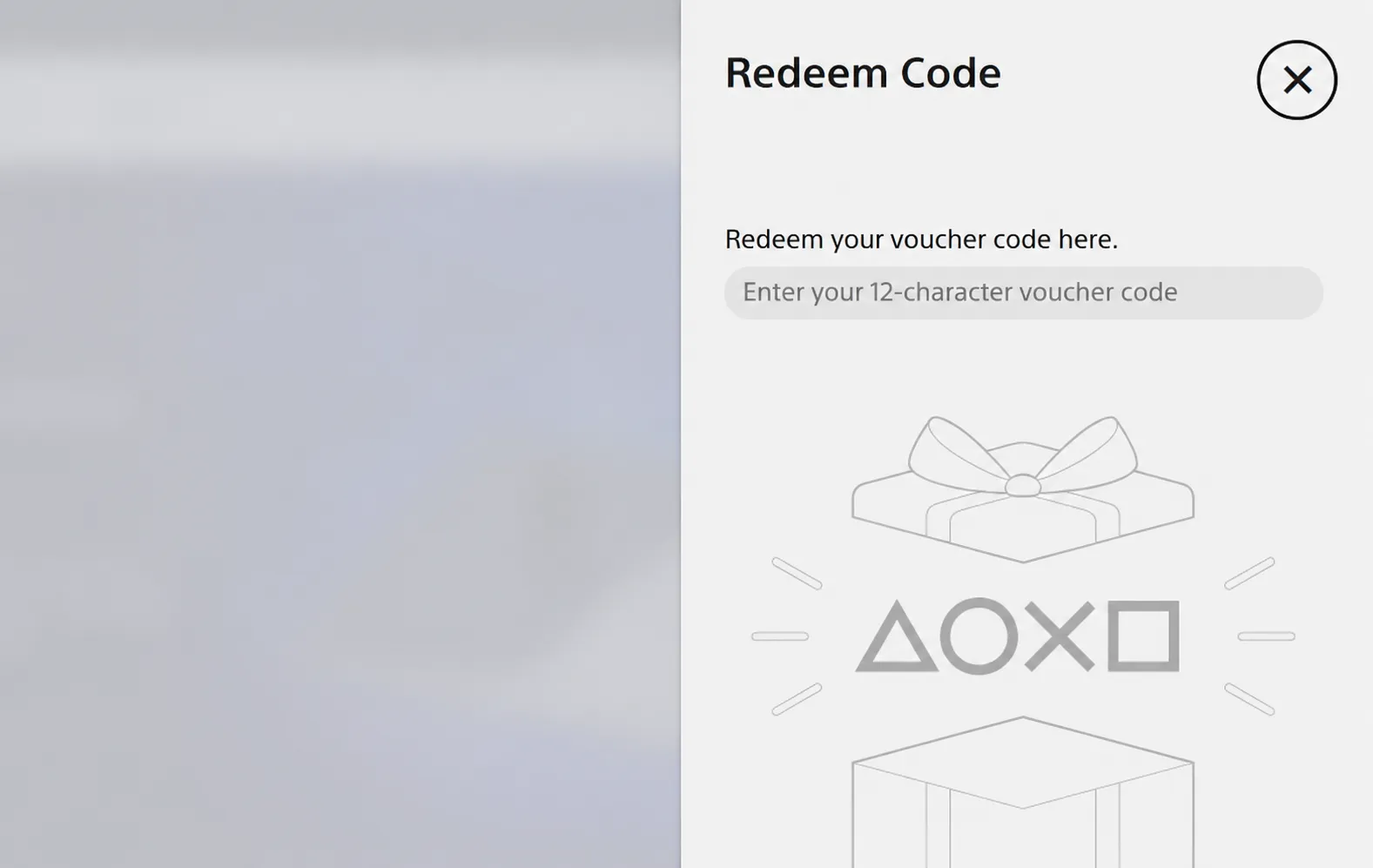
5. Review the card currency, value, and redemption account displayed on the screen. If all the information is correct, follow the on-screen instructions to complete the redemption.
6. After the code has been successfully redeemed, the card value will be added to your PlayStation Store wallet. You can check your current balance under payment management or wallet information in the PlayStation Store.
5. Region Restrictions and Frequently Asked Questions
Why does the system say that the redemption code is not valid for my current region?
PlayStation Network Cards are generally region-restricted. Make sure that the card region matches the registered region of your PlayStation Network account. Changing your console language, current location, or network location will not change the registered region of your PlayStation Network account.
Why is my coupon not displayed on the checkout page?
Make sure that you are signed in to the correct LDShop account. Check whether the coupon has been successfully claimed, is still valid, and whether the selected product and order amount meet its requirements. Some coupons cannot be combined with other promotions.
Why can’t I see a game after successfully redeeming the card?
Redeeming a PlayStation Network Card adds funds to your PlayStation Store wallet; it does not automatically add a game to your library. Return to the PlayStation Store and use your wallet balance to purchase the game or content you want.
What should I do if the redemption code is invalid or has already been used?
Check the letters and numbers in the code again and make sure that no extra spaces were entered. If the problem continues, keep a screenshot showing the complete error message, your LDShop order number, and your payment record, then contact LDShop customer support. Do not display the complete redemption code in public chats or on social media.