




How to Buy FC 27 Coins on LDShop?
1. Select your preferred language and payment currency at the top right of the website.
2. Log in to your LDShop account. If you haven't registered yet, please create a new LDShop account first.
3. Select your FC 27 game platform: 🎮 PS4 / PS5 | 🎮 Xbox | 💻 PC
4. Select the coin quantity and package you want to purchase.
5. Click "Top Up", select your preferred payment method, and complete the payment.
6. Submit the required information, wait for the coins to be delivered.
Most eligible orders are usually delivered within 40 minutes. Actual delivery time may be affected by factors such as game platform, coin quantity, account preparation status, and current Transfer Market conditions.
How to Get FC 27 Backup Codes?
To get FC 27 backup codes, you need to go to the EA account center: https://myaccount.ea.com/cp-ui/security/index
EA Backup Codes are an alternative login verification method in EA account two-step verification. If you have enabled EA account two-factor authentication, you can find Two-factor authentication in the Security and Privacy settings of your EA Account to view or manage Backup Codes.
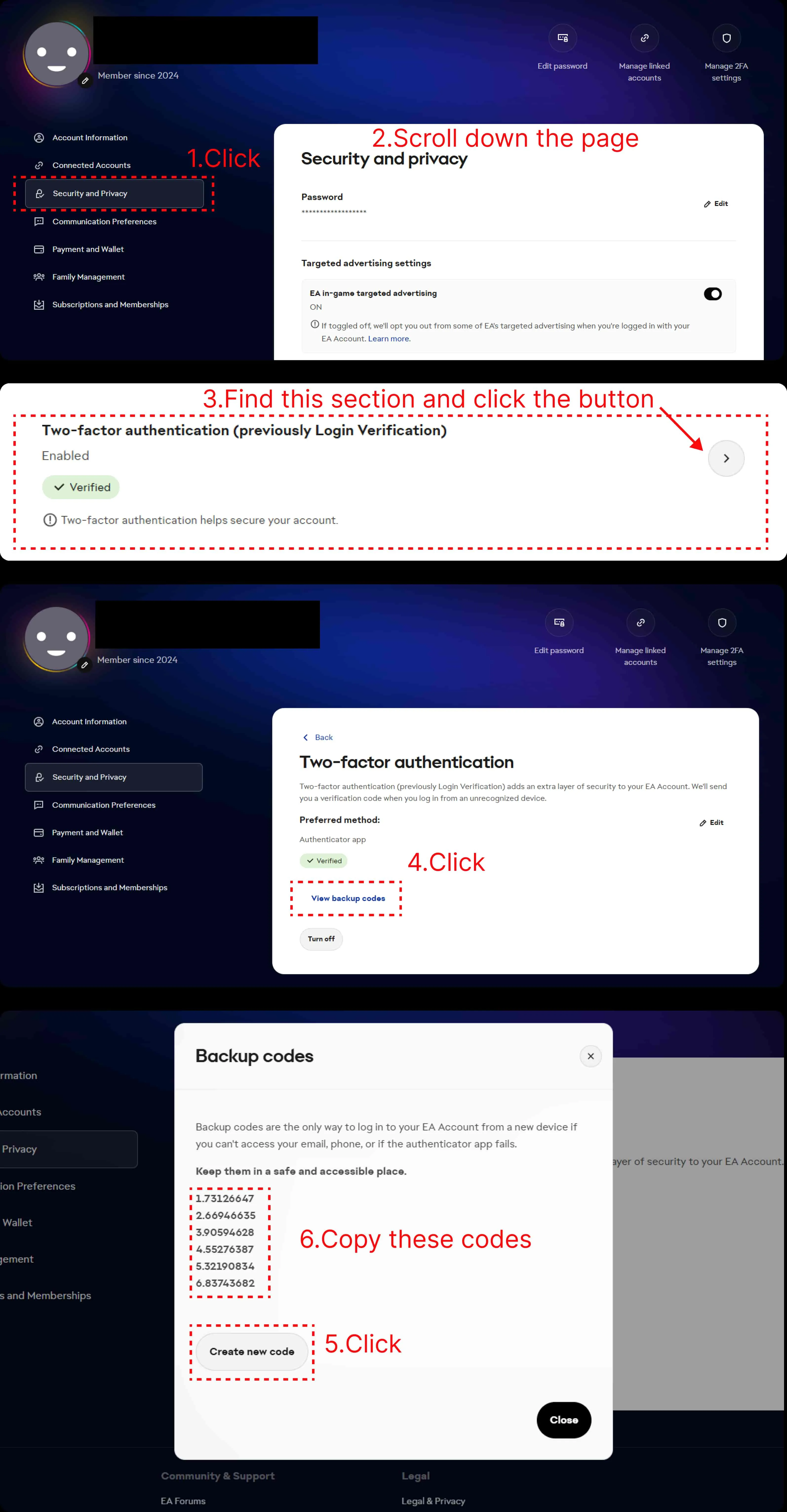
1. First, log in to your EA account, go to the Security and Privacy page of your EA Account, find "Security and Privacy" in the left menu, and click to enter.
2. After entering the Security and Privacy page, scroll down and find the "Two-factor authentication" option.
3. Click the arrow on the right of "Two-factor authentication" to enter the settings page.
4. After entering the Two-factor authentication page, find the "View backup codes" option and click it.
5. Click the "Create new code" button, the system will display your new EA backup codes.
6. Please copy 4 valid backup verification codes as required on the order page and submit them to the order. Please also keep the remaining backup codes properly for future use.
Security Reminder: LDShop's actual delivery process requires submitting your email address, EA password, and 4 valid backup verification codes on the order page. Please make sure information is only submitted through the official order process you are using.