
LDShop
guide registrationRegister now to enjoy 15% off new member gift!Go to register >
Delta Force

Delta Force

Instant DeliveryInstant Delivery
🔥Invite Friends And Get 15%OFF

Not currently supporting Garena, Steam, and Mainland China servers.

More Games You Might Like

Description

Buy Cheap Delta Force Coins - Fast & Secure

Top up Delta Force at LDShop and save up to 26% on Delta Coins. Enjoy fast UID-based delivery, secure checkout, and 24/7 customer support. Get more value for your Season Pass, weapon skins, and premium bundles without overspending.

Supported Platforms: Delta Force PC (excluding Steam) and Mobile (excluding Garena).

Supported Server: International Server (excluding Mainland China servers).

Required Information: Your Delta Force UID. (Make sure to double-check your UID for accuracy)
Top-up Procedures

How to Top Up Delta Force at LDShop?

  1. 1. Choose the product and quantity you want to purchase.
  2. 2. Enter your Delta Force UID, and click the "Top Up" button. 
  3. 3. Select your preferred payment method and complete the payment.
  4. 4. Track your top-up status in the Order Center. Once the top-up is complete, you can verify it in the game.
  5. 5. If you experience any issues, contact customer service by clicking the "Customer Service" button in the bottom-right corner of the platform.

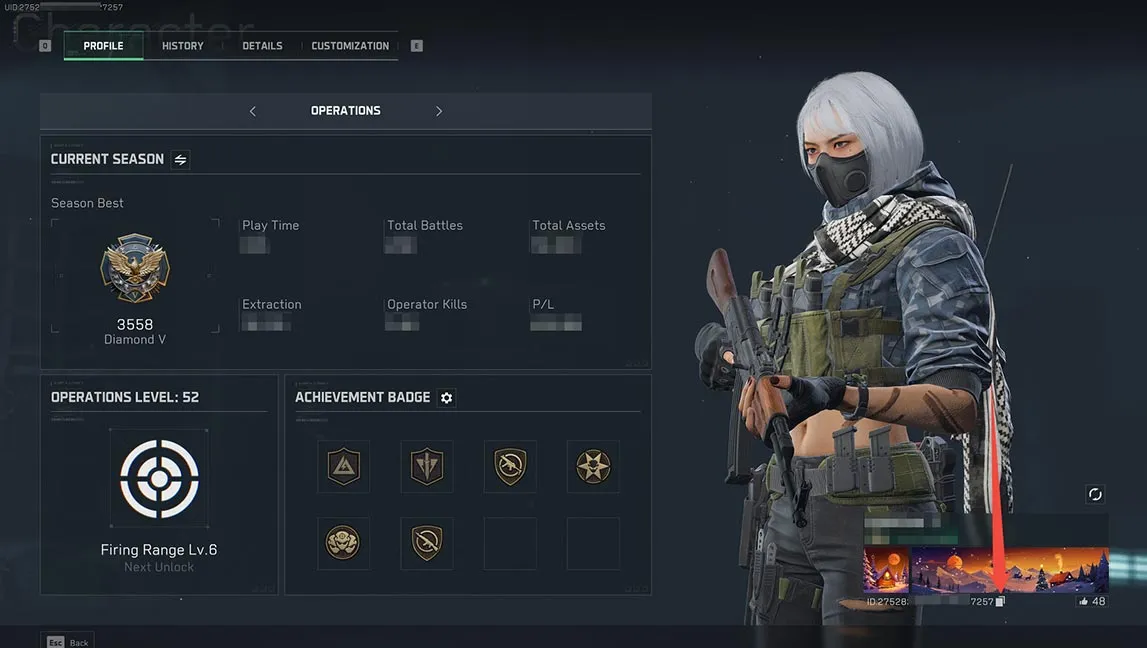
How to Find Your Delta Force UID

The Delta Force UID is always displayed in the bottom-right corner of your screen.

Delta Force UID for recharging

Why Choose LDShop for Delta Force Top Up?

  • Cheap Delta Force Coins. Save up to 26% on selected Delta Force deals and get more value from every top-up.
  • Secure UID Top-Up. Simply enter your Delta Force UID. No game account password or login credentials required.
  • Fast Delivery. Delta Coins typically arrive within 10 minutes after payment. Track your order anytime in the Order Center.
  • 24/7 Customer Support. Get timely assistance with payments, delivery, and order issues, anytime you need it.
  • Trusted by Gamers Worldwide. LDShop offers top-ups, gift cards, and game keys for popular for popular titles to gamers worldwide.


What Are Delta Force Coins in Delta Force?

Delta Force Coins are the premium paid currency in Delta Force, primarily obtained through real-money purchases. Unlike Delta Tickets, which players can earn through gameplay rewards and in-game activities, Delta Coins are designed for purchasing premium content that may not be available through regular progression.

From upgrading your Season Pass to collecting exclusive weapon skins and Operator appearances, Delta Coins let you access more premium items and customization options. Here's what you can buy with them:

  • Unlock Paid Season Pass Editions: Purchase eligible Season Pass upgrades to access additional cosmetics, weapon appearances, and other premium rewards as you progress through the season.
  • Get Premium Weapon Skins and Operator Appearances: Get weapon skins, operator appearances, and other cosmetic items that help your loadouts stand out in Warfare and Operations.
  • Access Exclusive Bundles & Draws: Spend Delta Coins on selected store bundles, cosmetic draws, and Quantum Keys where available, giving you more opportunities to collect premium appearances.
  • Buy Deluxe Appearances from the Market: Use Delta Coins to purchase eligible deluxe appearances listed by other players on the in-game Market, subject to current availability.

Ready to upgrade your Season Pass or grab your favorite weapon skins? Get cheap Delta Force Coins on LDShop and enjoy more premium content without stretching your budget.


About Delta Force

Delta Force is a free-to-play tactical first-person shooter developed by Team Jade. The game combines large-scale military combat with tactical extraction gameplay, offering different experiences through its Warfare and Operations modes.

In Warfare, players join massive team battles featuring vehicles, specialized operators, and coordinated objectives. Operations focuses on high-stakes extraction missions, where players gather valuable loot, manage equipment, and fight to survive. With extensive weapon customization, seasonal content, and a growing collection of cosmetic rewards, Delta Force gives players plenty of ways to make each match their own.

Tactical FPS Free-to-Play Extraction Shooter Multiplayer


Delta Force Top Up FAQ

Can I Top Up Delta Force on Steam or Garena at LDShop?

Can I Top Up Delta Force on Steam or Garena at LDShop?

Not currently. LDShop's Delta Force UID top-up supports eligible international accounts on supported PC and Mobile versions. Steam accounts, the Garena version, and Mainland China servers are not supported.

Please confirm your game version and server before placing an order. If you're unsure whether your account is eligible, contact LDShop customer support for assistance.

How Long Does Delta Force Top Up Take at LDShop?

How Long Does Delta Force Top Up Take at LDShop?

Delta Force top-ups at LDShop usually arrive within 10 minutes after payment confirmation. Actual delivery times may vary depending on order processing and other circumstances.

What Payment Methods Does LDShop Support for Delta Force?

What Payment Methods Does LDShop Support for Delta Force?

LDShop supports multiple payment methods, including Visa, Mastercard, and PayPal. Available options may vary depending on your country or region.

What Should I Do If My Delta Coins Haven't Arrived?

What Should I Do If My Delta Coins Haven't Arrived?

First, check your order status in the LDShop Order Center and confirm that you entered the correct Delta Force UID. If your order is marked as completed, check your Delta Coins balance in the game.

If you still haven't received your purchase, click the "Customer Service" button in the bottom-right corner of LDShop and provide your order details. Our support team is available 24/7 to help investigate delivery issues.

What If I Enter the Wrong Delta Force UID?

What If I Enter the Wrong Delta Force UID?

Contact LDShop customer support as soon as possible if you discover an incorrect UID after placing your order. Our team will check your order status and help determine whether a correction is still possible.

Please note that changes may not be possible once a top-up has been completed. We strongly recommend double-checking your UID before payment to avoid delivery problems.