LDShop
USD | English
guide registrationRegister now to enjoy 15% off new member gift!Go to register >
Honkai: Star Rail

Honkai: Star Rail

Instant DeliveryInstant Delivery
🔥Invite Friends And Get 15%OFF

Top-up Procedures

How to use?

1. Choose your items with a safe and trusted experience.

2. Select your Server and enter Honkai Star Rail UID.

3. Choose your preferred payment method and make the payment.

4. Check the status in the order center. After the status is completed, you can check the result in the game.

5. If you encounter any problems, please contact customer service (contact method: click the customer service button in the lower right corner of the platform).

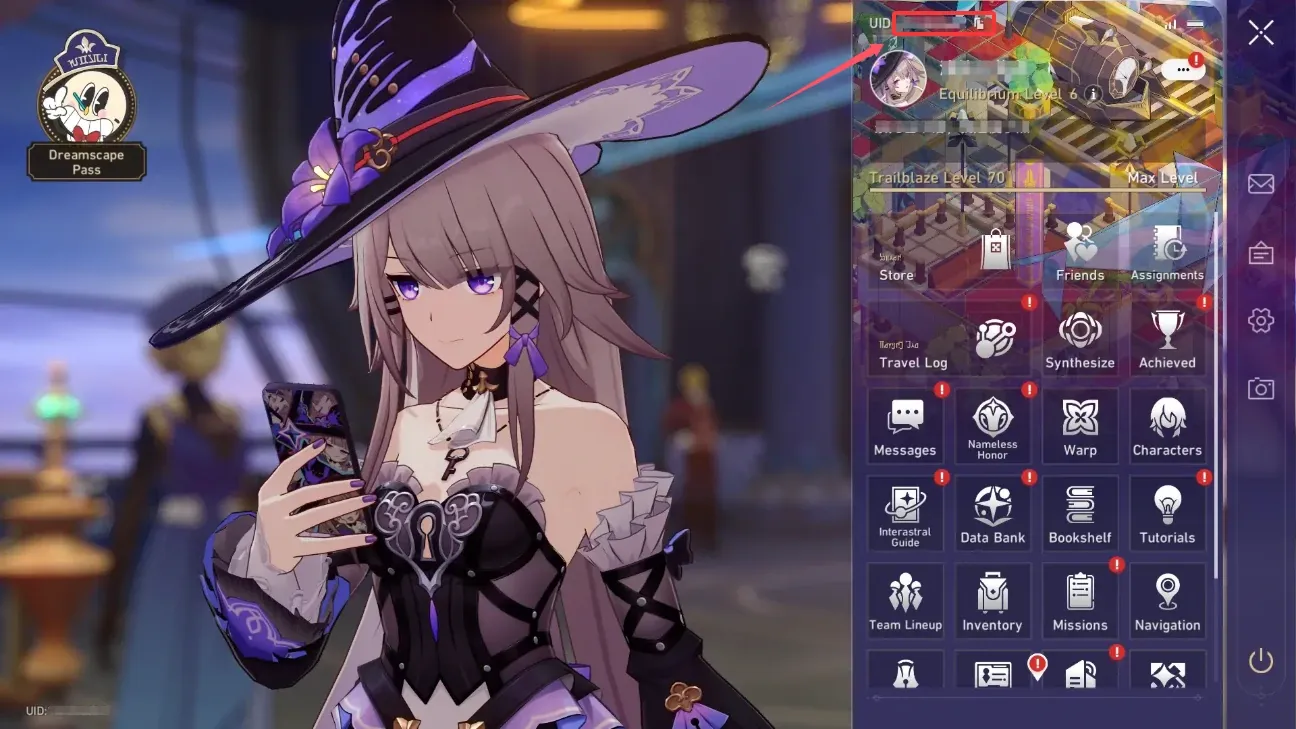
Note: The Honkai Star Rail UID is always visible in the lower left corner of the screen and can also be found in the mobile panel in the upper left corner. On the PC, you can directly click ESC to open the mobile panel.

hsr uid

FAQs

I am a PS5 user, how do I receive the content?

For PS5 users, you need to log in on the Honkai Star Rail mobile app to receive purchased content.

What Payment Methods Does LDShop Support?

LDShop supports a variety of secure payment methods for you to choose from, including Visa, MasterCard, and PayPal.

How Long Will It Take?

Usually, it arrives within 10 minutes. If not, please feel free to contact our online customer service.

Is Honkai Star Rail Data Cross Platform?

Account data between different servers/device platforms under the same HoYoverse account is interoperable, but only within the same server. For example, if a player is using the America server on PC or mobile, then when logging in on PS5 with the same HoYoverse account, they can also enter the America server and inherit the game progress.