LDShop
guide registrationRegister now to enjoy 15% off new member gift!Go to register >
Last Z: Survival Shooter

Last Z: Survival Shooter

Instant DeliveryInstant Delivery
🔥Invite Friends And Get 15%OFF

Faster Self Top-Up is now available! Click the "?" on the right for guidance.

More Games You Might Like

Description

Last Z: Survival Shooter Top Up at LDShop – Cheap, Fast & Secure

LDShop offers cheap Last Z top up with discounted prices and great value:

Top up Last Z: Survival Shooter at LDShop with cheap prices, instant delivery, and secure payment. Buy diamonds, gold bars, and packs easily to unlock heroes, upgrade faster, and get more resources. In this zombie survival shooter, you’ll fight waves of undead, build your base, and strengthen your team to survive and progress faster.

Join our Discord to get more offers and information
Discord: https://discord.com/invite/6VVYPqkVj7

Top-up Procedures

How to Top Up Survivor Escape on LDShop?

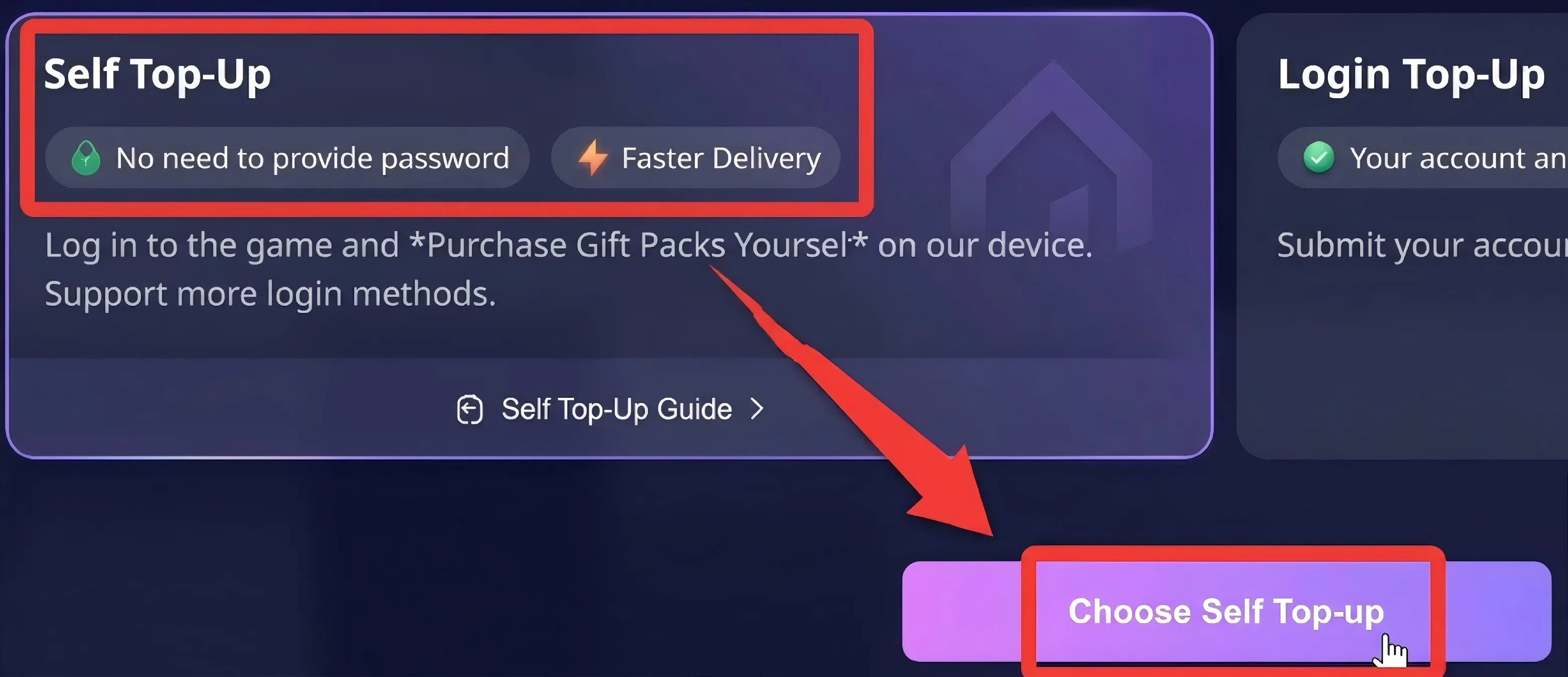
  • Self-Service Top-Up

1. Select [Self-Service Top-Up] After Placing Your Order:Select a product, place your order, complete the payment, and then select [Self-Service Top-Up】。

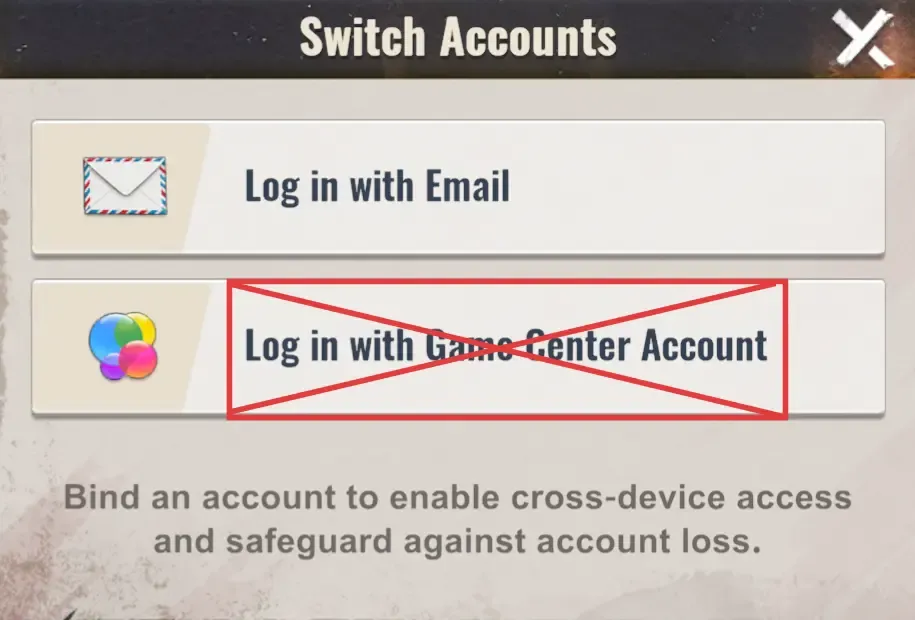
2. Log In Through LDShop:Launch the game through LDShop and log in to your game account(Email login only)

Note: Apple account login is currently not supported

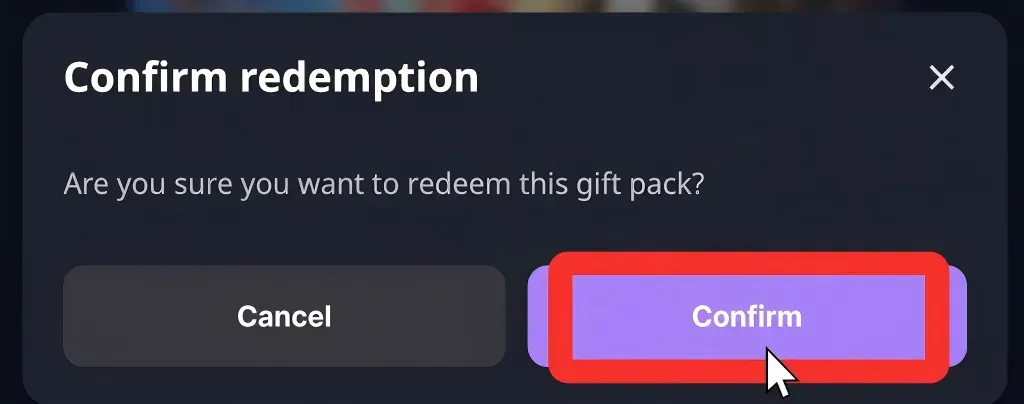
3. Redeem a Bundle Through LDShop:In the game, select the bundle you want and confirm.

[Purchase Recommendation]
To ensure your order is credited successfully, we recommend that you:Before making a purchase on the platform, spend Gold Bars in the game until your balance is lower than the amount required for the bundle (for example, purchase other daily items or resources first), then return to the platform to purchase/redeem it.

4. Automatic Logout:Once the top-up is complete, your account will be logged out automatically and the login record will be cleared.


Manual Top-Up

To ensure your purchase is delivered successfully, follow the steps below and provide the required information accurately:

Choose Your Bundle: Select the Exploration Coins, Pass, or all-in-one bundle you want to purchase.

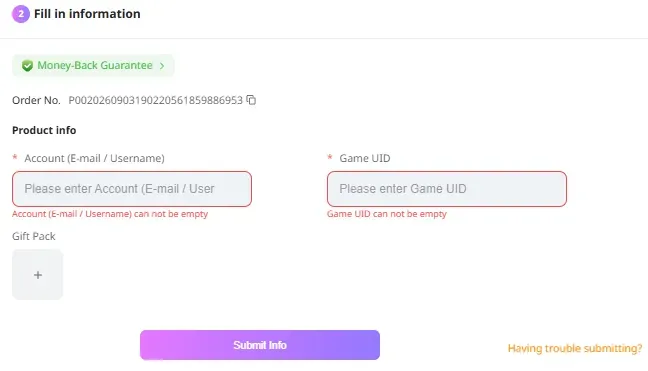
1. Select [Manual Top-Up] After Placing Your Order: Select a product, place your order, complete the payment, and then select [Manual Top-Up].

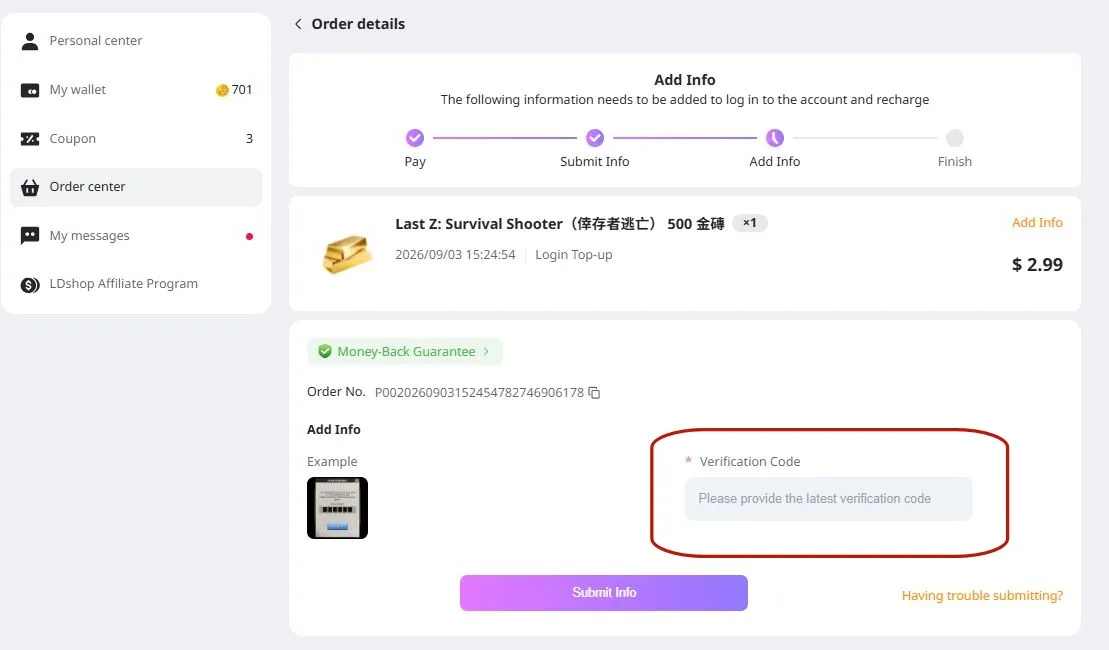
2. Enter Your Account Information:

Enter the required top-up information(linked email account and Character ID)

3. Enter the verification code sent to your linked email address

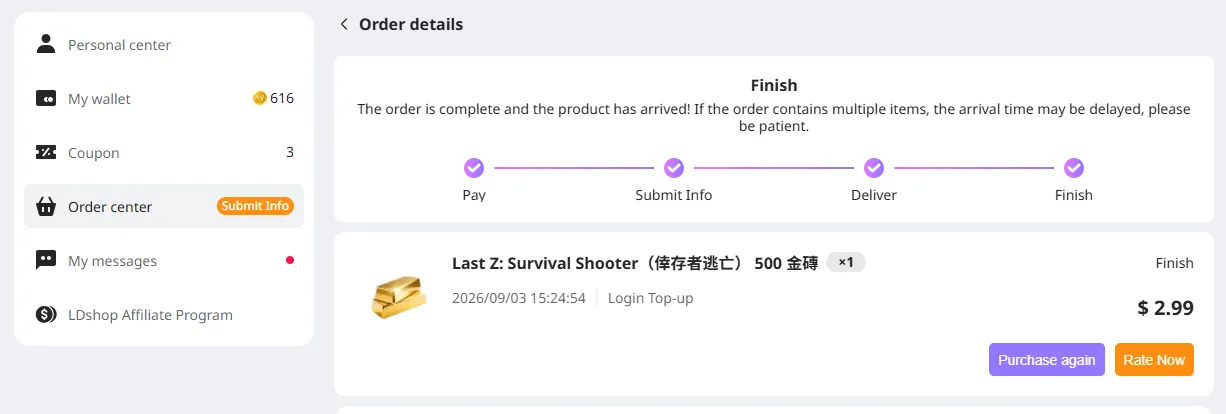
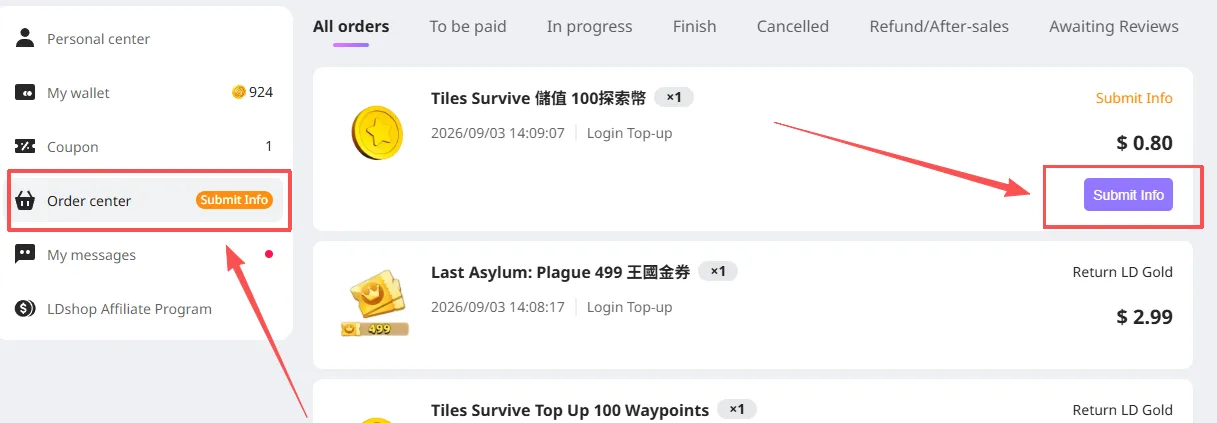
4. Track the Top-Up Progress: You can check the order status in the Order Center. Once the top-up is complete, enter the game to confirm.

What Should I Do If I Accidentally Close the Top-Up Information Page?

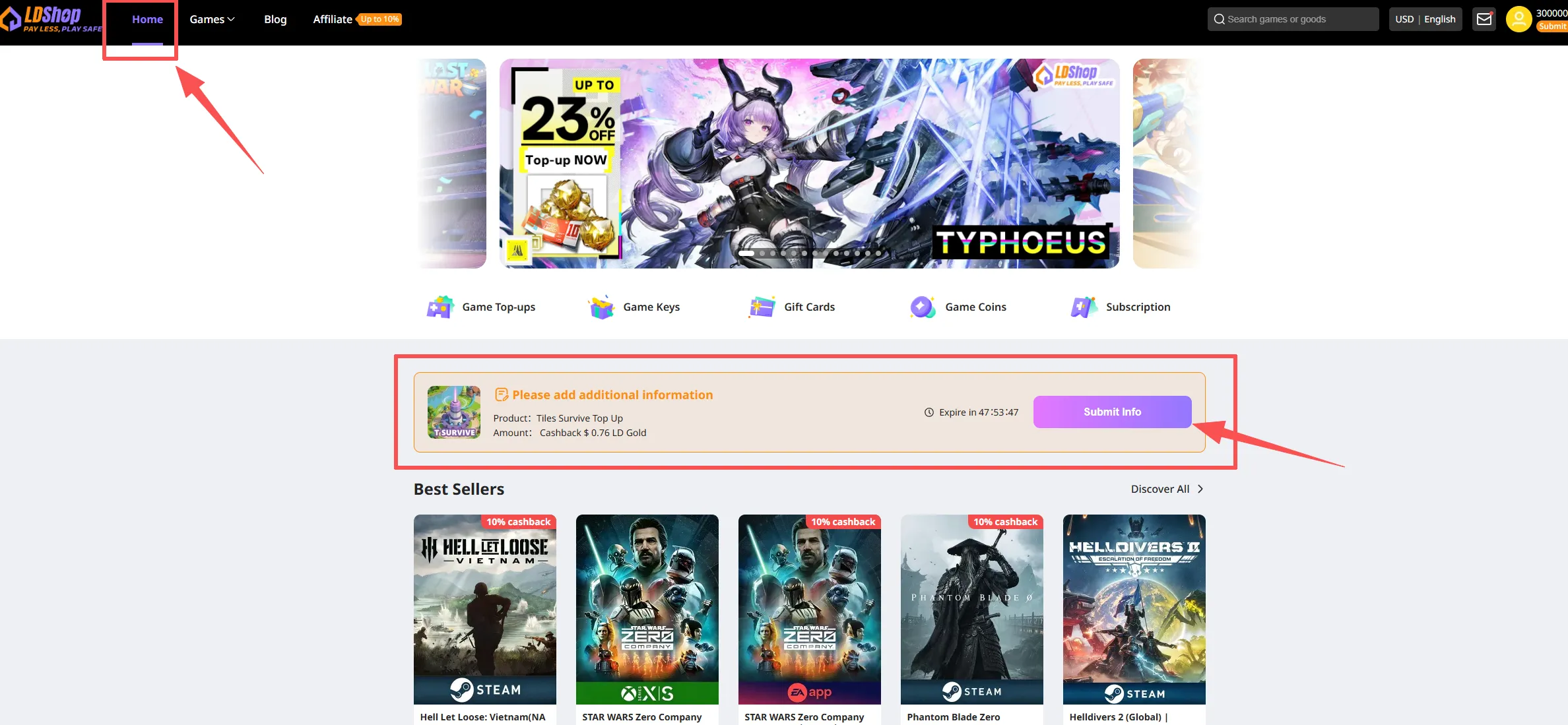
Method 1: Return to the main page, find the bundle you have paid for, and click "Fill in Information".

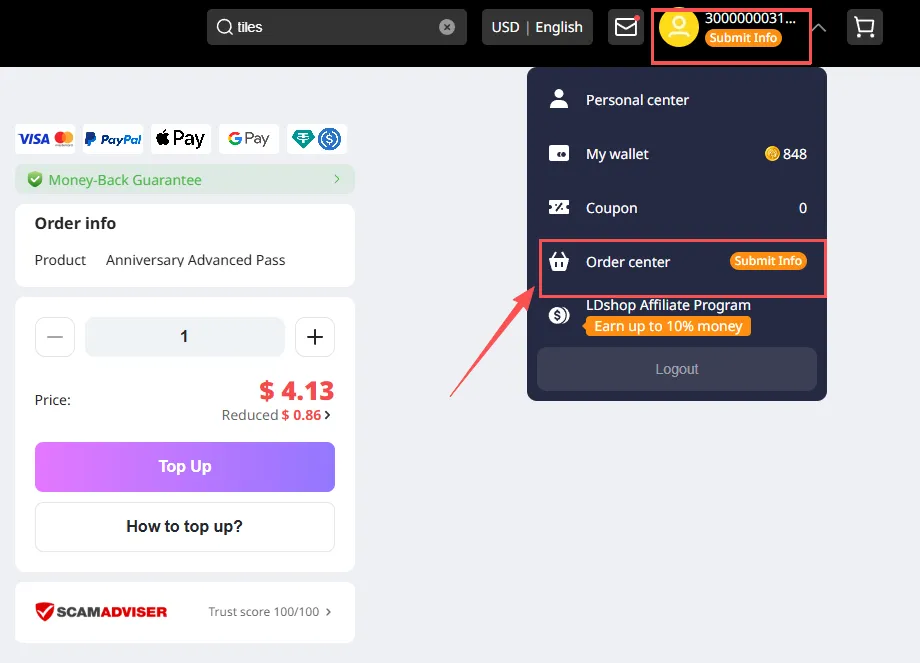
Method 2: Click your profile picture in the upper-right corner, then click Order Center.

After opening Order Center, find the item you purchased and click "Fill in Information" to continue.


🚨[MUST READ] If this top-up requires verification-code login, please watch for messages on the site after submitting your order.

If you do not receive it within the expected time, contact customer service for assistance.


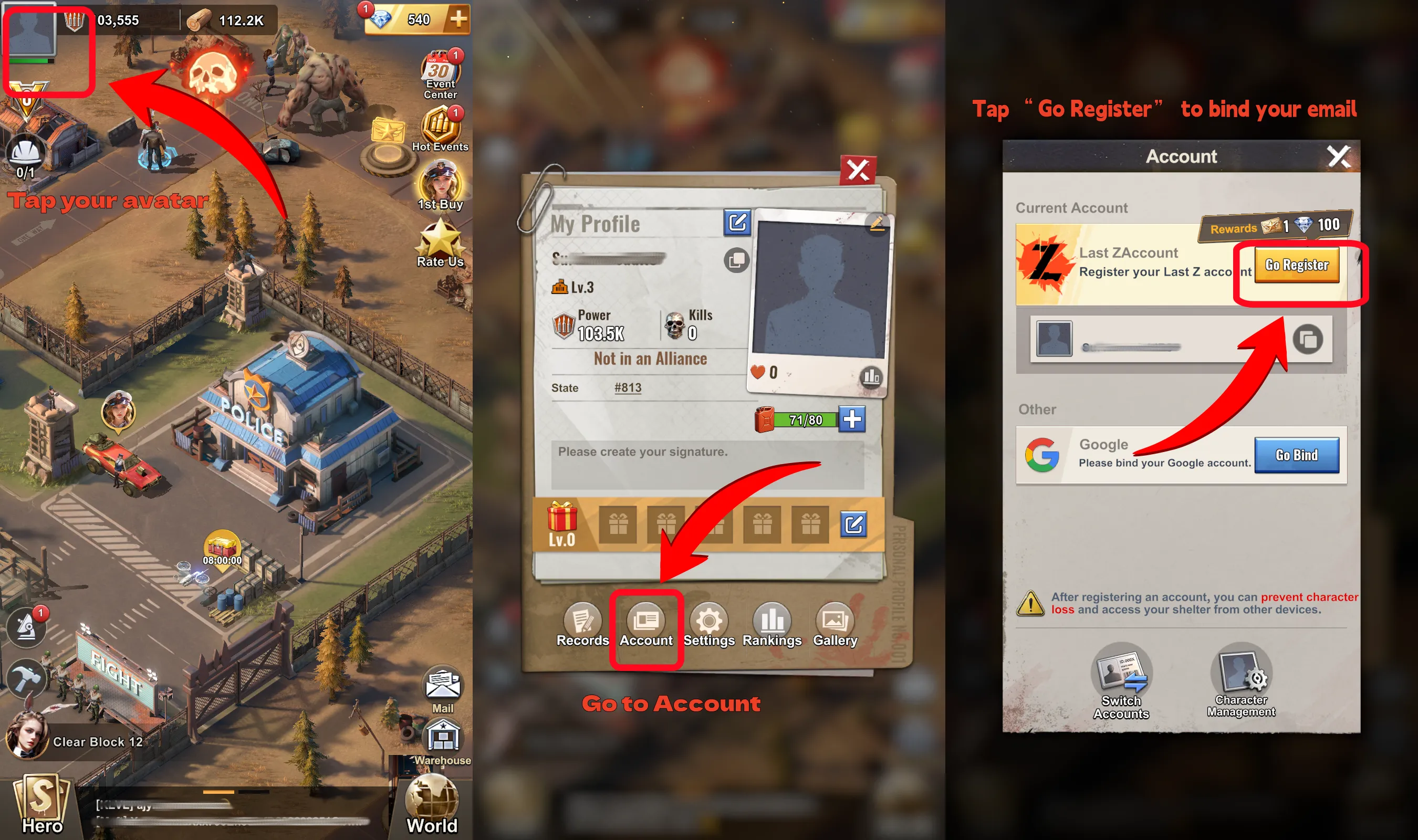
How to Link Your In-Game Account?

  1. After logging in to the game, click the profile picture in the upper-left corner ("Profile Picture") -> click "Account"
  2. Select "Link" – link your game account


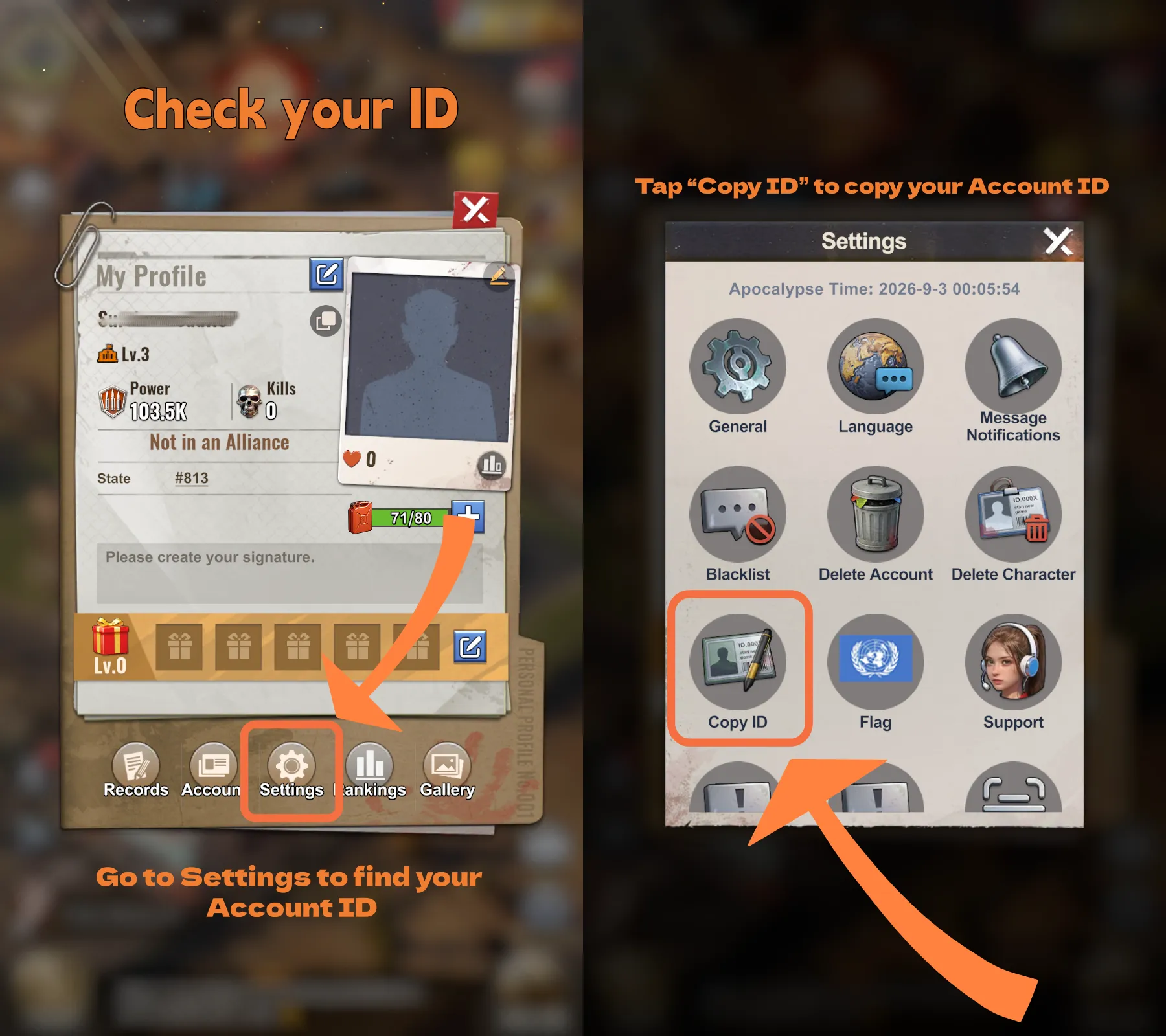
How to Find Your Player ID?

  • Click the profile picture in the upper-left corner
  • Click "Settings"
  • Copy your Player ID


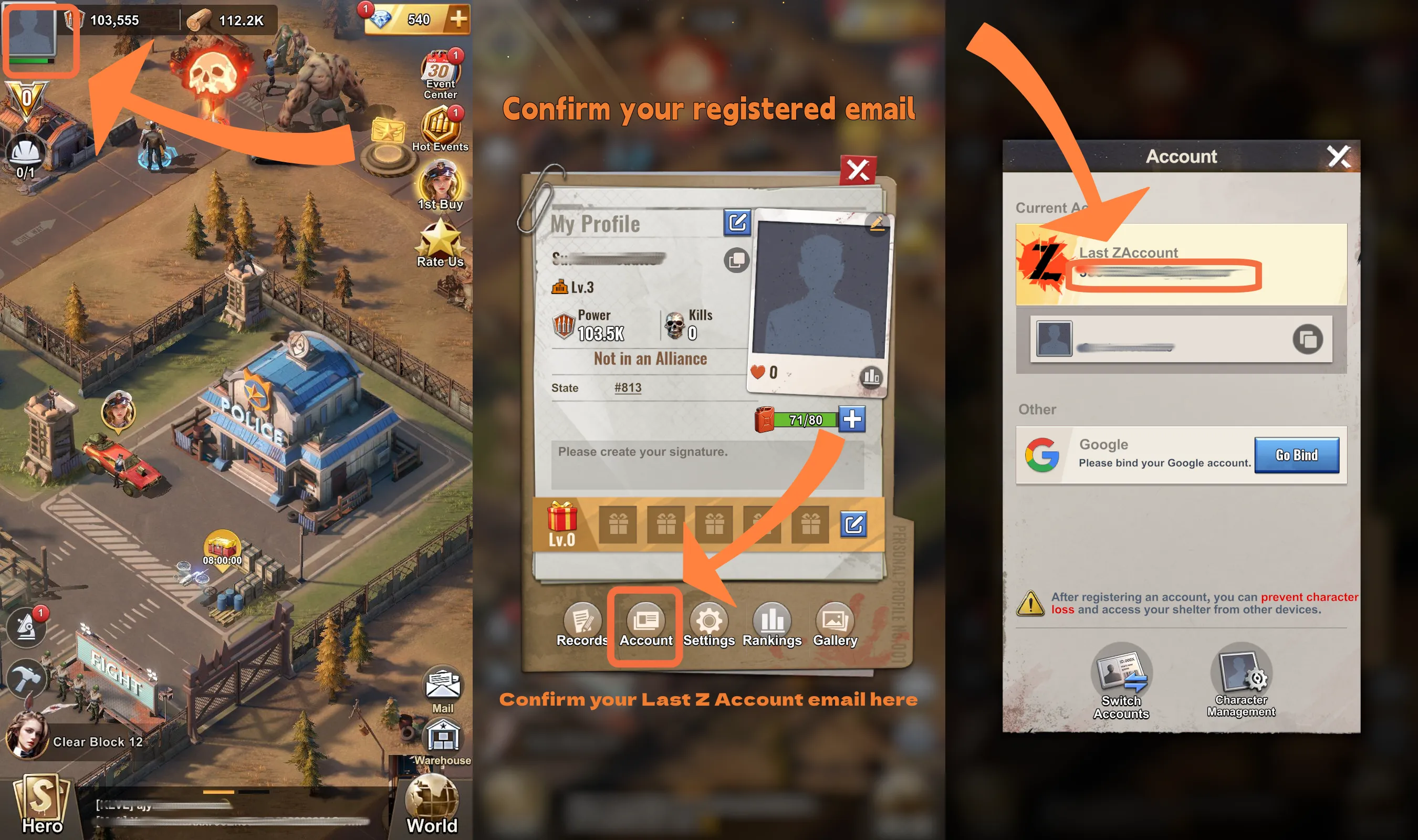
How to Confirm Your Linked Email Account

  • Click the profile picture in the upper-left corner
  • Click "Account"
  • Confirm the linked email account

Why Choose LDShop for Your Last Z Top Up?

1. Instant Delivery

Diamonds are usually delivered automatically within minutes after payment. No manual code redemption or long waiting—unlock skins and champs right away.

2. Cheap Rates & Discounts

Compared to official channels, LDShop often offers limited-time discounts, special bundles, or bonus credits. Get more diamonds for the same budget—maximize value!

3. Safe & Secure

LDShop is a trusted third-party platform using encrypted payment systems and official direct connections, minimizing account risk. Top up with confidence.

4. Flexible Payment Options

Supports credit cards, convenience store payments, e-wallets (e.g., PayPal), and other localized methods to suit different player preferences.

5. Simple Process

Just three steps: Select product → Enter UID → Confirm payment. No complicated procedures—easy even for beginners.

Choosing LDShop means choosing a top-up experience built on efficiency, great discounts, and security, so you can focus more on enjoying the game without worrying about top-up hassles or costs.

What are Gold Bars in Last Z?

Gold Bars are the primary premium currency in Last Z: Survival Shooter. They are mainly used in-game to purchase rare items and packs, or to speed up construction and upgrades. Afte buying Gold Bars, they can serve as the core resource for boosting combat power, acquiring resources, or unlocking exclusive content. 

What are Diamonds in Last Z?

Diamonds are key to enhancing your survival in Last Z: Survival Shooter. They are avaluable items for anyone looking to get resource faster in zombie apocalypse.If you want to buy diamonds cheaply at a more favorable price, consider recharging at LDShop online store!

Why Top Up Last Z Diamonds ?

  • Unlock Powerful Heroes and Equipment: Top up Diamonds to instantly unlock the game’s heroes and equipment, giving you an edge in every battle against the undead!
  • Exclusive Event Access: Gain access to special in‑game events and limited‑time rewards.
  • VIP Perks for Enhanced Progression: Boost your VIP level with Diamonds and unlock exclusive rewards, faster upgrades, discounts on items, and extra resources.
  • Speed Up Your Survival Journey: Save time and effort by purchasing Diamonds to accelerate your growth, unlocking game-changing boosts and items that speed up your progress and increase your chances of survival.

About Last Z: Survival Shooter

Last Z: Survival Shooter is a mobile strategy action game set in a zombie‑infested post‑apocalyptic world where players must survive waves of undead, explore abandoned areas, and build their own stronghold. Gameplay blends fast‑paced dodging and shooting action with base expansion and development, letting you fight enemies, collect resources, and grow your headquarters, heroes, and army to thrive rather than merely survive. 

Last Z Beginning Guide

1. Understand the Basics: The goal of the game is to survive against waves of zombies while upgrading your base and heroes. You'll need to gather resources and use them wisely to strengthen your defense and increase your chances of survival.

2. Upgrade Your Heroes: Heroes are essential for fighting zombies. Focus on upgrading their abilities and equipment to make them more powerful. 

3. Gather Resources: Collect resources like food, wood, and gold bars during your exploration. These are vital for base upgrades and hero enhancements. 

4. Build and Defend Your Base: Your base is your safe haven. Strengthen its defenses with barricades, traps, and turrets. Regularly upgrade and expand your base to survive longer and face more challenging zombie waves.

5. Participate in Events: Regular in‑game events will offer unique rewards. Make sure to participate to earn valuable items and resources that will help you grow your heroes and base faster.

FAQs

Is it safe to top up Last Z: Survival Shooter on LDShop? Is there any risk of my account being banned?
Topping up DIamonds for Last Z: Survival Shooter on LDShop is completely safe. All transactions are protected by encryption technology. This ensures your account will not face any risks from topping up. You can use our services with confidence.

What payment methods does LDShop support?
LDShop supports a variety of payment methods, including credit cards (Visa, Mastercard), e-wallets (such as PayPal), and convenience store code payments, making it convenient for you to choose the option that best suits you.

How long will it take for my top-up to be processed?
Your top-up order is usually processed and delivered within approximately 30 minutes. If you encounter any delays, our 24-hour customer service team is ready to assist you at any time to ensure a smooth gaming experience.